5. Wi-Fi Operation
5.1. STABasic Mode Operations
5.1.1. Load the driver
Steps 1. Driver
need /mnt/system/ko/3rdunder already under ofFile, ModuleLoadnot ko:
[root@cvitek]/mnt/system/ko/3rd# ls
8188fu.ko    8189fs.ko
Note, wifiDriverand inlinuxSource CodeContentsin the tree, with build-in, Build ko。
insmod /mnt/system/ko/3rd/8189fs.ko
or
insmod /mnt/system/ko/3rd/8188fu.ko
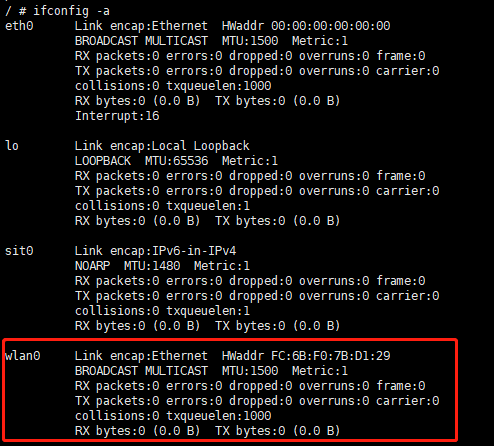
Steps2. ViewDriver Success
Executeshell Command:
ifconfig -a
If Success,caninExecuteshellCommandafter to wlan0Ethernet Port
5.1.2. Start Wi-Fi and connect to the AP
Steps1. Wlan0Ethernet Port
scExecuteshellCommand:
ifconfig wlan0 up
Steps2. wpa_supplication
Execute shell Command:
echo "ctrl_interface=/var/run/wpa_supplicant" >/tmp/wpa_supplicant.conf
wpa_supplicant -iwlan0 -Dnl80211 -c/tmp/wpa_supplicant.conf &
-iwlan0 IndicatesUsewlan0Interface
-Dnl80211 IndicatesUsecfg80211Interface
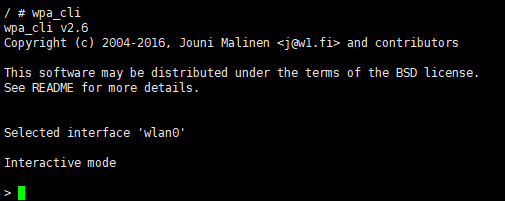
Steps3. wpa_cli
ExecuteshellCommand:
wpa_cli -i wlan0
ExecuteSuccess “>”
Steps4. Scan Nearby NetworksAP
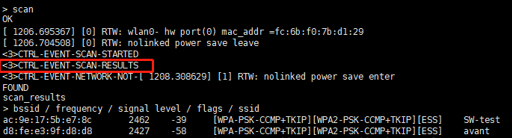
in “>” afterExecuteas followsCommand:
scan
in “CTRL-EVENT-SCAN-RESULTS”after, Execute
scan_results
can toScanResult
Steps 5. AP
ConfigurationisWPA-PSK/WPA2-PSKAuthentication and EncryptionTypeMethodofAP
in“>” afterExecuteas followsCommand,with ID ( Exampleinis0):
add_networkConfiguration ofSSID ( ExampleinofSSIDisSW-test, Steps4 )
set_network 0 ssid “SW-test”Configuration EncryptionMethodandPassword ( SW-testPasswordis012345678)
set_network 0 psk “012345678”select_network 0toCTRL-EVENT-CONNECTED,If , Indicates Success。orcanExecute”status”Command,Query Connection Status
Input“quit” wpa_cli, ExecuteshellCommandas followswith IPAddress
udhcpc -b -i wlan0 -R &ExecutepingCommand, with , ex.
Ping 8.8.8.8
Configurationisopen systemofAP
StepsandConfigurationisWPA-PSK/WPA2-PSKAuthentication and EncryptionTypeMethod , inConfigurationThe network encryption method requires enteringas followsCommand:
set_network 0 key_mgmt NONE
5.1.3. Disable Wi-Fi and unload the driver
Steps 1. Executeshell Commandas follows:
ifconfig wlan0 down
Steps 2. Executeas followsshellCommand:
rmmod 8189fs.ko
or
rmmod 8188fu.ko
5.2. SoftAPBasic Mode Operations
5.2.1. Load the driver
DriverMethodandSTAMode ,PleaseRefer toChapter 5.1.1.Load the driver
5.2.2. hostapdConfiguration, udhcpd Configuration, and SoftAP Startup
SoftAPneed hostapd。andwpa_supplicant ,hostpadCan ConfigurationAP of ,withand Flow。
Steps1. hostpad。ExecuteshellCommands
ifconfig wlan0 192.168.1.1 up
hostapd /etc/network/hostapd.conf -B -i wlan0
Steps2. udhcpdwith IP ,Executeshell Commands
udhcpd /etc/network/udhcpd.conf
Note:
can Modifyhostapd.conf ConfigurationSoftAPofssid, channel, Encryption Methodetc., inSDK of/ramdisk/rootfs/overlay/{chip_name}/etc/network or on the platformof/etc/network。for examplecanModifyssidwithandwpa_passphrase ConfigurationAP Namewithand Password
interface=wlan0
ctrl_interface=/var/run/hostapd
ssid=CV184X_EVB
channel=6
wpa=3
wpa_passphrase=012345678
canRefer to: http://manpages.ubuntu.com/manpages/bionic/man5/udhcpd.conf.5.html
can Modifyudhcpd.conf ConfigurationSoftAP ofIP 。udhcpd.conf inSDK of/ramdisk/rootfs/overlay/{chip_name}/etc/network or on the platformof/etc/network。
# The start and end of the IP lease block
start       192.168.1.10   #default: 192.168.0.20
end      192.168.1.254   #default: 192.168.0.254