13. Debugging Tool
Linux:
sensorthe corresponding contentDebugging Toolusesensor_test,
sensorConfigurationFilethe corresponding content/mnt/data/sensor_cfg.ini。
the corresponding contentmiddlewareContentsthroughCommand git apply sensor_test.patchthe corresponding content,the corresponding contentgeneratesensor_test the corresponding contentuse。
Alios:
sensor_test the corresponding contentdefaultthe corresponding contentperipherals_testthe corresponding contentsolutionthe corresponding content,the corresponding contentsolutionthe corresponding content,the corresponding contentPathsolutions/peripherals_test/sensor_test/sensor_test.c
13.1. the corresponding contentFunction
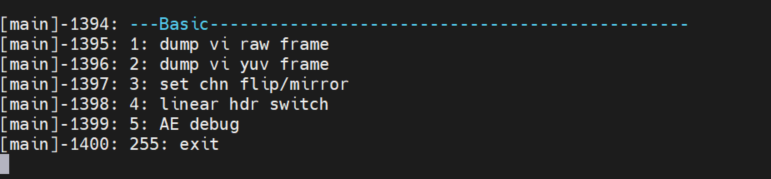
sensor_testdefaultthe corresponding contentFigurethe corresponding content5the corresponding contentFunction:
dump sensor rawFigure
dump sensor yuvFigure
SetsensorOutputImageflip/mirror
the corresponding contentsensorDriverSupportedlinearthe corresponding contentwdrmode,canusethe corresponding contentoptionthe corresponding contentsensor modeswitch
AEtuningFunction
13.2. Dump RAW
the corresponding content Dump RAW
13.3. Dump YUV
the corresponding content Dump YUV
13.4. Set flip/mirror
the corresponding contentsensorthe corresponding content/the corresponding contentFunction。
Runsensor_test,Input3select”set chn flip/mirror”,the corresponding contentpromptchn(0~1): Inputdev(0Tablethe corresponding contentvi pipe0,Controlthe corresponding content0the corresponding contentImage,1Tablethe corresponding contentvi pipe1)the corresponding contentControlthe corresponding contentflip/mirror。
Note:Functionthe corresponding content,needverifydump yuvFigurethe corresponding contentColorthe corresponding contentexpected。
13.5. WDRthe corresponding contentLinearswitch
the corresponding contentsensorthe corresponding contentwide dynamic rangemodethe corresponding contentlinearmodeswitchFunction。
Runsensor_test,Input4select” linear hdr switch”, the corresponding content” Please select sensor input mode (0:linear/1:wdr) :”Input0the corresponding contentlinear;1the corresponding contentWDR;
Note
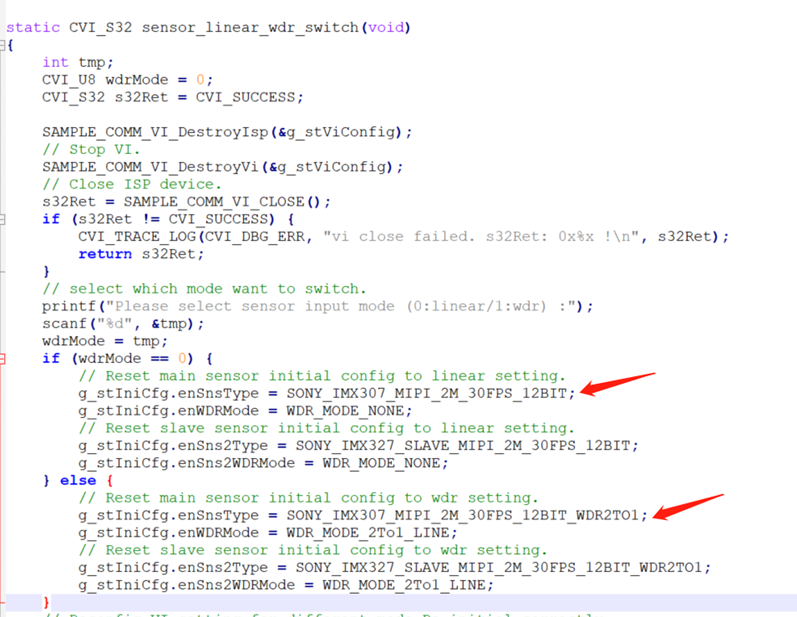
1、the corresponding contentFunctionthe corresponding contentsensorSupportedlinearthe corresponding contentwdrthe corresponding contentmode
2、the corresponding contentsensorConfigurationthe corresponding contentsensor_test.cthe corresponding contentmodifythe corresponding contentsensorConfiguration,the corresponding contentas followsFigure
13.6. AERelatedVerification
the corresponding content AERelatedVerification