3. Echo Cancellation Debugging
3.1. Basic Checks:
AECdebugonenvironmentonhasseveralitemrequirement:involvingandrecording, playback, volume, testenvironment. inbasicrequirementmeetafteronly thenis AECparameterdebug.
Step 1: Set the left and right ADC and DAC gain values separately:
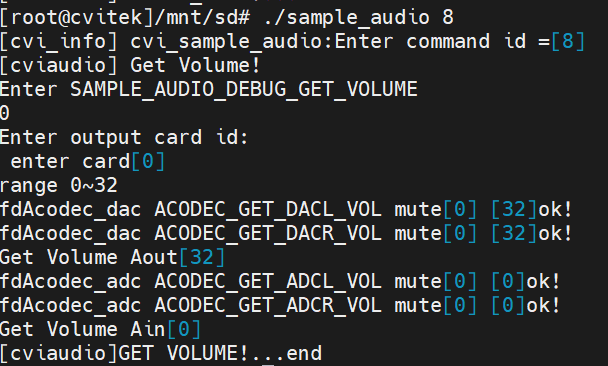
During tuning, you may need to adjust the left and right microphone or speaker volume separately. Set them with register commands or the sample_audio program.
Set both channels as follows:
./sample_audio 6, then enter 0, 8 (volume), and 1 (playback), and press Enter speaker channel
./sample_audio 6, then enter 0, 8 (volume), and 0 (recording), and press Enter microphone recording volume
Set the left and right channels separately as follows:
The speaker mapping is as follows:
Levels 1 to 32 (n * 0x10) - 1) // -24 dB to 3 dB
devmem 0x300a010 32 0x000F000F #(1 * 0x10) - 1) sets the left volume to 1 and the right microphone volume to 6.
The microphone mapping is as follows:
devmem 0x0300a110 32 0x04000002 # sets the left microphone volume to 1 and the right microphone volume to 6. Left channel: lower 16 bits; right channel: upper 16 bits.
#define ADC_VOL_GAIN_0 0x0001
#define ADC_VOL_GAIN_1 0x0002
#define ADC_VOL_GAIN_2 0x0004
#define ADC_VOL_GAIN_3 0x0008
#define ADC_VOL_GAIN_4 0x0010
#define ADC_VOL_GAIN_5 0x0020
#define ADC_VOL_GAIN_6 0x0040
#define ADC_VOL_GAIN_7 0x0080
#define ADC_VOL_GAIN_8 0x0100
#define ADC_VOL_GAIN_9 0x0200
#define ADC_VOL_GAIN_10 0x0400
#define ADC_VOL_GAIN_11 0x0800
#define ADC_VOL_GAIN_12 0x1000
#define ADC_VOL_GAIN_13 0x2400
#define ADC_VOL_GAIN_14 0x2800
#define ADC_VOL_GAIN_15 0x3000
#define ADC_VOL_GAIN_16 0x6400
#define ADC_VOL_GAIN_17 0x6800
#define ADC_VOL_GAIN_18 0x7000
#define ADC_VOL_GAIN_19 0xA400
#define ADC_VOL_GAIN_20 0xA800
#define ADC_VOL_GAIN_21 0xB000
#define ADC_VOL_GAIN_22 0xE400
#define ADC_VOL_GAIN_23 0xE800
#define ADC_VOL_GAIN_24 0xF000
Step 2: Confirm that recording and playback work normally:
Before two-way talk, confirm that microphone capture and speaker playback work normally. You can use the
sample_audio program provided in the SDK for verification.
[Normal Recording Test]:
This produces Cvi_8k_2chn.raw file.
[Verification]: Copy it to a computer and play it to check the recorded waveform, for example:
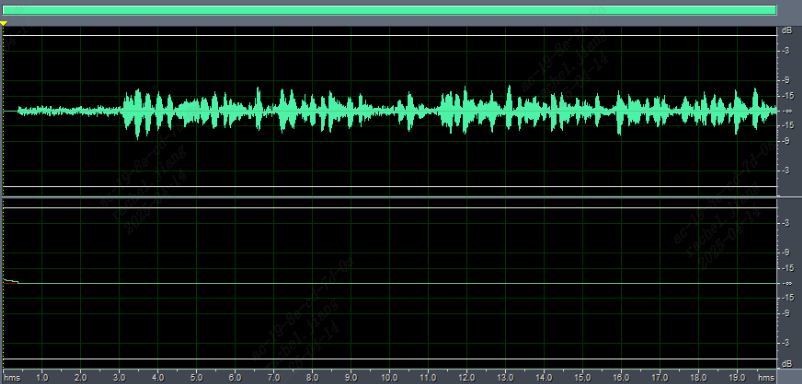
above The waveform should be moderate and must not exceed the white line above, or clipping will occur. If it is too large or too small, before pressing Enter at "preset recording duration in seconds:10 "pressEnterbeforetosshendsideexecute sample audio 9 respectivelyinput11EnterselectsetADCLsubfunction, theninput7Enter. 7thisitemgainvaluecustomeraccording toitselfwaveformactualcaseset.
[Normal Playback Test]:
./sample_audio 5 –list -r 8000 -R 8000 -c 2 -p 320 -C 0 -V 0 -F Cvi_8k_2chn.raw -T 10 playback parameters.
(channel:2/ sample rate:8000/period size:320/ VQE on:0)
[Verification]: During playback, confirm that the speaker produces sound at an appropriate level with no obvious distortion such as popping, noise, or crackling.
Step 3: Confirm that echo cancellation works normally:
Before using the remote talk application on the client, verify echo cancellation on the board as follows.
[AECEffect Test]:
execute touch /tmp/ain_record command and touch /tmp/dump_ao_outputcommand. (If testing multiple times, run rm /tmp/*.pcm before each test. Do not test for too long; otherwise PCM files may exhaust DDR memory and cause the system to hang.)
Then run: sample_audio 10
./sample_audio 10 –list -r 8000 -R 8000 -c 2 -p 320 -C 0 -V 1 -F play.wav -T 10
Capture parameters(sample rate:8000/ chn:2/ period size:320)
Set VQE/AEC to on, specify the recording duration and the file to play. After playback begins, speak into the microphone, for example 123456789abcdef; 20 seconds may be used. After recording for a while, double-press Enter and wait for completion.
ininputrecordtimeEnterbeforetosshendsidesetappropriateADCL,ADCR,DACRgainvalue. methodabovehasraiseto: sample audio 9 respectivelyexecuteADCL:11->willset10; ADCR:12->setis1; DACR:10-> setis8. where10, 1, 8these threevaluecustomermanuallyaccording toactualcaseadjust. thethese threevaluerememberFinally, initselftalkprograminuse.
[Verification]:
This produces sample_record.raw. Run cp /tmp/*.pcm ./ to copy the files to the current directory.
Copy sample_record.raw and ain_record.pcm to a computer and view them with free audio software such as Audacity or Cool Edit
Normally, sample_record.raw is mono and you should hear only "123456789abcdef
". No gaps indicate that the result is OK; in the actual talk application, the sample_record.raw audio is what the other party hears.
If the prompt voice can still be heard, or "123456789abcdef" contains gaps or missing characters, the result is unsatisfactory.
ain_record.pcm is stereo
The left channel is the sound captured by the microphone (including the speaker’s voice *123456789abcdef* and the prompt voice),
The right channel contains only the speaker output, namely the prompt voice (the waveforms of both channels must be moderate and free of clipping).
3.2. [Returned Parameters (if the debugging result is unsatisfactory)]
No. |
command |
Related File Name |
Comment |
|---|---|---|---|
1 |
touch /tmp/ain_record |
/tmp/ain_record.pcm |
Raw PCM data obtained from the lower layer |
2 |
touch /tmp/dump_before_aec |
/tmp/dump_before_aec.pcm |
PCM before VQE (non-bind mode) |
3 |
touch /tmp/dump_after_aec |
/tmp/dump_after_aec.pcm |
PCM after VQE (non-bind mode) |
4 |
touch /tmp/dump_ao_output |
/tmp/dump_ao_output.pcm |
Raw playback audio data |
Information required when AEC performance is poor (first ensure that the basic AEC requirements are met):
1.A simple TXT file containing:
cv180x... projectname
sample rate
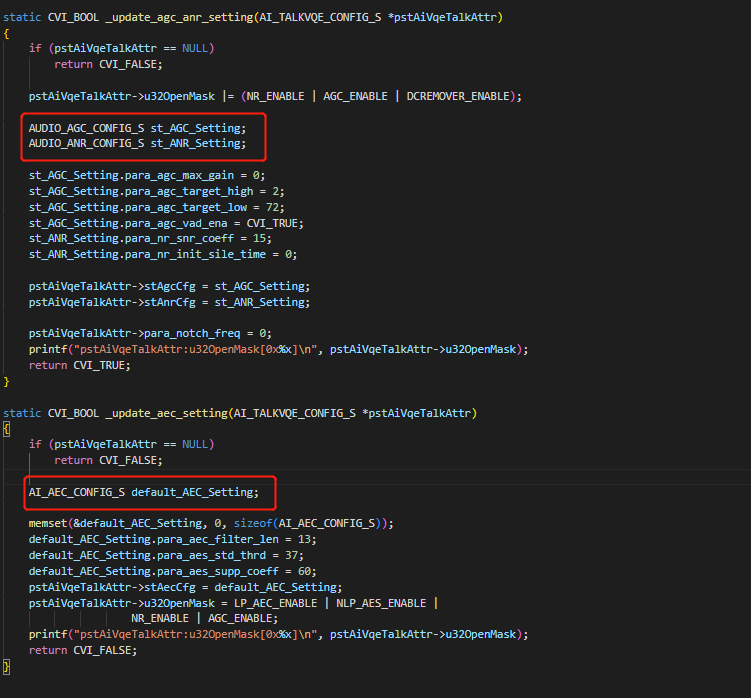
vqeconfig.txtcontains the parameter values of the structure shown in the code below:
2.dumpfile:
*.pcm files in the /tmp directory