2. Burn-In Procedure
2.1. Preparation Before Use
Refer to 【CV184x Linux Development Environment User Guide】【1.2If BuildBSP】Buildunder File:
fip.bin - bootloader + uboot
fip_spl.bin - bootloader + uboot_spl (Configurationuboot splIt takes effect only after the mode is configured; otherwise, it has the same content as fip.bin.)
boot.spinand - Linux image
logo.jpg - boot logo (Optional)
rootfs.spinand  - root file system
system.spinand – system partition (Optional)
cfg.spinand – encrypted ISP PQ partition (Optional)
fip.bin from install/<board name> under the directory :
$ ls -al install/soc_cv1842hp_wevb_0014a_spinand
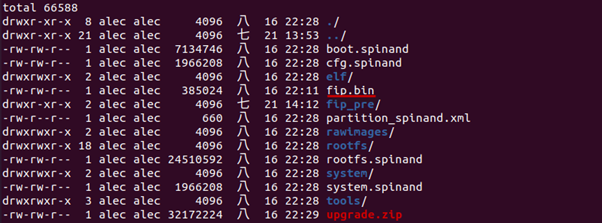
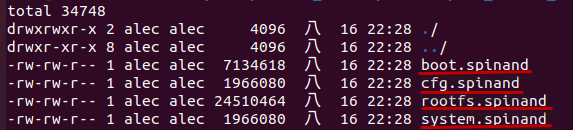
*.spinandfrom install/<board name>/rawimages under the directory :
$ ls -al install/soc_cv1842hp_wevb_0014a_spinand/rawimages
Note
Note: *.spinand files under the rawimages directory are raw images for programmer burning. The *.spinand files in the parent directory are in the format used specifically for CVITEK SD card/USB burning and add a 128-byte header to the raw image.
build/tools/common/spinand_tool/fip_maker,Executeas followsOperation:
make clean; make
Copy fip.bin under the directory,Execute ./fip_maker {pagesize} {DID/MID} {input_path} {output_path}, in {pagesize} and {DID/MID} ValuePleasefrom spi nand datasheet inGet
Example:
    ./fip_maker 2048 0x71e5 ./fip.bin ./fip_out.bin
1. If no errors occur, fip_out.bin is generated. This fip_out.bin is the file required for programmer burning. Note: both programmer burning and TFTP burning require the fip_out.bin file above.
After completing the three steps above to prepare the binary files, programmer burn-in can be performed.
2.2. Partition Table
CVITEK FlashPartition Tablewithxml Definition, PleaseRefer to《Flash PartitionToolsUse 》。
FlashPartitionPartitions are defined in XML; take boards/default/partition/partition_spinand_page_2k.xml as an example:
<physical_partition type="spinand">
    <partition label="fip" size_in_kb="2560" file="fip.bin"/>
    <partition label="BOOT" size_in_kb="8192" file="boot.spinand"/>
    <partition label="MISC" size_in_kb="384" file="logo.jpg" />
    <partition label="ENV" size_in_kb="128" file="" />
    <partition label="ROOTFS" size_in_kb="71680" file="rootfs.spinand" />
    <partition label="SYSTEM" size_in_kb="20480" file="system.spinand" mountpoint="" type="ubifs" />
    <partition label="CFG" size_in_kb="4096" file="cfg.spinand" mountpoint="/mnt/cfg" type="ubifs" />
    <partition label="DATA" file="" mountpoint="/mnt/data" type="ubifs" />
</physical_partition>
with 2KB page size 128KB blocksize of NAND flash as an example: xmlFileonData,will PartitionSize blockSizeafter( :block = PartitionSize / blockSize),as follows :
Partition |
Start block offset |
Number of blocks |
Binary files |
|---|---|---|---|
FIP |
0 |
20 |
fip.bin |
BOOT |
24 |
64 |
boot.spinand |
MISC |
Sequential order (skip bad blocks) |
3 |
logo.jpg |
ENV |
Sequential order (skip bad blocks) |
1 |
Null (No content) |
ENV_BAK |
Sequential order (skip bad blocks) |
1 |
Null (No content) |
ROOTFS |
Sequential order (skip bad blocks) |
560 |
rootfs.spinand |
SYSTEM |
Sequential order (skip bad blocks) |
160 |
system.spinand |
CFG |
Sequential order (skip bad blocks) |
32 |
cfg.spinand |
DATA |
Sequential order (skip bad blocks) |
Don’t Care |
Null (No content) |
2.3. Burning Rules
2.3.1. FIP Partition
- FIP PartitionIncludeTwo parts:
ProcessorThe related bootloader (not open source), u-boot. CVITEK BuildThe build flow automatically packages both into a single fip.bin. nand Burning Burning from block 0~19 , Burn , in block 0~9, Burnin block 10~19, is 。
fip.binThe image itself uses approximately 3 to 4 blocks when burned to SPI NAND. Because of SPI NAND characteristics, blocks may be bad, so the remaining unused blocks are reserved for bad-block replacement. ,inxmlFileinfip ofPartitionnot 20 blocksofSize。
Example 1
If there are no bad blocks, burn the first fip.bin to blocks 0, 1, 2, 3, and 4; burn the second fip.bin to blocks 9, 10, 11, 12, and 13.
Example 2
Ifblock 4, 11is ,Pleasewill fip.bin Burn block 0, 1, 2, 3, 5; fip.bin Burn block 9, 10, 12, 13, 14
2.3.2. Other Partitions
Partition TableConfiguration, Burn, to , under Burn。