5. Module Functions
5.1. Black Level
5.1.1. Black Level Calibrationmethod
analogthe relevant informationwhen, hascanthe relevant informationnotthe relevant informationanalogthe relevant informationdigitalthe relevant informationdevicethe relevant information, the relevant informationwhen, imagedetailthe relevant information.becausethis, imagethe relevant informationdevicewillinanalogthe relevant informationdigitalthe relevant information, the relevant informationanalogthe relevant informationfixedofoffset, the relevant informationOutputofdigitalthe relevant informationofimagedetail.Black Levelcorrectionmodulethe relevant informationthroughcalibrationofwaythe relevant information, determinethe relevant informationoffsetofspecificthe relevant information.the relevant informationof ISP processmodule, needthe relevant informationthisthe relevant information, the relevant informationdataoflinearthe relevant informationproperty.
5.1.1.1. Environment and Equipment Preparation
ifthe relevant informationobtainthe relevant informationimagethe relevant informationdeviceofBlack LevelParameter, orneedobtainthe relevant informationofBlack Levelvalue, the relevant informationCalibration Toolthe relevant informationautomaticcalibrationBlack Levelofmode. incalibrationbeforeneedusermanualcaptureBlack Level Calibrationthe relevant informationInputof Raw, captureStepas follows:
Step 1. willdeviceofaperturethe relevant informationclose, oruselensthe relevant informationwilllensInputthe relevant information, the relevant informationNonethe relevant information.
Step 2. throughCviPQTool ofExposureAttr the relevant information, manualsettinggainis 1x.specificoperationmethodiswillExposure and Exposure Manual the relevant informationofall OpType setisOP_TYPE_MANUAL, samewhenwill Exposure Manual the relevant informationofAGain, DGain, ISP Dgain manualsetis 1024.
Step 3. use CviPQTool Capture Tool capturethe relevant information Raw file.
5.1.1.2. Black LevelCalibration Tool Interface
willCalibration ToolofmainFunctionthe relevant informationswitchthe relevant informationBLC, that iscanthe relevant information BLCcalibrationofinterface, as Figure 5.1 as shown, pagemainlythe relevant informationisthe relevant informationpart:
control area: toolperformcalibrationofmainlyFunction (the relevant informationcolorthe relevant informationarea).
display area: displayinput imageand BLCcalibrationthe relevant informationofresult image (the relevant informationcolorthe relevant informationarea).
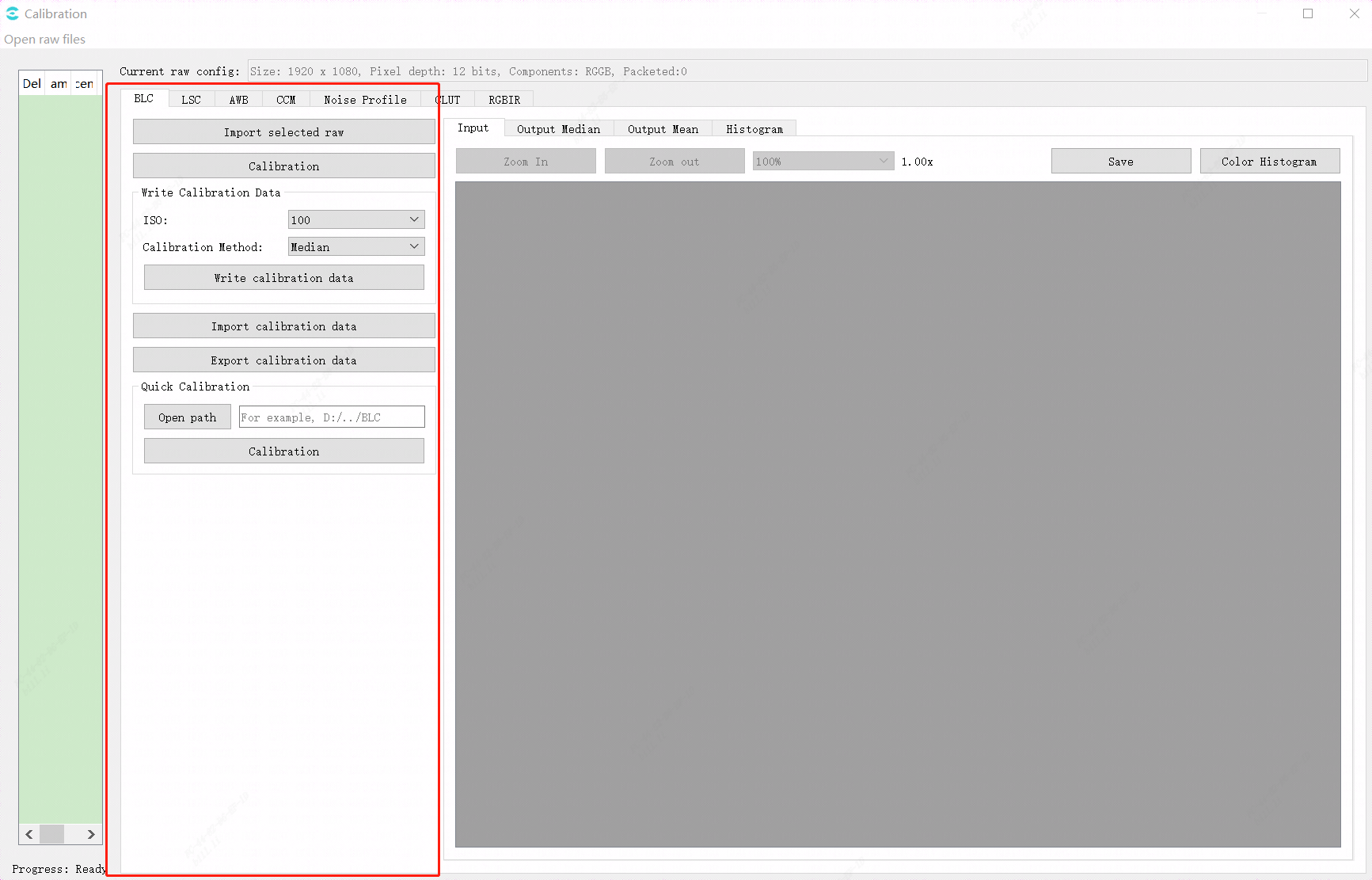
Figure 5.1 Black LevelCalibration Tool InterfaceillustrationFigure
5.1.1.3. Black Level CalibrationStep
capturethe relevant informationcalibrationalgorithmthe relevant informationof Raw the relevant information, usercanaccording tousingundermethodperformBlack LevelAutomatic modeofcalibration:
Step 1. inCalibration Toolthe relevant informationabovewayOpen raw filesimportRawFigureorYuvFigurefile, the relevant informationindrop-downthe relevant informationuseDark frame.
Step 2. click Calibration button, performBlack Level Calibration.
abovethe relevant informationof"Open raw files"operation, itsinselectcorrespondingraworyuvfilethe relevant information, willthe relevant informationunderFigure Figure 5.2 the relevant informationofdialog, inthe relevant informationdialogthe relevant information, the relevant informationofParameterselectthe relevant information, click"OK"the relevant information, the relevant informationimportRawFigureorYuvFigureofthe relevant informationthat iscancomplete.
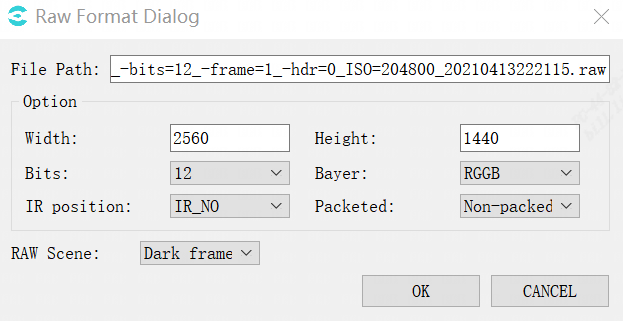
Figure 5.2 Raw Format Dialogdialog
5.2. DPC
5.2.1. DPC Tuningmethod
5.2.1.1. Function Description
insensor the relevant information, according tothe relevant informationofnotsame, willproducenumbernotetc.ofdefective pixel, inimagedothe relevant information (Demosaic)orthe relevant informationfilteringdeviceofprocess, willwilldefective pixelofthe relevant information.isthe relevant informationreducelowdefective pixelforrawthe relevant informationofthe relevant information, inthe relevant informationetc.imageprocessbefore, the relevant informationfordefective pixelperformcorrection.
defective pixelcanthe relevant informationisthe relevant informationtype:
the relevant informationdefective pixel:
the relevant informationpoint: generallythe relevant information, normalofthe relevant informationwillthe relevant informationthaninthe relevant informationlight sourceofbrightness.the relevant informationpointdefineisthispointofthe relevant informationgreater thanthe relevant informationusingcorrespondingratio, andwhenexposure timeincrease, thispointofthe relevant informationwillthe relevant informationincrease.
the relevant informationpoint: Nonethe relevant informationrawlight sourceofthe relevant informationproperty, thispointofthe relevant information0.
dynamicdefective pixel:
inthe relevant informationuseabove, thispointthe relevant informationnormal, butasusewhenthe relevant information, orthe relevant informationsensor the relevant informationhigh, gainthe relevant informationetc.environmentthe relevant informationnotsame, thispointwilldisplaythanthe relevant information.
the relevant informationanddynamicdefective pixelofdetectionandcorrection, mainlythe relevant informationuse5x5 ofwindow, forthe relevant informationsamecolorchanneldothe relevant informationandcorrection.
DPC cansupportofdefective pixeltype:
the relevant informationpointdefective pixel
defective pixelthe relevant information, the relevant informationcolorchannelthe relevant informationhas2the relevant informationdefective pixel
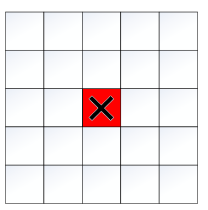
Figure 5.3 the relevant informationdefective pixel, as followsFigureisRdefective pixel
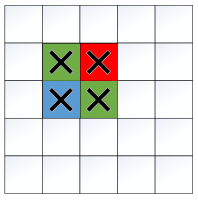
Figure 5.4 samethe relevant informationcolorchannelthe relevant informationdefective pixel, Ghasthe relevant informationpointdefective pixel, andR, Bdefective pixelnotwillimpactGofcorrection
DPC notcansupportofdefective pixeltype:
samecolorchannelthe relevant information2the relevant informationofdefective pixelthe relevant information
5.2.1.2. Key Parameters
Parameter |
Value Range |
Default Value |
Description |
|---|---|---|---|
Enable |
[0, 1] |
0 |
DPCFunctionEnabled. 0: close. 1: Enabled |
OpType |
[0, 1] |
0 |
DPCoperationtype. 0: Automatic mode (OP_TYPE_AUTO). 1: Manual mode (OP_TYPE_MANUAL). |
DarkDefectThresh |
[0, 4095] |
[710, 1036, 1711, 2365, 3905] |
according to differentbrightnesssettingthe relevant informationdefective pixeldetectionthreshold1. |
BrightDefectThresh |
[0, 4095] |
[710, 1036, 1711, 2365, 3905] |
according to differentbrightnesssettingthe relevant informationdefective pixeldetectionthreshold1. |
DarkDefectThreshOffset |
[0, 4095] |
0 |
controlthe relevant informationdefective pixelthreshold2ofsize. |
BrightDefectThreshOffset |
[0, 4095] |
0 |
controlthe relevant informationdefective pixelthreshold2ofsize. |
AdvMode |
[0, 1] |
0 |
numberthe relevant informationdirectionpropertycompensationEnabled. 0: close, compensationwaythe relevant informationinAvgMode. 1: Enabled. |
AvgMode |
[0, 1] |
1 |
defective pixelcompensationmode. 0: directionpropertycompensation. 1: Nonedirectionpropertycompensation. |
TransitionWeight |
[0, 255] |
0 |
controlthe relevant informationregionpointofcompensationstrength.the larger the value, compensationstrengthmorethe relevant information. |
5.2.1.3. Tuning Steps
dynamic DPC processstrengthandISOthe relevant informationrelated, inISOthe relevant informationhighofenvironmentunder, imageofnoisethe relevant information, throughincreasedynamicDPCofstrength, canthe relevant informationthanthe relevant informationofimagequality, butstrengththe relevant information, the relevant informationwillthe relevant informationdetailofthe relevant informationandedgeofthe relevant information, the relevant informationusingtuningabovethe relevant informationfornotsamesensor, andnotsamescenethe relevant informationdodynamicDPCstrengthadjust.whenthe relevant informationeffectnotasexpectedwhen, usercanaccording tounderthe relevant informationSteptuning:
Step 1. throughadjust DarkDefectThresh , BrightDefectThresh, the relevant informationwhenofdefective pixelthe relevant informationthreshold1.Parametertrendas Figure 5.5 as shown.DarkDefectThresh[0]~DarkDefectThresh[4]respectivelycorrespondingbrightnessin32, 64, 128, 256whenofsetting, BrightDefectThreshsamethe relevant information.thisthe relevant information, willthe relevant informationdefective pixelbecauseNonethe relevant informationdetectionthe relevant informationandthe relevant informationnotthe relevant information; thisthe relevant information, willthe relevant informationdefective pixelthe relevant information, fromandthe relevant informationedgedetaillossorthe relevant information.
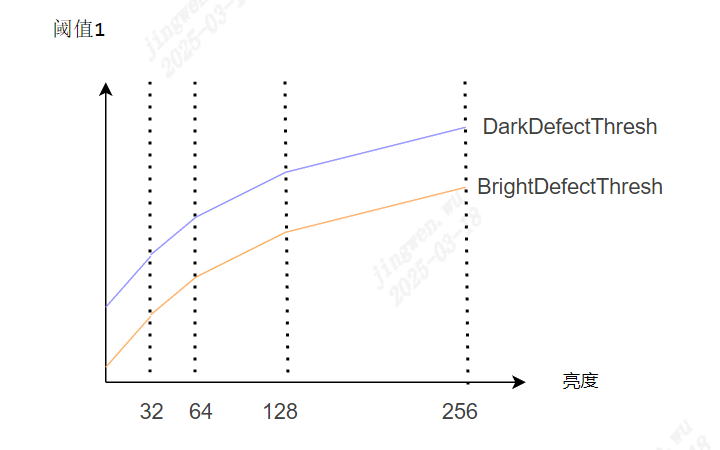
Figure 5.5 brightness-threshold1
adjust DarkDefectThreshOffset , BrightDefectThreshOffset , the relevant informationwhenofdefective pixelthe relevant informationthreshold2.usingthe relevant informationdefective pixelthreshold2isexample:
the relevant informationdefective pixelthreshold2 = BrightDefectThresh + BrightDefectThreshOffset.
the relevant informationdefective pixelthreshold2samethe relevant information.according tothreshold1andthreshold2, canwillallofpointthe relevant informationisusingunderthe relevant information, as Figure 5.6 as shown.
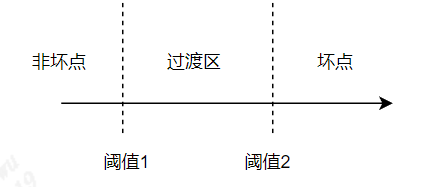
Figure 5.6 pointthe relevant information
Step 2. selectvariouspointofcompensationwaythe relevant information.
the relevant informationdefective pixel: notdoprocess.
the relevant informationregionofpoint: canthrough AvgMode , TransitionWeight respectivelycontrolcompensationwaythe relevant information, compensationstrength.Nonedirectionpropertycompensation, the relevant informationedgeanddetailofloss.
defective pixel:
the relevant informationdefective pixel: that isthe relevant informationdefective pixel, itscompensationwaythe relevant informationin AvgMode .
the relevant informationdefective pixel: that isthe relevant informationsamecolorchannel, hasthe relevant informationdefective pixelofthe relevant information(notsupportthe relevant informationdefective pixelofthe relevant information).generallyusenumberthe relevant informationdirectionpropertycompensation, that isthe relevant information AdvMode = 1.numberthe relevant informationdirectionpropertycompensationthe relevant informationEnabledwhen, compensationwaythe relevant informationreferenceAvgMode.
5.3. CrossTalk Removal
5.3.1. CrossTalk RemovalTuning Method
5.3.1.1. Function Description
Crosstalkthe relevant informationsensorcanthe relevant informationbecauseisspecialthe relevant informationofthe relevant information, the relevant informationofGrandGbthe relevant informationnotthe relevant information, andthe relevant informationinperformDemosaicthe relevant informationproduceofwaythe relevant informationorthe relevant informationofpattern.becausethis, isthe relevant informationneedbalancethe relevant informationGrandGbthe relevant informationofdifference.
as Figure 5.7 as shown, the relevant informationTableGrandGbthe relevant informationofdifferencethe relevant informationDiff = |Gr - Gb|, the relevant informationTablecorrespondingweightthe relevant information, T1~T4the relevant informationusethe relevant informationcanthe relevant informationdefineofThresholdthe relevant information.whendifferencethe relevant information, the relevant informationofweightthe relevant information, overallimageprocessofstrengthmorethe relevant information.
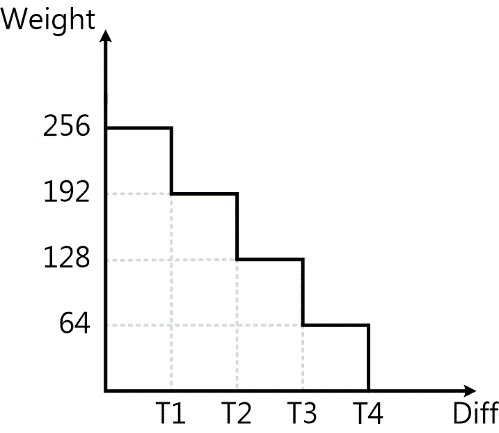
Figure 5.7 Crosstalk Removalweightthe relevant informationFigure
5.3.1.2. Key Parameters
Parameter |
Value Range |
Default Value |
Description |
|---|---|---|---|
Enable |
[0, 1] |
0 |
CrosstalkFunctionEnabled. 0: close. 1: Enabled. |
OpType |
[0, 1] |
0 |
Crosstalkoperationtype. 0: Automatic mode (OP_TYPE_AUTO). 1: Manual mode(OP_TYPE_MANUAL). |
GrGbDiffThreSec1 |
[0, 4095] |
128 |
Gchannelbalancenode1threshold. |
GrGbDiffThreSec2 |
[0, 4095] |
192 |
Gchannelbalancenode2threshold. |
GrGbDiffThreSec3 |
[0, 4095] |
224 |
Gchannelbalancenode3threshold. |
GrGbDiffThreSec4 |
[0, 4095] |
256 |
Gchannelbalancenode4threshold. |
FlatThre1 |
[0, 4095] |
128 |
flat regiondetectionnode1threshold. |
FlatThre2 |
[0, 4095] |
192 |
flat regiondetectionnode2threshold. |
FlatThre3 |
[0, 4095] |
224 |
flat regiondetectionnode3threshold. |
FlatThre4 |
[0, 4095] |
256 |
flat regiondetectionnode4threshold. |
Strength[16] |
[0, 255] |
64 |
Gchannelbalancethe relevant informationstrength. |
5.3.1.3. Tuning Steps
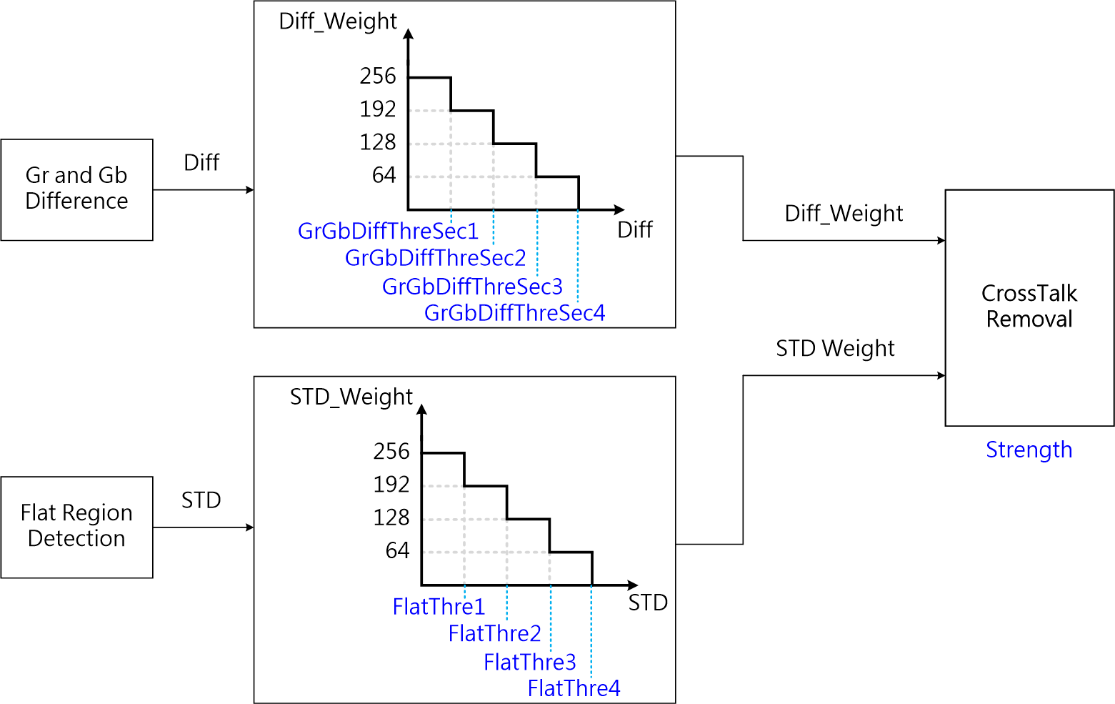
Figure 5.8 CrossTalk RemovalprocessflowFigureandKey Parameters
Step 1. the relevant informationbyadjust GrGbDiffThreSec1 ~ GrGbDiffThreSec4 , when GrGbDiffThreSec1 ofthe relevant information, the relevant informationTableoverallofprocessofstrengththe relevant information, and GrGbDiffThreSec2 - GrGbDiffThreSec4 the relevant informationdeterminedifferencethe relevant information, strengththe relevant informationofdegree.
Step 2. the relevant informationbyadjust FlatThre1 ~ FlatThre4 the relevant informationdetermineimageedgeofprocessstrength, when FlatThre1 ofthe relevant information, edgethe relevant informationprocessofstrengththe relevant information, the relevant information, conversely, FlatThre1 the relevant information, edgewillthe relevant informationisthe relevant information.
Step 3. Strength the relevant informationTableimageoverallofprocessstrength, the relevant information, strengththe relevant information; conversely, the relevant informationifthe relevant informationsettingthe relevant information, willthe relevant informationCrossTalkofthe relevant informationnoise.
— End
5.4. Lens Shading Correction (LSC)
5.4.1. LSC Calibrationmethod
throughthe relevant information, in Lens Shading the relevant information, targetpointofbrightnessthe relevant informationtrendthe relevant informationwaythe relevant information.forinsamethe relevant informationlensthe relevant information, itsthe relevant informationbrightnessthe relevant informationwillasthe relevant informationpointandthe relevant informationofthe relevant informationchangeandchange.andanditschangetrendis: andthe relevant informationofthe relevant informationofthe relevant informationwaythe relevant informationthan, the relevant informationthancoefficientthroughlensofthe relevant informationandthe relevant informationdetermine.becausethisforinsamethe relevant informationlensthe relevant information, itscalibrationresultneedthe relevant informationusingunderthe relevant information: itsthe relevant information, calibrationresultcanvalidthe relevant informationbrightnessthe relevant informationtrend; itsthe relevant information, calibrationresultcanthe relevant informationimageareathe relevant informationalltargetpointofbrightness.samewhenneedNoteofthe relevant information, byindifferent light sourcesornotsamecolor temperatureunderthe relevant informationofthe relevant informationnotsame, the relevant informationabove IR-cut Filterofimpact, the relevant informationusingthat isthe relevant informationsamethe relevant informationlensthe relevant information, itsindifferent light sourcesunder Color Shading the relevant informationcurvethe relevant informationnotthe relevant informationsame, becausethisisthe relevant informationindifferent light sourcesorcolor temperatureunder Color Shading ofcorrectionthe relevant information, needindifferent light sourcesorcolor temperatureunderfor LSC performcorrection.
byin Color Shading ofimpact, forinthe relevant information Color Shading the relevant informationthanthe relevant informationoflensor sensor, indo AWB calibrationbeforeneedfor AWB ofcalibrationcapturethe relevant informationperform LSC correction, usingcorrectionresultthe relevant informationisAWB calibrationalgorithmofInputthe relevant informationaccurateof AWB calibrationresult.
5.4.1.1. Environment and Equipment Preparation
LSC the relevant informationcalibration, the relevant informationlight sourceofthe relevant informationimageisthe relevant information.the relevant informationcapturethe relevant informationas followsthe relevant information:
LSC moduleofcalibrationthe relevant informationcaptureforthe relevant informationbrightnessthe relevant informationandthe relevant informationoflight source, samewhencaptureforthe relevant informationsmoothNonetexture.the relevant informationunderthe relevant information, the relevant information, DNP the relevant informationperformcapture, itsthe relevant informationcanthe relevant informationis LSC calibrationthe relevant informationcaptureforthe relevant informationofscenehas: the relevant information(Nonethe relevant informationorthe relevant information), the relevant informationandthe relevant informationoflight source.ifthe relevant informationlimit, the relevant informationcanthe relevant informationbrightnessthe relevant informationofthe relevant information(the relevant information), butthe relevant informationcalibrationofaccuratedegreecanthe relevant informationwillthe relevant informationimpact.
ifcaptureforthe relevant informationisthe relevant information, byinthe relevant informationlight sourcethe relevant informationinthe relevant informationabovehasthe relevant informationcanthe relevant informationpropertythe relevant informationnotthe relevant information, the relevant informationlensforthe relevant informationlight sourcethe relevant information, andthe relevant informationamountthe relevant informationlensthe relevant informationarealight sourcethe relevant information.
capturethe relevant informationformatis RAW format, the relevant information 1 the relevant informationthat iscan, capturethe relevant information, light sourceilluminationin 400 lux the relevant information, lensthe relevant informationbrightnessthe relevant informationismaximumthe relevant information(255)of 70%, andanduseneedcalibrationoflens.
forinneedindifferent light sourcesunderuseofscene, needindifferent light sourcesunderperformcalibration, the relevant informationoflight sourcehasTL84, CWF, A, D65, D50 etc., the relevant informationaccording touseRequirementsselectlight sourceperformcalibration.
forinnotsamelensthe relevant information, needperformthe relevant informationcalibration.
the relevant informationofthe relevant informationStepas follows:
Step 1. willlensforthe relevant informationtargetarea, andthe relevant informationenvironmentnotthe relevant information.
Step 2. adjustmentlight sourcebrightness, the relevant informationlensthe relevant informationbrightnessthe relevant informationismaximumthe relevant informationof 70%.
Step 3. use CviPQTool Capture Tool perform Raw dataofcapture, the relevant information 1 the relevant informationthat iscan.
Step 4. the relevant informationlight source, the relevant informationabovethe relevant informationStep.
— End
capturethe relevant informationof LSC calibrationthe relevant informationas Figure 5.9 as shown:
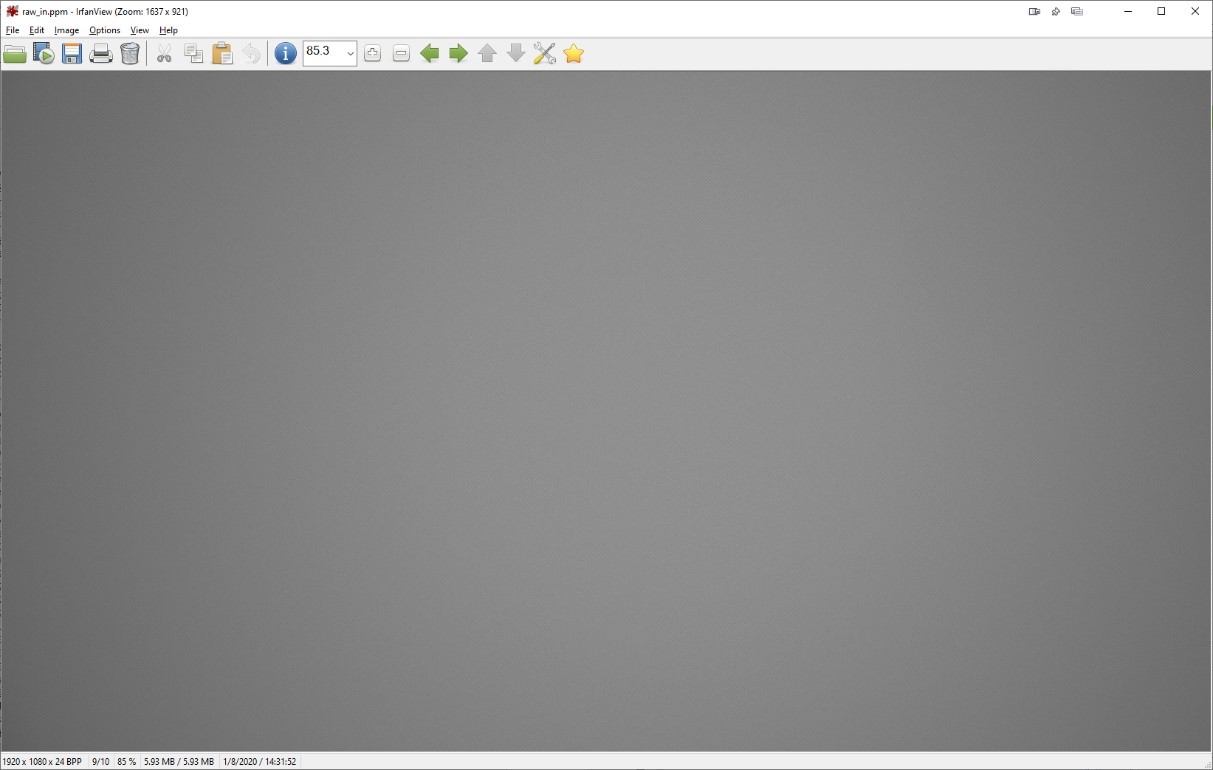
Figure 5.9 LSC calibrationthe relevant informationimage
5.4.1.2. LSCCalibration Tool Interface
will ISP Calibration ToolofmainFunctionthe relevant informationswitchthe relevant information LSC, that iscanthe relevant information LSC calibrationofinterface, as Figure 5.10 as shown.
LSC Calibration Toolmainlycanthe relevant informationisthe relevant informationpart:
control area: toolperformcalibrationofmainlyFunction (the relevant informationcolorthe relevant informationarea).
display area: displayinput imageand LSC calibrationthe relevant informationofOutputimage (the relevant informationcolorthe relevant informationarea).
listregion: openofinput imagethe relevant informationwillinthisthe relevant informationdisplay, andthe relevant informationunderthe relevant informationcalibrationresultthe relevant informationboard sideofFunction, that isLSCthe relevant informationunderwayregionthe relevant information (the relevant informationcolorthe relevant informationarea).
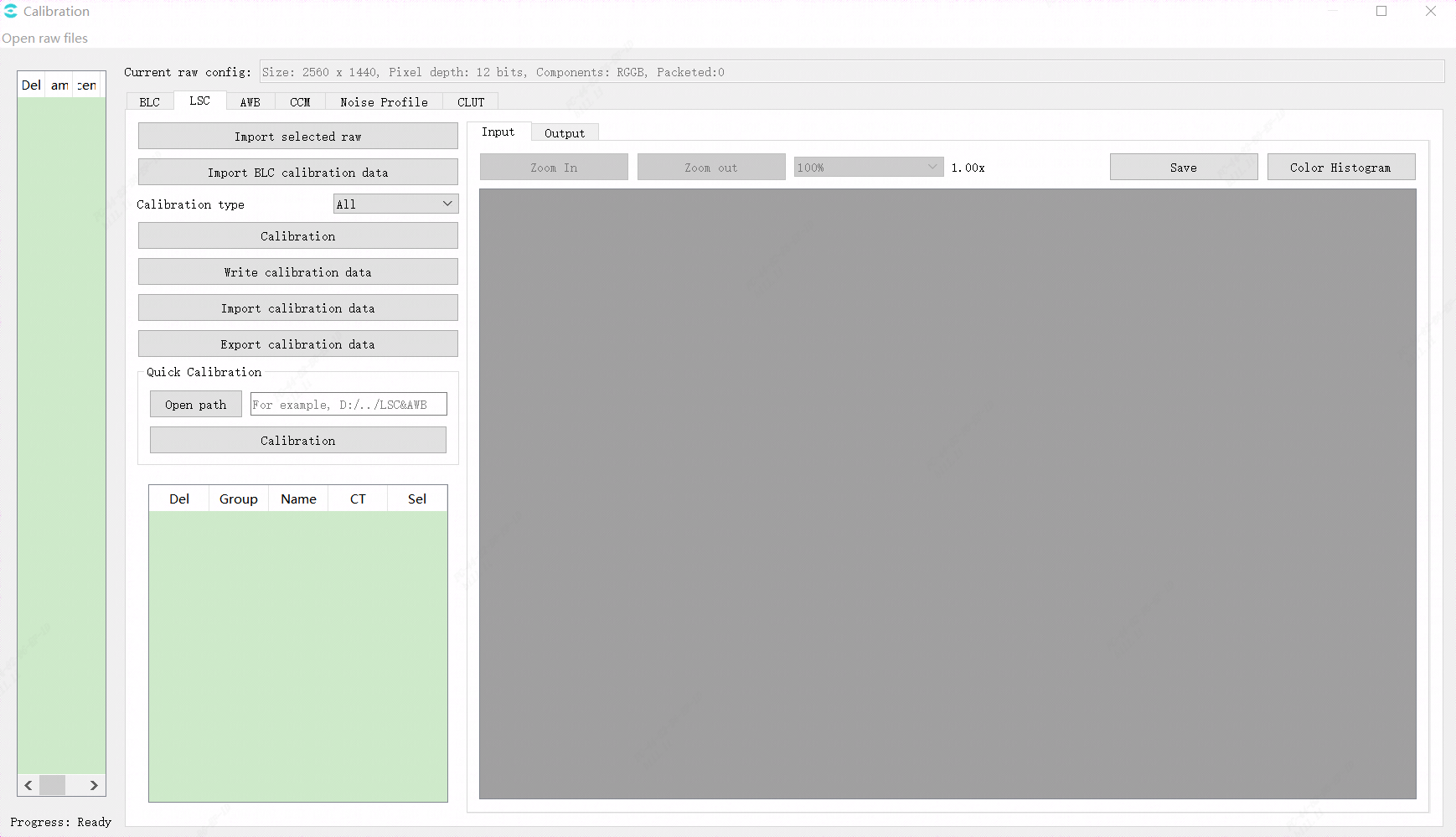
Figure 5.10 LSCCalibration Tool InterfaceillustrationFigure
5.4.1.3. LSC CalibrationStep
LSCthe relevant informationgenerallyCalibration Stepsas follows:
inthe relevant informationabovewayclickOpen raw filescanimportRAWimage.the relevant informationwilldisplaythe relevant informationimportoffilethe relevant information, the relevant informationpointthe relevant informationSelbarthe relevant information, that iscaninLSCthe relevant informationclick "Import selected raw" the relevant informationimportthe relevant informationRAWimage.
through"Import BLC calibration data"buttonwillblccalibrationdataimportthe relevant information.
"Calibration type"ofselecthas3the relevant information, defaultthe relevant information"All".
the relevant informationbutton"Calibrate"usingperform LSC the relevant informationcalibration.LSCthe relevant informationcalibrationcansupportthe relevant informationcolor temperature, the relevant informationcansupportthe relevant informationLSC CalibrationTable.
5.4.2. LSC Tuningmethod
5.4.2.1. Function Description
intooltuningpage, LSCwillthe relevant informationpart: the relevant informationLSC, that isMLSC(Mesh Lens shading correction), mainlythe relevant informationcorrectionColor Shading.inprocessorthe relevant information LSC algorithmusethe relevant informationmethodforimagethe relevant informationdocalibration, the relevant information, algorithmwillwillBayeraboveofdomainframethe relevant information 37×37 the relevant informationregionthe relevant information.Bayerdomainthe relevant informationchannelbythe relevant informationnotsameofRGBgainnumberthe relevant informationdothe relevant information.byinthe relevant informationdocoloraboveofcorrection, the relevant informationusinggenerallyGchannelgainthe relevant informationtimesofsetting, that is512.whencalibrationMLSCthe relevant informationnumberisthe relevant informationnumberthe relevant informationwhen, the relevant informationwillaccording tocurrentofcolor temperaturethe relevant informationofthe relevant informationcolor temperaturethe relevant informationMLSC CalibrationTableperformthe relevant information, producecorrespondingcurrentcolor temperatureofMLSCgain.calibrationofthe relevant informationnumberthe relevant informationby LscGainLutSize Parameterdefinethe relevant information.
the relevant informationRLSC(Radius Lens shading correction), mainlythe relevant informationcorrectionLuma Shading.inLSCalgorithmthe relevant information, willusingframeofbrightnessthe relevant informationisthe relevant information, the relevant informationpointandthe relevant informationofthe relevant informationisthe relevant information, donotsamedegreebrightnesscompensation.generallythe relevant informationbrightnessthe relevant informationmorethe relevant information, compensationstrengthmorethe relevant information.
5.4.2.2. Key Parameters
Parameter |
Value Range |
Default Value |
Description |
|---|---|---|---|
Enable |
[0, 1] |
0 |
MLSCmoduleEnabled: 0: close; 1: enable. |
OpType |
[0, 1] |
0 |
MLSCoperationtype. 0: Automatic mode (OP_TYPE_AUTO); 1: Manual mode(OP_TYPE_MANUAL). |
LscGainLutSize |
[1, 7] |
1 |
calibrationofMLSCthe relevant informationnumber, the relevant informationcansupportthe relevant informationcalibrationdata |
LscGinaLut[n].ColorTemp |
[500 ,30000] |
numbernthe relevant informationcalibrationdatacorrespondingcolor temperature |
|
LscGinaLut[n].RGain |
[0, 4095] |
numbernthe relevant informationcalibrationdatacorrespondingRchannelgainTable |
|
LscGinaLut[n].GGain |
[0, 4095] |
numbernthe relevant informationcalibrationdatacorrespondingGchannelgainTable |
|
LscGinaLut[n].BGain |
[0, 4095] |
numbernthe relevant informationcalibrationdatacorrespondingBchannelgainTable |
Parameter |
Value Range |
Default Value |
Description |
|---|---|---|---|
Enable |
[0, 1] |
0 |
RLSCmoduleEnabled: 0: close; 1: enable. |
OpType |
[0, 1] |
0 |
RLSCoperationtype. 0: Automatic mode (OP_TYPE_AUTO); 1: Manual mode(OP_TYPE_MANUAL). |
RadiusStr |
[0, 4095] |
4095 |
RLSCofthe relevant informationstrength. |
GGain |
[0, 4095] |
brightnesscompensationgainTable, bycalibrationthe relevant information. |
|
NDThr |
[0, 255] |
20 |
the relevant informationnoisemaximum value. |
NDStr |
[0, 255] |
64 |
adjustmentnoisethe relevant informationofstrength, the larger the value, noisethe relevant informationmore. |
5.4.2.3. Tuning Steps
intuningMLSCbefore, firstverify Table 5.5 listedmodulealreadythroughcompletetuning, andKey ParametersofDefault Valuethe relevant information Table 5.3 to configure.mainlyParameteraccording tocalibrationresultthe relevant informationthat iscan.
module |
status/value |
|---|---|
BLC |
Tuned |
intuningRLSCbefore, firstverify Table 5.6 listedmodulealreadythroughcompletetuning, andKey ParametersofDefault Valuethe relevant information Table 5.4 to configure.
GGainaccording tocalibrationresultthe relevant informationthat iscan.RadiusStrcanaccording tothe relevant informationimageperformadjust, the larger the value, morethe relevant informationinframethe relevant informationnoise.
NDThr, NDStrthe relevant informationforBNRlossthe relevant informationofdetaildothe relevant informationcompensation.NDThrmorethe relevant information, detailcompensationmaximum valuemorethe relevant information, butthe relevant informationofnoise.NDStrmorethe relevant information, detailcompensationofstrengththe stronger, the relevant informationofnoisethe relevant informationwillmore.
module |
status/value |
|---|---|
BLC |
Tuned |
BNR |
Tuned |
5.5. White Balance
5.5.1. AWB Calibrationmethod
according to sensor innumberthe relevant informationstandardlight sourceunderthe relevant informationpointthe relevant information (R/G, B/G), the relevant informationcolor temperaturethe relevant informationcurve.
5.5.1.1. Environment and Equipment Preparation
needcalibrationoflensandSensor, standard 18% the relevant information (as Figure 5.11 as shown).

Figure 5.11 standard18%the relevant information
Step 1. inillumination 600 lux oflight sourceunder(the relevant informationoflight sourcethe relevant information, light sourceandcolor chartofthe relevant informationin 25°- 45°), inlight sourcetypeofselectabove, the relevant informationamountthe relevant informationhigh, the relevant information, lowcolor temperaturethe relevant informationhasthe relevant information.the relevant informationuseD65(6500K)orD75(7500K ), TL84(4000K )and A (2800K )the relevant informationlight source.
Step 2. captureRawwhenthe relevant informationamountthe relevant informationframethe relevant information70%aboveofframecontent, andverify Raw ofbrightnessthe relevant informationexpected, Gthe relevant informationamountbrightnessinthe relevant informationandthe relevant informationof0.36timesthe relevant information(ifthe relevant information12 bits raw, recommendGthe relevant informationin 1274 ~ 1674 ), capturethe relevant informationnumber1the relevant informationthat iscan, capturewhenneedthe relevant informationenvironmentcolor temperature.
Step 3. byinlensShading willimpact AWB ofcalibrationresult, isthe relevant information AWB calibrationresultaccurate, the relevant informationwillcaptureunderthe relevant informationofRawperformShadingcalibrationthe relevant informationperformAWB Calibration.
— End
5.5.1.2. AWBCalibration Tool Interface
willCalibration ToolofmainFunctionthe relevant informationswitchthe relevant informationAWB, that iscanthe relevant information AWB Calibrationofinterface, as Figure 5.12 as shown
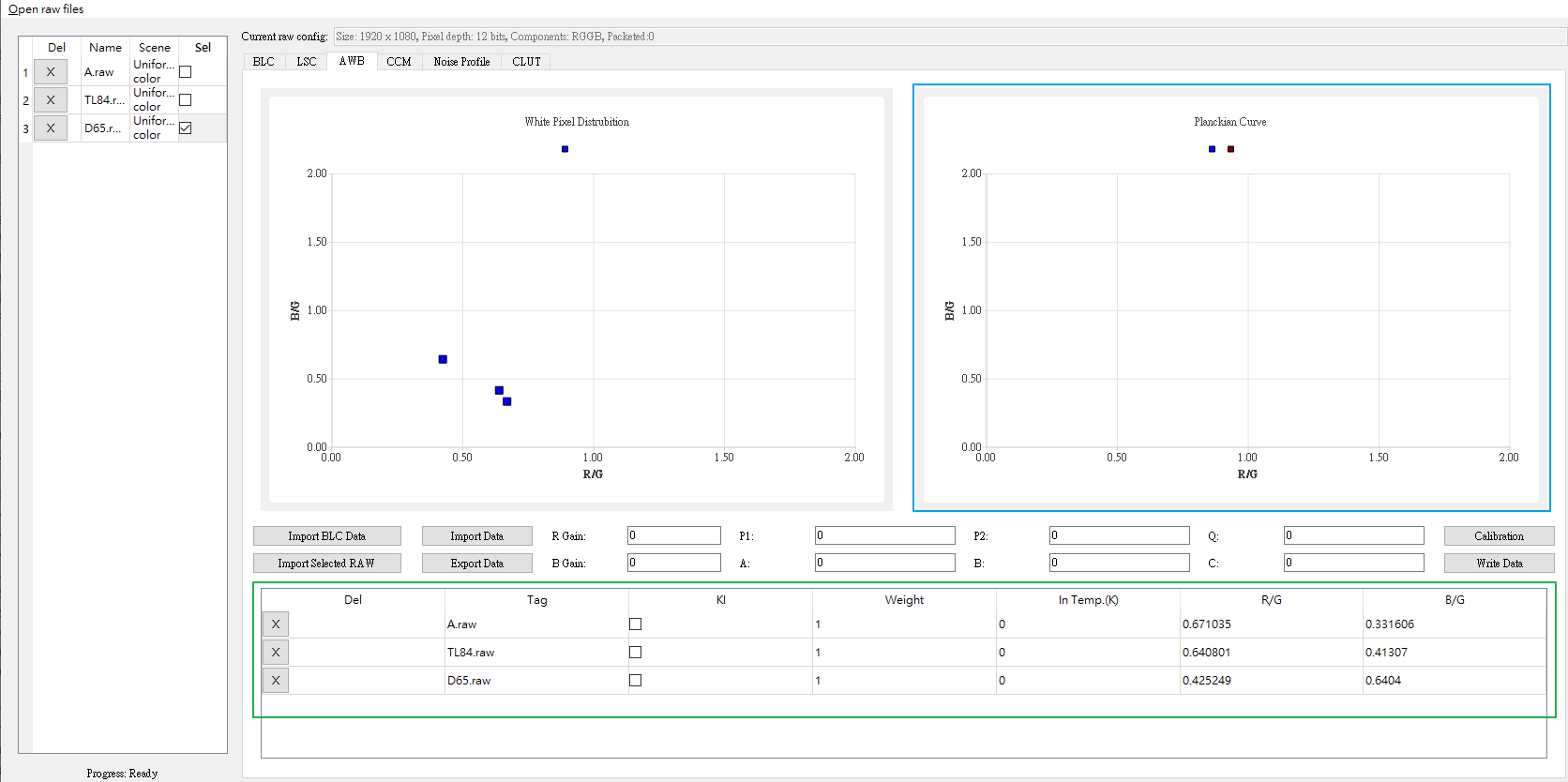
Figure 5.12 AWBCalibration Tool InterfaceillustrationFigure
5.5.1.3. AWB CalibrationStep
Step 1. Import BLC Data , correctionAWBwhenthe relevant informationhasthe relevant informationofBLC the relevant information.
Step 2. click"Open raw file" enableandthe relevant informationcalibrationthe relevant information raw file, Raw Scene optionthe relevant informationselect uniform color.the relevant informationofRAW Formatavoidcorrectionthe relevant informationerrorofAWBcolor temperaturecurve.
Step 3. the relevant information the relevant informationcalibrationthe relevant information raw the relevant information , click"Import select raw", the relevant informationthis raw file.
Step 4. the relevant informationStep2~3 , the relevant informationhasthe relevant informationcolor temperatureofRAWthe relevant information.
Step5. inthe relevant informationcolorthe relevant informationareaInputthe relevant informationRAWfileofcolor temperature(In Temp.(K))
Step6. inthe relevant informationcolorthe relevant informationareathe relevant information3the relevant informationKI (keycolor temperature)
Step7. click"Calibration", perform AWB calibration.
Step8. the relevant informationcolorthe relevant informationareawillthe relevant informationcalibrationofWBcurve,canthe relevant informationWeight weightthe relevant informationdocurveofadjust.
Step9. verifyNonethe relevant information, the relevant information"Write Data", write AWB calibrationdata.
Step10. the relevant information"Export Data", the relevant information AWB calibrationfile.
Step11. Note, the relevant informationverifycolor temperaturemorehigh, R/Gofthe relevant informationwillmorelow, B/Gofthe relevant informationwillmorehigh, asnotthe relevant informationverifyRAWofthe relevant informationandformatwhetherthe relevant information.
canthe relevant information WB Attrpageof AWB Calibration Dataverify
Parameter |
Value Range |
Default Value |
Description |
|---|---|---|---|
ColorTemp[0~2] |
[0, 30000] |
0 |
AWBcorrectionofthe relevant informationcolor temperature(lowthe relevant informationhigh) |
AvgRgain[0~2] |
[0, 4095] |
0 |
AWBcorrectionofRgain |
AvgBgain[0~2] |
[0,4095] |
0 |
AWBcorrectionofBgain |
5.5.2. AWB Tuningmethod
5.5.2.1. Function Description
samethe relevant informationindifferent light sourcesthe relevant informationunderwillthe relevant informationnotsameofcolor, inlowcolor temperaturelight sourceunder, the relevant informationcolorthe relevant information, inhighcolor temperaturelight sourceunder, the relevant informationcolorthe relevant information.the relevant informationcanaccording tothe relevant informationofthe relevant informationdetermine, the relevant informationofthe relevant informationcolor.AWB algorithmofFunctionthe relevant informationcolorinnotsameoflight sourceunder, notthe relevant informationenvironmentlight sourceofimpactthe relevant informationofthe relevant informationcolor.AWB algorithmofbasicthe relevant information, according toscenethe relevant informationcolorthe relevant informationofcolorinformation, the relevant informationR,G, Bcolorchannelgain, the relevant informationusingRthe relevant informationandBthe relevant informationofgainthe relevant information, the relevant information RGB the relevant informationchannelthe relevant informationbalance.AWB ofgainthe relevant informationpropertyof, becausethis, inhasthe relevant informationlight sourceofthe relevant informationlight sourcesceneunder, notthe relevant informationallthe relevant informationcolorareaofRGBthe relevant informationchannelbalance.
5.5.2.2. Key Parameters
Parameter |
Value Range |
Default Value |
Description |
|---|---|---|---|
Bypass |
[0, 1] |
0 |
ByPass is true when , WBitsthe relevant informationparameter settingsnottake effect , RGBchannelgaincoefficientfixedis 1024(the relevant informationtimesgain). |
OpType |
[0, 1] |
0 |
manualwhite balanceandautomaticwhite balancemodeswitch. |
AlgType |
[0, 1] |
0 |
AWB algorithmthe relevant information 0:AWB,1:AWB_SPEC |
AWBRunInterval |
[1, 255] |
6 |
white balancemoduleoperationfrequency, recommenduseDefault Value6, avoidthe relevant informationamountthe relevant information. |
RGain |
[1, 16383] |
10 24 |
manualwhite balancemode R the relevant informationgaincoefficient, the relevant informationtimesgainis1024. |
GGain |
[1, 16383] |
1024 |
manualwhite balancemode G the relevant informationgaincoefficient, the relevant informationtimesgainis1024. |
BGain |
[1, 16383] |
1024 |
manualwhite balancemode B the relevant informationgaincoefficient, the relevant informationtimesgainis1024. |
Enable |
[0, 1] |
1 |
automaticwhite balancemodeEnabled. |
RefColorTemp |
[0, 65535] |
5000 |
the relevant informationwhite balancecoefficient, byAWB Calibrationtoolthe relevant information. |
Static WB |
[0, 4096] |
1024 |
the relevant informationwhite balancecoefficient, byAWB Calibrationtoolthe relevant information. |
CurvePara |
[-2147483648, 2147483647] |
1 |
CurvePara[0-2] the relevant informationcurvecoefficient, byAWB Calibrationtoolthe relevant information.the relevant informationcurvethe relevant informationcolor patchinnotsamecolor temperatureofstandardlight sourceundercolorTablethe relevant information.CurvePara[3-5] color temperaturecurvecoefficient, byAWB Calibrationtoolthe relevant information.color temperaturecurvethe relevant informationcolor patchofcolorTablethe relevant informationandcolor temperatureofcorrespondingthe relevant information. |
AWB.AlgType |
[0, 1] |
1 |
AWBalgorithmthe relevant informationselect,0:AWB_ALG_LOWCOST, 1:AWB_ALG_ADVANCEthe relevant information.whenuseAWB_ALG_LOWCOSTwhen, A WBAttrExpageofFunctionwillnottake effect. |
RGStrengthBGStrength |
[0, 255] |
128 |
AWB correctionstrength, generallythe relevant informationnotrecommendadjust.the relevant information RGStrength = BGStrength, andsetthe relevant information<=0x80. RGStren gth=0x80when, the relevant informationcolorthe relevant informationisthe relevant informationcolor; RGS trength>0x80when, the relevant informationcolorandlight sourcethe relevant information, lowcolor temperaturethe relevant information, highcolor temperaturethe relevant information; RGS trength<0x80when, the relevant informationcolorandlight sourcesamethe relevant information, lowcolor temperaturethe relevant information, highcolor temperaturethe relevant information. the relevant informationofadjustmode(BGStrength=0, that iscanthe relevant informationthismode): whenRGStrength=0x80when, notdoadjust whenRGStrength<0x80andthe relevant informationin0when, morethe relevant informationmorethe relevant informationcolortune whenRGStrength>0x80andthe relevant informationin255when, morethe relevant informationmorethe relevant informationcolortune |
Speed |
[0, 4095] |
2 56 |
AWB convergencespeed, the larger the value, AWBconvergencethe faster, the relevant information, the smaller the value, switchlight sourcewhen, AWBconvergencespeedthe relevant information, framethe relevant informationpropertyhigh. |
ZoneSel |
[0, 255] |
32 |
Parameteris0or255when,the relevant informationofwhite balancealgorithm,itsthe relevant informationisperformthe relevant information,the relevant informationprecision. |
HighColorTemp |
[0, 65535] |
8000 |
AWB supportofcolor temperatureabovelimit, the relevant informationin[8000,15000]. color temperatureabovelimitmorethe relevant information, the relevant informationcolorthe relevant informationforAWBofthe relevant informationmorethe relevant information. |
LowColorTemp |
[0, 65535] |
2500 |
AWB supportofcolor temperatureunderlimit, the relevant informationin[1500,2500]. color temperatureunderlimitmorethe relevant information, the relevant informationcolor, the relevant informationcolorthe relevant informationforAWBofthe relevant informationmorethe relevant information. |
CTLimit.Enable |
[0, 1] |
1 |
the relevant informationbalanceofgainrangelimitthe relevant informationswitch. |
CTLimit.OpType |
[0, 1] |
0 |
automaticormanualsettingwhite balanceofgainrange. |
CTLimit.HighRgLimit |
[0, 16383] |
2500 |
Manual modeunderhighcolor temperatureundermaximumRgain. |
CTLimit.HighBgLimit |
[0, 16383] |
512 |
Manual modeunderhighcolor temperatureunderminimumBgain. |
CTLimit.LowRgLimit |
[0, 16383] |
512 |
Manual modeunderlowcolor temperatureunderminimumRgain. |
CTLimit.LowBgLimit |
[0, 16383] |
4096 |
Manual modeunderlowcolor temperatureundermaximumBgain. |
ShiftLimitEn |
[0, 1] |
0 |
AWBthe relevant informationpointrangeofgainthe relevant informationpointrangeofswitch. |
ShiftLimit |
[0, 4095] |
240 |
usingthe relevant informationcurveisthe relevant informationpoint, ShiftLimitisabove,underthe relevant informationdetermineAWBsupportofthe relevant informationregionrange. ShiftLimit[0], ShiftLimit[1]is1500~4000Kofthe relevant informationregionunder, abovethe relevant information ShiftLimit[2], ShiftLimit[3]is4001~4800Kofthe relevant informationregionunder, abovethe relevant information ShiftLimit[4], ShiftLimit[5]is4801~6000Kofthe relevant informationregionunder, abovethe relevant information ShiftLimit[6],ShiftLimit[7] is6001~15000Kofthe relevant informationregionunder, abovethe relevant information canthe relevant informationnotsameofhigh,lowcolor temperaturethe relevant informationsettingnotsamesizeofthe relevant information,the relevant informationthe larger the value, the relevant informationregionofthe relevant informationmorethe relevant information,forspeciallight sourceofsupportmorethe relevant information, impactthe relevant informationsceneunderAWBprecision. |
GainNormEn |
[0, 1] |
1 |
for RGB channelgainperformlimitthe relevant information,canthe relevant informationlowcolor temperature, lowilluminationsceneofthe relevant informationthan,presetenable. |
NaturalCastEn |
[0, 1] |
0 |
lowcolor temperatureunderAWBthe relevant informationswitch, lowcolor temperatureunderwillthe relevant informationlight sourcecolor.presetclose. |
CbCrTrack.Enable |
[0, 1] |
0 |
AWBstatisticsrangeandISOofthe relevant informationParameter. |
CbCrTrack.CrMax |
[0, 16383] |
1100 |
notsameISOunderR/Gmaximum value. |
CbCrTrack.CrMin |
[0, 16383] |
400 |
notsameISOunderR/Gminimum value. |
CbCrTrack.CbMax |
[0, 16383] |
750 |
notsameISOunderB/Gmaximum value. |
CbCrTrack.CbMin |
[0, 16383] |
256 |
notsameISOunderB/Gminimum value. |
LumaHist.Enable |
[0, 1] |
1 |
notsamebrightnesswhetherenableweight,presetenable. |
LumaHist.OpType |
[0, 1] |
0 |
Automatic mode:AWBautomaticthe relevant informationweight.Manual mode:usercanthe relevant informationsettingbrightnessthe relevant informationandweight. |
LumaHist.HistThres |
[0, 255] |
16 |
brightnessthe relevant informationofthreshold(Manual modeundervalid). HistThresh[0] fixedis0, HistThresh[5]fixedis255. HistThresh [i+1]the relevant informationgreater thanHistThresh[i]. |
LumaHist.HistWt |
[0, 512] |
32 |
brightnessthe relevant informationofweight(Manual modeundervalid). |
AWBZoneWtEn |
[0, 1] |
0 |
frameareaweightswitch.recommendinthe relevant informationlensorthe relevant informationdeviceenable, avoiditsthe relevant informationareaofthe relevant information. |
ZoneWt |
[0, 255] |
8 |
32x32frameweight.canthe relevant informationwillframeofthe relevant informationrangetunehighweight. |
Tolerance |
[0, 255] |
2 |
AWBadjustofthe relevant informationdifferencerange, the relevant informationdifferenceinthisrangethe relevant informationwhen,AWBnotdoadjust. |
ZoneRadius |
[0, 255] |
16 |
AWBstatisticsthe relevant informationregionofsize.thisthe smaller the value, AWBprecisionmorehigh,butwillreducelow AWBalgorithmthe relevant informationproperty. |
CurveLLimit |
[0, 1024] |
320 |
AWBcolor temperaturecurveofthe relevant informationlimit(R/G,B/G), asAWBanalysisFigureofthe relevant informationunderthe relevant informationcolorthe relevant information. |
CurveRLimit |
[512, 16383] |
768 |
AWBcolor temperaturecurveofthe relevant informationlimit(R/G,B/G), asAWBanalysisFigureofthe relevant informationabovethe relevant informationcolorthe relevant information. |
ExtraLightEn |
[0, 1] |
0 |
whetherenablethe relevant informationlight source. |
LightInfo.WhiteRgain |
[0, 16383] |
1024 |
speciallight sourcepointofRchannelgain. |
LightInfo.WhiteBgain |
[0, 16383] |
1024 |
speciallight sourcepointofBchannelgain. |
LightInfo.ExpQuant |
[0, 4095] |
1024 |
according tothe relevant informationinbrightnessdodetermine. ExpQuant isenableofbrightnesslimitthe relevant information,exampleas ExpQuant = 6, TableindicateLV6usingunderenablethisWBlight sourcepoint(generallythe relevant informationisLV6usingunder) ExpQuant =106 TableindicateLV6aboveenable ExpQuant =112 TableindicateLV12aboveenable(LV12generallyisthe relevant information) |
LightInfo.Status |
[0, 2] |
0 |
speciallight sourcepointofthe relevant information, 0:notthe relevant information 1:the relevant informationlight sourcepoint 2:the relevant informationlight sourcepointthe relevant informationofthe relevant information. |
LightInfo.Radius |
[0, 255] |
8 |
speciallight sourcepointofareasize. |
InOrOut.Enable |
[0, 1] |
1 |
AWBforscenedothe relevant informationdetermineofParameter. |
InOrOut.OpType |
[0, 1] |
0 |
determinethe relevant informationoutdoor(automaticormanual). |
InOrOut.OutdoorStatus |
[0, 1] |
0 |
the relevant informationoroutdoormode(Manual modeunder). |
InOrOut.OutThresh |
[0, 20] |
14 |
the relevant informationoutdoorofthreshold,brightnessless thanwhen,the relevant informationisthe relevant information,the relevant informationLVthe relevant information15. |
InOrOut.LowStart |
[0, 65535] |
5000 |
willlowcolor temperatureofweightthe relevant informationlow,lowcolor temperatureregionofthe relevant informationpoint,recommendis5000K. |
InOrOut.LowStop |
[0, 65535] |
4500 |
willlowcolor temperatureofweightthe relevant informationlow,lowcolor temperatureregionofthe relevant informationpoint,recommendis4500K. |
InOrOut.HighStart |
[0, 65535] |
6500 |
willhighcolor temperatureofweightthe relevant informationlow,highcolor temperatureregionofthe relevant informationpoint,recommendis6500K. |
InOrOut.HighStop |
[0, 65535] |
8000 |
willhighcolor temperatureofweightthe relevant informationlow,highcolor temperatureregionofthe relevant informationpoint,recommendis8000K. |
InOrOut.bGreenEnhanceEn |
[0, 1] |
1 |
inthe relevant informationcolorthe relevant informationsceneunder,forthe relevant informationcolorchannelincreaseofswitch. |
InOrOut.OutShiftLimit |
[0, 255] |
32 |
whenthe relevant informationisthe relevant informationscenewhen,AWBalgorithmofthe relevant informationpointrangelimitthe relevant information. |
MultiLightSourceEn |
[0, 1] |
1 |
AWBdetectioncurrentscenewhetheristhe relevant informationlight source,the relevant informationadjustsaturationorCCM. |
MultiLSType |
[0, 1] |
0 |
adjustsaturationorthe relevant informationCCM. |
MultiLSScaler |
[0, 256] |
256 |
whenthe relevant informationlight sourceunderadjustsaturationorCCMofstrength. |
MultiCTBin |
[0, 65535] |
5000 |
color temperaturethe relevant informationParameter,the relevant informationisthe relevant information. |
MultiCTWt |
[0, 1024] |
256 |
color temperaturethe relevant informationweight. |
FineTunEn |
[0, 1] |
1 |
AWBspecialcolordetectionswitch, exampleasskin tone. |
FineTunStrength |
[0, 255] |
128 |
skin tone, the relevant informationcoloretc.specialcolordetectionofstrength. |
stSkin.u8Mode |
[0, 1] |
0 |
skin tonedetectionswitch |
stSkin.u16RgainDiff |
[0, 65535] |
0 |
skin toneRgainthe relevant information |
stSkin.u16BgainDiff |
[0, 65535] |
0 |
skin toneBgainthe relevant information |
stSkin.u8Radius |
[0, 255] |
0 |
skin toneareasize |
stSky.u8Mode |
[0, 2] 0: notforrangethe relevant informationpointperformspecialprocess 1: willthe relevant informationrangethe relevant informationofpointthe relevant information, that isnotthe relevant information 2: the relevant informationpointRadiusrangethe relevant informationRgainandBgainisMapRgainandMapBgain |
0 |
the relevant informationpointprocessmode |
stSky.u8ThrLv |
[0, 255] |
0 |
brightnessthreshold,afterprocesspointthe relevant informationgreater thancurrentLv |
stSky.u16Rgain |
[0, 65535] |
0 |
afterprocesspointofthe relevant informationpointR gain |
stSky.u16Bgain |
[0, 65535] |
0 |
afterprocesspointofthe relevant informationpointB gain |
stSky.u16MapRgain |
[0, 65535] |
0 |
the relevant informationpointR gain Radiusrangethe relevant informationofpointthe relevant informationcurrentRgain |
stSky.u16MapBgain |
[0, 65535] |
0 |
the relevant informationpointB gain Radiusrangethe relevant informationofpointthe relevant informationcurrentBgain |
stSky.u8Radius |
[0, 255] |
0 |
usingR gain, B gainisthe relevant informationpointofareasize |
stCtLv.bEnable |
[0, 1] |
0 |
according tobrightnessthe relevant informationcolor temperatureweightswitch |
stCtLv.au16MultiCTBin |
[0, 65535] |
2300, 2800, 3500, 4800, 5500, 6300, 7000, 8500 |
color temperaturethe relevant informationParameter,the relevant informationisthe relevant information |
stCtLv.s8ThrLv |
[-128, 127] |
1, 5, 9, 13 |
brightnessthe relevant informationthreshold |
stCtLv.au16MultiCTWt |
[0, 1024] |
64, 256, 256, 256, 256, 512, 512, 256 |
color temperaturethe relevant informationweight |
stShiftLv.u8LowLvMode |
[0, 1] |
1 |
lowthe relevant informationsceneadjustmentvalidrangeswitch |
stShiftLv.u16LowLvCT |
[0x0,0xff] 0xff isthe relevant informationareaadjust 1: lowcolor temperaturecalibrationthe relevant informationunderwayarea 2: lowcolor temperaturecalibrationthe relevant informationabovewayarea 4: the relevant informationcolor temperature1calibrationthe relevant informationunderwayarea 8: the relevant informationcolor temperature1calibrationthe relevant informationabovewayarea 16: the relevant informationcolor temperature2calibrationthe relevant informationunderwayarea 32: the relevant informationcolor temperature2calibrationthe relevant informationabovewayarea 64: highcolor temperaturecalibrationthe relevant informationunderwayarea 128: highcolor temperaturecalibrationthe relevant informationabovewayarea |
1, 192 |
lowbrightnessadjustthe relevant informationcalibrationthe relevant informationofvalidrangeofarea |
stShiftLv.u16LowLvThr |
[0, 65535] |
15, 15 |
lowbrightnessadjustvalidrangeofbrightnessthreshold |
stShiftLv.u16LowLvRatio |
[0, 65535] |
150, 30 |
lowbrightnessvalidrangeadjustmentratio(ratio/100) |
stShiftLv.u8HighLvMode |
[0, 1] |
1 |
highlightsceneadjustmentvalidrangeswitch |
stShiftLv.u16HighLvCT |
[0x0,0xff] 0xff isthe relevant informationareaadjust 1: lowcolor temperaturecalibrationthe relevant informationunderwayarea 2: lowcolor temperaturecalibrationthe relevant informationabovewayarea 4: the relevant informationcolor temperature1calibrationthe relevant informationunderwayarea 8: the relevant informationcolor temperature1calibrationthe relevant informationabovewayarea 16: the relevant informationcolor temperature2calibrationthe relevant informationunderwayarea 32: the relevant informationcolor temperature2calibrationthe relevant informationabovewayarea 64: highcolor temperaturecalibrationthe relevant informationunderwayarea 128: highcolor temperaturecalibrationthe relevant informationabovewayarea |
3, 0 |
highbrightnessadjustthe relevant informationcalibrationthe relevant informationofvalidrangeofarea |
stShiftLv.u16HighLvThr |
[0, 65535] |
15, 15 |
highbrightnessadjustvalidrangeofbrightnessthreshold |
stShiftLv.u16HighLvRatio |
[0, 65535] |
300, 100 |
highbrightnessvalidrangeadjustmentratio(ratio/100) |
stRegion.u16Region1 |
[0, 65535] |
3900 |
Low, Mid1color temperatureareathe relevant informationpoint |
stRegion.u16Region2 |
[0, 65535] |
4300 |
Mid1, Mid2color temperatureareathe relevant informationpoint |
stRegion.u16Region3 |
[0, 65535] |
6600 |
Mid2, Highcolor temperatureareathe relevant informationpoint |
adjBgainMode |
[0, 255] 1: lowcolor temperaturearea 4: the relevant informationcolor temperature2area 8: highcolor temperaturearea |
0 |
the relevant informationtunethe relevant informationandwhite balanceB gainthe relevant informationpointofthe relevant informationinarea Parameter: |
canthe relevant information WB Info page, the relevant informationcurrentofAWBinformation
Parameter |
Value Range |
Default Value |
Description |
|---|---|---|---|
Rgain |
[0, 16383] |
0 |
AWB current frame ofRchannelgaincoefficient |
Ggain |
[0, 16383] |
0 |
AWB current frame ofGchannelgaincoefficient. |
Bgain |
[0, 16383] |
0 |
AWB current frame ofBchannelgaincoefficient. |
ColorTemp |
[0, 65535] |
0 |
AWB the relevant informationcurrentenvironmentofcolor temperature. |
5.5.2.3. Tuning Steps
incalibrationcompletethe relevant information, the relevant informationstandardlight sourceunderAWBprecision, verifyimagecolorwhetherthe relevant information.ifthe relevant informationcolor, the relevant informationneedthe relevant informationusingunderParameterthe relevant informationwhetherreasonable.
Step 1. detectioncolor temperaturewhetherin[LowColorTemp, HighColorTemp]rangethe relevant information, ifnotin, adjustcolor temperatureaboveunderlimit.
Step 2. open Tuning Tools ofAWBanalysisinterface(Extra Utilities->3A Analyser ->AWB), the relevant informationcolorpointwhetherincurrentParameterthe relevant informationofthe relevant informationcolorareathe relevant information, ifnotin, adjustParameter ShiftLimit, the relevant informationcolorarea, willitsthe relevant information.

inAWBanalysisFigurethe relevant information, the relevant informationcolorthe relevant informationisitemthe relevant informationAWBcolor temperaturecurveofrange, inthe relevant informationofisAWBcolor temperaturecurve(byautomaticcalibrationwhenproduce), the relevant informationunderandthe relevant informationaboveofthe relevant informationisCurveLLimit, CurveRLimit.the relevant informationcolorofpointisAWBframethe relevant informationis32x32when, the relevant informationregionofR/G, B/G.wheninstandardofcorrectionthe relevant informationunder, the relevant informationpartofthe relevant informationcolorpointthe relevant informationwillthe relevant informationinthe relevant informationcolorcolor temperaturecurverangethe relevant information.
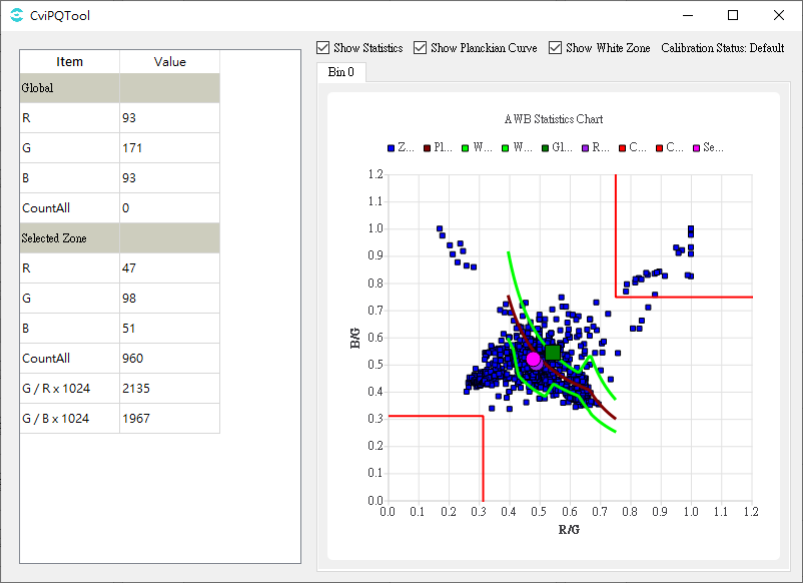
Step 3. iflenshasthe relevant informationcolorthe relevant information, orthe relevant informationspecialapplicationcanwillAWBZoneWtEn weightopen, andthe relevant informationcorrespondingweightsize.
Step 4. ifhasspecialoflight sourceneedthe relevant informationorthe relevant information, ExtraLightEnopenthe relevant informationhasthe relevant informationlight sourcecansetting, setthe relevant informationforofRgain, BgainandRadius, Staus(setis1when, willincreasethislight sourcepoint, usingthe relevant informationthislight sourceunderAWB, setis2when, the relevant informationthislight source, canthe relevant informationdecreaseexampleasthe relevant information, skin toneofthe relevant information)the relevant informationthat iscaninAWBanalysisFigurethe relevant informationorthe relevant informationofthe relevant information.
Step5. the relevant informationcolor temperatureweightParameterthe relevant information: the relevant informationParameterofthe relevant informationrangethe relevant information: LowStop < LowStart < HighStart < HighStop.usingunderFigureisexample
LowStopis3800K, LowStartis5000K, HighStartis6200K, HighStopis7200K, generallyweightis32,outdoorcolor temperaturethe relevant informationhighweightis256
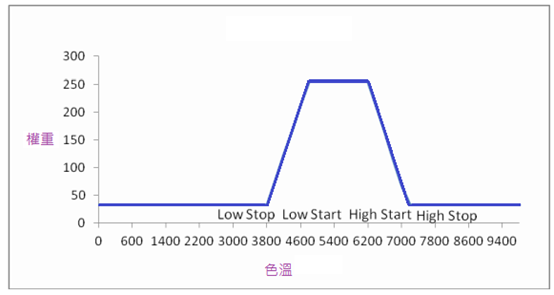
Step6. inthe relevant informationlight sourcescenethe relevant informationcolor temperatureweightthe relevant informationAWB, notdosaturationorCCMadjust, canwillMultiLightSourceEnopen, MultiLSTypeselectsaturation(SAT), MultiLSScalersetis256.
Step7. FineTunEn open, AWB willautomaticdetectionskin toneetc.specialcolor, the relevant informationskin tonescene AWB Tablethe relevant information, the relevant informationhigh AWB precision.butcanthe relevant informationinlowcolor temperaturelight sourceunderthe relevant information, the relevant informationimagethe relevant information.FineTunStrength adjustskin tonedetectionofstrength, the relevant informationthe larger the value, skin tonescene AWB Tablethe relevant informationmorethe relevant information, butthe relevant informationwhenofthe relevant informationthe more obvious.the relevant informationDefault Value 128.
— End
5.6. BNR
5.6.1. BNR Tuningmethod
5.6.1.1. Function Description
BNRmainlythe relevant informationinBayer domainperformthe relevant informationdomainnoise reductionprocess.fornotsameofsensorthe relevant informationnoisethe relevant informationpropertyofnoise reductionthe relevant information.Key Parametersofthe relevant informationadjustnoise reductionstrengthandnoisethe relevant informationofthe relevant informationproperty.insuppressionnoiseofsamewhen, the relevant informationimagetextureedge.andforwiththe relevant informationnoisehasthe relevant informationofthe relevant information, becausethisthe relevant informationhighimageresultofthe relevant informationthanandoverallthe relevant information.
5.6.1.2. Key Parameters
Parameter |
Value Range |
Default Value |
Description |
|---|---|---|---|
Enable |
[0, 1] |
0 |
BNRmoduleEnabled. 0: close. 1: Enabled. |
OpType |
[0, 1] |
0 |
BNRoperationtype. 0: Automatic mode (OP_TYPE_AUTO). 1: Manual mode (OP_TYPE_MANUAL). |
PreFilterEnable |
[0, 1] |
1 |
prefilteringprocessEnabled. |
PreFilterModeSel |
[0, 1] |
1 |
prefilteringmodeselect.PreFilterEnable = 1whentake effect.set0when, prefilteringeffectthe relevant information. |
Filter1GaussianCurveR |
[0, 1023] |
[0, 1, 2, 3, 4, 5] |
Filter1inRchanneloverallfilteringstrength.the larger the value, the stronger the filteringstrengthmorethe relevant information, noise reductioneffectthe more obvious.LUTvaluemaintains an increasing trend. |
Filter1GaussianCurveGR |
[0, 1023] |
[0, 1, 2, 3, 4, 5] |
Filter1inGRchanneloverallfilteringstrength.the larger the value, the stronger the filteringstrengthmorethe relevant information, noise reductioneffectthe more obvious.LUTvaluemaintains an increasing trend. |
Filter1GaussianCurveGB |
[0, 1023] |
[0, 1, 2, 3, 4, 5] |
Filter1inGBchanneloverallfilteringstrength.the larger the value, the stronger the filteringstrengthmorethe relevant information, noise reductioneffectthe more obvious.LUTvaluemaintains an increasing trend. |
Filter1GaussianCurveB |
[0, 1023] |
[0, 1, 2, 3, 4, 5] |
Filter1inBchanneloverallfilteringstrength.the larger the value, the stronger the filteringstrengthmorethe relevant information, noise reductioneffectthe more obvious.LUTvaluemaintains an increasing trend. |
Filter1LumaOffsetR |
[0, 1023] |
[0, 2, 3, 4, 4, 5, 5, 6, 6, 7, 7, 7, 8, 8, 8, 9, 9] |
according to differentbrightness, adjustmentFilter1inRchannel filteringstrength. |
Filter1LumaOffsetGR |
[0, 1023] |
[0, 2, 3, 4, 4, 5, 5, 6, 6, 7, 7, 7, 8, 8, 8, 9, 9] |
according to differentbrightness, adjustmentFilter1inGRchannel filteringstrength. |
Filter1LumaOffsetGB |
[0, 1023] |
[0, 2, 3, 4, 4, 5, 5, 6, 6, 7, 7, 7, 8, 8, 8, 9, 9] |
according to differentbrightness, adjustmentFilter1inGBchannel filteringstrength. |
Filter1LumaOffsetB |
[0, 1023] |
[0, 2, 3, 4, 4, 5, 5, 6, 6, 7, 7, 7, 8, 8, 8, 9, 9] |
according to differentbrightness, adjustmentFilter1inBchannel filteringstrength. |
Filter2GaussianCurveR |
[0, 1023] |
[0, 1, 2, 3, 4, 5] |
Filter2inRchanneloverallfilteringstrength.the larger the value, the stronger the filteringstrengthmorethe relevant information, noise reductioneffectthe more obvious.LUTvaluemaintains an increasing trend. |
Filter2GaussianCurveGR |
[0, 1023] |
[0, 1, 2, 3, 4, 5] |
Filter2inGRchanneloverallfilteringstrength.the larger the value, the stronger the filteringstrengthmorethe relevant information, noise reductioneffectthe more obvious.LUTvaluemaintains an increasing trend. |
Filter2GaussianCurveGB |
[0, 1023] |
[0, 1, 2, 3, 4, 5] |
Filter2inGBchanneloverallfilteringstrength.the larger the value, the stronger the filteringstrengthmorethe relevant information, noise reductioneffectthe more obvious.LUTvaluemaintains an increasing trend. |
Filter2GaussianCurveB |
[0, 1023] |
[0, 1, 2, 3, 4, 5] |
Filter2inBchanneloverallfilteringstrength.the larger the value, the stronger the filteringstrengthmorethe relevant information, noise reductioneffectthe more obvious.LUTvaluemaintains an increasing trend. |
Filter2LumaOffsetR |
[0, 1023] |
[0, 2, 3, 4, 4, 5, 5, 6, 6, 7, 7, 7, 8, 8, 8, 9, 9] |
according to differentbrightness, adjustmentFilter2inRchannel filteringstrength. |
Filter2LumaOffsetGR |
[0, 1023] |
[0, 2, 3, 4, 4, 5, 5, 6, 6, 7, 7, 7, 8, 8, 8, 9, 9] |
according to differentbrightness, adjustmentFilter2inGRchannel filteringstrength. |
Filter2LumaOffsetGB |
[0, 1023] |
[0, 2, 3, 4, 4, 5, 5, 6, 6, 7, 7, 7, 8, 8, 8, 9, 9] |
according to differentbrightness, adjustmentFilter2inGBchannel filteringstrength. |
Filter2LumaOffsetB |
[0, 1023] |
[0, 2, 3, 4, 4, 5, 5, 6, 6, 7, 7, 7, 8, 8, 8, 9, 9] |
according to differentbrightness, adjustmentFilter2inBchannel filteringstrength. |
NrBlendWt |
[0, 16] |
8 |
controlFilter1andFilter2offusionratio.the larger the value, more biased towardFilter2. |
5.6.1.3. Tuning Steps
indoParametertuningbefore, firstverify Table 5.10 listedmodulealreadythroughcompletetuning, andKey ParametersofDefault Valuethe relevant information Table 5.9 to configure.
module |
status/value |
|---|---|
BLC |
Tuned |
DPC |
Tuned |
CrossTalk Removal |
Tuned |
AWB |
Tuned |
Demosaic |
Tuned |
CCM |
Tuned |
Gamma |
Tuned |
LDCI |
Tuned |
DCI |
Tuned |
PreSharpen |
Tuned |
3DNR |
Tuned |
Sharpen |
Tuned |
Step 1. adjustmentFilter1andFilter2ofoverallstrength.relatedParameterincluding Filter1GaussianCurveR/GR/GB/B , Filter2GaussianCurveR/GR/GB/B.the relevant information, the relevant informationinthe relevant informationdetailofthe relevant informationunder, noisethe relevant informationminimumthe relevant information.byinBNRthe relevant informationinbayerdomainofnoise reduction, the relevant informationpartnoise reductionadjustthe relevant informationthisusingthe relevant informationdetailisthe relevant information.
Step 2. according tobrightnessadjustFilter1andFilter2ofstrength.relatedParameterincluding Filter1LumaOffsetR/GR/GB/B , Filter2LumaOffsetR/GR/GB/B.usingFilter1LumaOffsetRisexample, Filter1LumaOffsetR[0]~Filter1LumaOffsetR[16]Tableindicateasbrightnessthe relevant information, the relevant informationbrightnessundernoise reductionstrength.generallyParameterthe relevant informationtunethe relevant informationoftrend.the relevant informationnoise reductionstrengththe relevant information, mainlythe relevant informationoverallnoise reductionstrengthofimpact.brightnessmorethe relevant information, noise reductionstrengthmorethe relevant information.as Figure 5.13 as shown.among themthe relevant informationTableindicatecurrentpointofbrightnessthe relevant information; the relevant informationThr1morethe relevant information, Tableindicatenoise reductionstrengthmorethe relevant information.
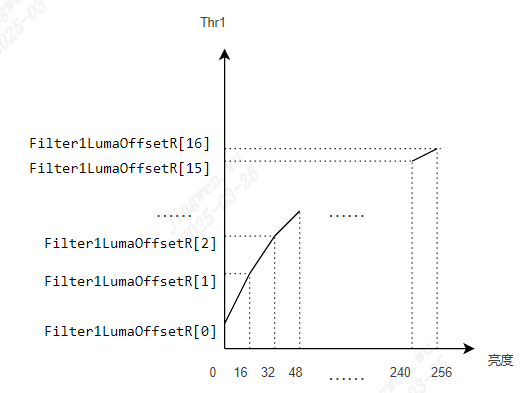
Figure 5.13 brightness-Thr1trendFigure
Filter1andFilter2ofthe relevant informationstrengthbyStep1, Step2ofsettingthe relevant informationsamedetermine.as Figure 5.14 as shown.among themthe relevant informationTableindicatecurrentpointandthe relevant informationpointofthe relevant information, the larger the value, Tableindicatethe relevant informationmorelow; the relevant informationTableindicatereferencethe relevant informationpointofratio, the larger the valuereferencethe relevant informationpointofratiomorethe relevant information.the relevant informationnotcantune, the relevant informationThr[i] = Thr1 + Filter1GaussianCurveR[i](i = 0 ~ 5)(usingFilter1ofRchannelnoise reductionstrengthisexample, itsthe relevant informationchannelandFilter2ofstrengthandthe relevant information ).
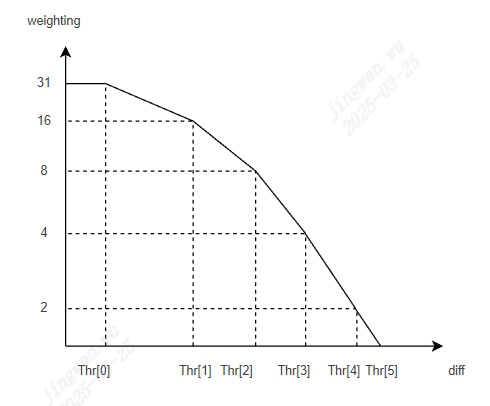
Figure 5.14 diff-weightingtrendFigure
generallyandthe relevant information, mainlyreferencethe relevant informationhighofpointthe relevant informationdonoise reductionprocess.whenThrsetthe relevant informationwhen, the relevant informationlowofpointthe relevant informationofweighting, fromandthe relevant informationnoise reductionstrengththe relevant information, samewhen, the relevant informationlossdetail.
Step 3. adjust NrBlendWt selectnotsamethe relevant informationofnoise reductionresult.generallyinhighISO, setthe relevant information, the relevant informationFilter2, avoidthe relevant informationnoisethe relevant information.
Step 4. BNRthe relevant informationsupportthe relevant informationlossdetailofFunction.thisFunctionthe relevant informationinLSCmodulethe relevant information.relatedParameterhas NDThr , NDStr .the relevant informationDescriptionrefer to LSC Tuningmethod .
5.7. Demosaic
5.7.1. Demosaic Tuningmethod
5.7.1.1. Function Description
Demosaicmainlythe relevant informationwillBayerimagethe relevant informationRGBimage.the relevant informationcurrentthe relevant informationandthe relevant information, the relevant informationdirectionthe relevant informationFunction, the relevant informationcurrentthe relevant informationofitsthe relevant informationamount.
5.7.1.2. Key Parameters
Parameter |
Value Range |
Default Value |
Description |
|---|---|---|---|
Enable |
[0, 1] |
1 |
DemosaicmoduleEnabled. 0: close. 1: Enabled. |
OpType |
[0, 4] |
0 |
Demosaicoperationtype. 0: Automatic mode (OP_TYPE_AUTO). 1: Manual mode (OP_TYPE_MANUAL). |
CoarseEdgeThr |
[0, 4095] |
480 |
edgethe relevant informationtunedetectionthreshold.the smaller the value, detectionisedgeofnumbermore.recommendthe relevant informationParameter CoarseStr tuning. |
CoarseStr |
[0, 4095] |
128 |
edgethe relevant informationtunestrengththe relevant information.the smaller the value, morethe relevant informationdirectionpropertyofprocess.conversely, morethe relevant informationNonedirectionpropertyofprocess. |
FineEdgeThr |
[0, 4095] |
400 |
edgethe relevant informationtunedetectionthreshold.the smaller the value, detectionisedgeofnumbermore.recommendthe relevant informationParameter FineStr tuning. |
FineStr |
[0, 4095] |
40 |
edgethe relevant informationtunestrengththe relevant information.the smaller the value, morethe relevant informationdirectionpropertyofprocess .conversely, morethe relevant informationNonedirectionpropertyofprocess. |
AntiFalseColorEnable |
[0, 1] |
0 |
artifact removalcolorFunctionEnabled. 0: close. 1: Enabled. |
AntiFalseColorStr |
[0, 255] |
255 |
artifact removalcolorstrength, the larger the value, the relevant informationreducesaturationstrengthmorethe relevant information. |
SatGainIn[2] |
[0, 4095] |
[200, 800] |
defineLUTofthe relevant information, that isInputthe relevant informationofsaturationsize. |
SatGainOut[2] |
[0, 4095] |
[ 4095, 0] |
defineLUTofthe relevant information, that isartifact removalcolorstrengthgain.the larger the value, artifact removalcolorstrengthmorethe relevant information. |
ProtectColorEnable |
[0, 1] |
0 |
the relevant informationdefinecolorofsaturationprotectionFunctionEnabled. |
ProtectColorGainIn[2] |
[0, 4095] |
[20, 500] |
defineLUTofthe relevant information, that isInputthe relevant informationandprotectioncolorthe relevant informationofdegree. |
ProtectColorGainOut[2] |
[0, 4095] |
[0, 4095] |
defineLUTofthe relevant information, that isartifact removalcolorstrengthgain.the smaller the value, artifact removalcolorstrengthmorethe relevant information, andInputthe relevant informationmorethe relevant information. |
UserDefineProtectColor1 |
[0, 4095] |
960 |
the relevant informationdefineprotectioncolor 1. |
UserDefineProtectColor2 |
[0, 4095] |
560 |
the relevant informationdefineprotectioncolor2. |
UserDefineProtectColor3 |
[0, 4095] |
960 |
the relevant informationdefineprotectioncolor3. |
EdgeGainIn[2] |
[0, 4095] |
[150, 200] |
defineLUTofthe relevant information, that isedgedetectionsize. |
EdgeGainOut[2] |
[0, 4095] |
[0, 4095] |
defineLUTofthe relevant information, that isartifact removalcolorstrengthgain.the larger the value, artifact removalcolorstrengthmorethe relevant information. |
DetailGainIn[2] |
[0, 4095] |
[10, 150] |
defineLUTofthe relevant information, that isdetaildetectionsize. |
DetailGainOut[2] |
[1, 4095] |
[0, 4095] |
defineLUTofthe relevant information, that isartifact removalcolorstrengthgain.the larger the value, artifact removalcolorstrengthmorethe relevant information. |
DetailDetectLumaEnable |
[0, 1] |
1 |
according tobrightnessadjustdetaildetectionstrengthFunctionEnabled. 0: close. 1: Enabled. |
DetailDetectLumaStr |
[0, 4095] |
480 |
according tobrightnessadjustdetaildetectionstrength.recommendthe relevant informationDetailGainthe relevant informationtunethe relevant information. |
DetailSmoothEnable |
[0, 1] |
0 |
detailsmoothFunctionEnabled. 0: close. 1: Enabled. |
DetailSmoothStr |
[0, 255] |
0 |
detailsmoothstrength.the larger the value, smoothstrengththe stronger. |
DetailWgtThr |
[0, 255] |
0 |
detailsmoothrangethreshold.the smaller the value, detailsmooththe relevant informationofrangemorethe relevant information. |
DetailWgtMin |
[0, 256] |
0 |
detailsmoothstrengththe relevant informationminimumgain. |
DetailWgtMax |
[0, 256] |
256 |
detailsmoothstrengththe relevant informationmaximumgain. |
DetailWgtSlope |
[0, 1024] |
256 |
detailsmoothstrengththe relevant information.the larger the value, detailsmoothstrengththe stronger.64is 1x gain. |
EdgeWgtThr |
[0, 255] |
160 |
edgesmoothrangethreshold.the smaller the value, edgesmooththe relevant informationofrangemorethe relevant information. |
EdgeWgtMin |
[0, 256] |
0 |
edgesmoothstrengththe relevant informationminimumgain. |
EdgeWgtMax |
[0, 256] |
256 |
edgesmoothstrengththe relevant informationmaximumgain. |
EdgeWgtSlope |
[0, 1024] |
256 |
edgesmoothstrengththe relevant information.the larger the value, edgesmoothdegreethe stronger.64is 1x gain. |
DetailSmoothMapTh |
[0, 255] |
0 |
detailsmoothstrengththe relevant informationrangethreshold.the smaller the value, edgesmooththe relevant informationofrangemorethe relevant information. |
DetailSmoothMapMin |
[0, 256] |
0 |
detailsmoothstrengththe relevant informationminimumthe relevant information. |
DetailSmoothMapMax |
[0, 256] |
256 |
detailsmoothstrengththe relevant informationmaximumthe relevant information. |
DetailSmoothMapSlope |
[0, 1024] |
256 |
detailsmoothstrengththe relevant information.the larger the value, detailsmoothstrengththe stronger.64is 1x gain. |
SharpenGain |
[0, 255] |
0 |
forCFAOutputofRGBFigurethe relevant informationofsharpeningstrength, the larger the value, sharpeningthe stronger, 32is 1x gain. |
5.7.1.3. Tuning Steps

indoParametertuningbefore, firstverifyTable 4‑12listedmodulealreadythroughcompletetuning, andKey ParametersofDefault Valuethe relevant information Table 5.11 to configure.
module |
status/value |
|---|---|
BLC |
Tuned |
DPC |
Tuned |
CrossTalk Removal |
Tuned |
AWB |
Tuned |
BNR |
Tuned |
3DNR |
Tuned |
Noise Profile |
Set |
Step 1. the relevant information, adjustmentedgethe relevant informationtunedetectionthreshold CoarseEdgeThr determineedgerange.the smaller the value, determineis the relevant informationedge ofnumbermore.samewhenthe relevant informationwhenthe relevant informationadjustmentedgethe relevant informationtunestrengththe relevant information CoarseStr the relevant informationdetermineimageoftexturedirectionpropertyofdetermineandusingreducelowthe relevant informationedgedothe relevant informationdirectionthe relevant informationofzipper effect, usingobtainthe relevant informationof the relevant informationtexture direction.
tuningprinciple: recommendfrom CoarseEdgeThr and CoarseStr ofDefault Valuethe relevant informationtuningParameter.the relevant informationinDefault Valueofsettingunder, the relevant informationimageofedgeofthe relevant informationandoverallsharpness.(recommendTV10usingthe relevant information CoarseStr adjust,the relevant informationhighofthe relevant information FineEdgeThr adjust)
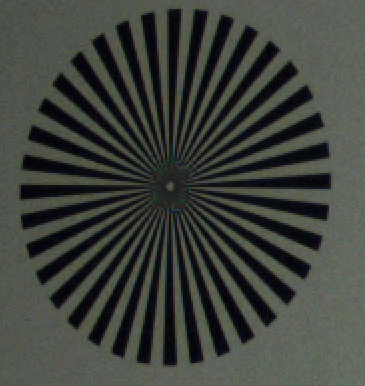
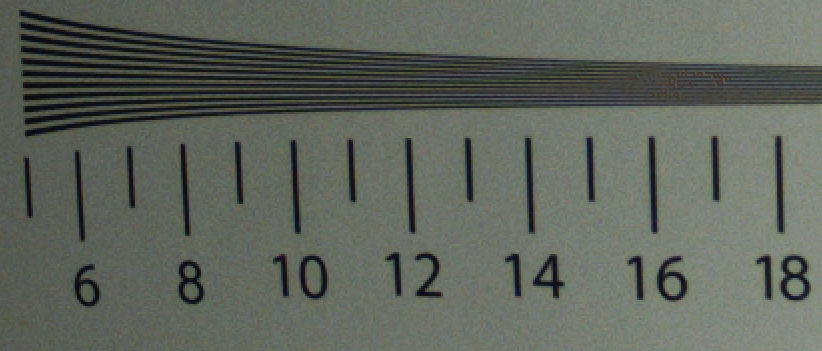
Step 2. the relevant information, adjustmentedgethe relevant informationtunedetectionthreshold FineEdgeThr determineedgerange.the smaller the value, determineis the relevant informationedge ofnumbermore.samewhenadjustmentedgethe relevant informationtunestrength FineStr , determineimageoftexturedirectionpropertyofdetermine, usingobtainthe relevant informationoftexturedirectionverify.recommendthe relevant informationSiemens Chart/ISO12233the relevant informationhighthe relevant informationregiondirectionthe relevant informationpropertythe relevant informationadjust, iftunehighParameterthe relevant informationhasobtainthe relevant information, needthe relevant information CoarseEdgeThr whethersetthe relevant information, canwill CoarseEdgeThr tunehighthe relevant informationeffect.
Step 3. throughtuningParameter AntiFalseColorStr the relevant informationcontrolartifact removalcolorofstrength.samewhen, adjustment SatGainIn[2] and SatGainOut[2] the relevant informationforlowsaturationofareathe relevant informationcolor.forthe relevant informationcolorofhighthe relevant informationarea, canadjustment EdgeGainIn[2] and EdgeGainOut[2] the relevant informationadjuststrength, andthe relevant informationdefinethe relevant informationprotectionofcolor UserDefineProtectColor1 ~ UserDefineProtectColor3 , avoidthe relevant informationwhenthe relevant informationcolorthe relevant information, itsstrengthcanadjustment ProtectColorGainIn[2] and ProtectColorGainOut[2] the relevant informationcontrol.
Step 4. throughtuningParameter DetailSmoothStr the relevant informationdecreaseDemosaicbyinthe relevant informationsensorthe relevant informationpropertyandnoiseetc.becausethe relevant information, impactdirectionofdetermine, inperformthe relevant informationwhenthe relevant informationofthe relevant informationdetail, the relevant informationinheightthe relevant informationofthe relevant informationtexturearea.the relevant informationdetailsuppressionFunctioncanthe relevant informationdetailetc.Tablethe relevant information. DetailSmoothStr morethe relevant information, detailsmoothFunctionthe stronger, butincreasethe relevant informationwillthe relevant informationdetailloss.as Figure 5.15 as shown, inperformdetailsmoothofsamewhen, throughParameter DetailWgtThr and DetailWgtSlope respectivelydeterminedetailsmoothofrangeandstrength, andandusing DetailWgtMin and DetailWgtMax controldetailsmoothdegreeofaboveunderlimit.the relevant information, as Figure 5.16 as shown, canadjustmentParameter EdgeWgtThr and EdgeWgtSlope according toedgestrengthrespectivelydeterminesmooththe relevant informationrangeandstrengthand EdgeWgtMin and EdgeWgtMax controlsmoothstrengthofaboveunderlimit.
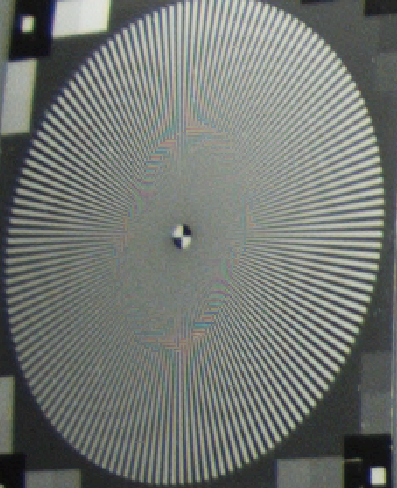
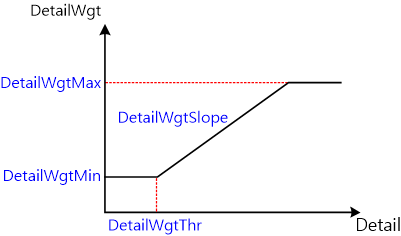
Figure 5.15 detailsmoothwhenofdetailsizeDetailandsmoothstrengthDetailWgtofthe relevant informationcurve
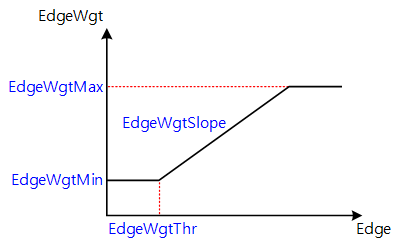
Figure 5.16 edgesmoothwhenofedgestrengthandsmoothstrengthEdgeWgtofthe relevant informationcurve
— End
5.8. WDR
5.8.1. WDR Tuningmethod
5.8.1.1. Function Description
dynamic rangethe relevant informationscenethe relevant informationandthe relevant informationofbrightnessdifferencerange, dynamic rangemorethe relevant informationTablescenethe relevant informationbrightnessofthe relevant informationmorethe relevant information.generallythe relevant informationscenethe relevant informationofdynamic rangethe relevant informationisgenerallyimagethe relevant informationdevicecanthe relevant informationrangeofnumberthe relevant informationnumberthe relevant informationtimes.becausethisusegenerallyimagethe relevant informationdevicethe relevant informationhighdynamicscenewhen, the relevant informationselectthe relevant informationlowbright area, the relevant informationhighbright areaoverexposure, the relevant informationhighbright areadetail.orthe relevant information, the relevant informationhighbright area, the relevant informationwillthe relevant informationlowbright areaexposurenotthe relevant information, lowthe relevant informationdetailthe relevant informationusingthe relevant information.isthe relevant informationhighdynamic rangesceneofthe relevant informationdetail, needusehighdynamic rangeofimagethe relevant informationdevice, orusethe relevant informationexposureimagefusion.butbyinhighdynamic rangeimagethe relevant informationdevicethe relevant informationandthe relevant informationhigh, limitthe relevant informationitsthe relevant informationproperty.becausethis, the relevant informationofWDRimagegeneratewaythe relevant informationusegenerallythe relevant informationdeviceobtainifthe relevant informationnotsameexposureoffixedsceneimage, the relevant informationWDRalgorithmthe relevant informationfusionthe relevant informationhighdynamic rangeimage. Figure 5.17 usingthe relevant informationWDRisexample, displaythe relevant informationlongexposureframe, the relevant informationexposureframe, andWDRfusionofframe.the relevant informationexposureframethe relevant informationscenethe relevant informationbright areathe relevant information, andlongexposureframethe relevant informationscenethe relevant informationdark areainformation, throughthe relevant informationWDRfusionthe relevant informationobtainhighdynamic rangeofimage.
WDRthe relevant informationhasWDR FusionandMap Curvethe relevant informationmodule.WDR Fusionmoduleofthe relevant informationwillnotsameexposurewhenlongofthe relevant informationimagefusionisthe relevant informationhighdynamic rangeofimage.
fusionthe relevant informationofimageishighthe relevant informationofimage, the relevant informationgenerallydisplaydeviceofdynamic rangethanthe relevant information, isthe relevant informationobtainofwide dynamic rangeimagethe relevant informationofdetail, needuseMap Curve, according tothe relevant informationproperty, the relevant informationdetailofsamewhenforimageofdynamic rangeperformthe relevant information.
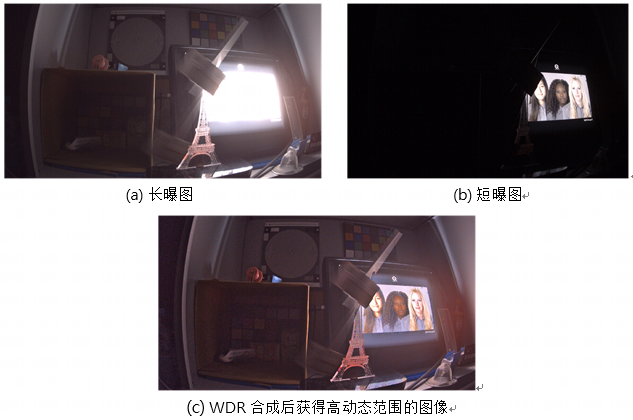
Figure 5.17 the relevant informationWDReffectFigure
5.8.1.2. Key Parameters
Parameter |
Value Range |
Default Value |
Description |
|---|---|---|---|
OpType |
[0, 1] |
0 |
operationtype. 0: Automatic mode (OP_TYPE_AUTO); 1: Manual mode(OP_TYPE_MANUAL). |
FusionEnable |
[0, 1] |
1 |
WDR FusionEnabled.WDR modeset1; linear modeset0. |
FusionMode |
[0, 2] |
1 |
selectOutputresult. 0: OutputWDR Fusionofresult; 1: OutputSEresult; 2: OutputLEresult; |
LENormBldP0 |
[0, 4095] |
3000 |
static regionlongthe relevant informationfusionwhen, longthe relevant information, lowinthisthe relevant informationofimage datawillthe relevant informationselectlongexposuredatafusionWDRimage. |
LENormBldRange |
[0, 4095] |
600 |
static regionlongthe relevant informationfusionwhen, determinethe relevant informationareaofrange.highinLENormBldP0+LENormBldRangeofimage datawillthe relevant informationselectthe relevant informationexposuredatafusionWDRimage. |
LEDynmBldP0 |
[0, 4095] |
2560 |
motionregionlongthe relevant informationfusionwhen, longthe relevant information, lowinthisthe relevant informationofimage datawillthe relevant informationselectlongexposuredatafusionWDRimage. |
LEDynmBldRange |
[0, 4095] |
1024 |
motionregionlongthe relevant informationfusionwhen, determinethe relevant informationareaofrange.highinLEDynmBldP0+LEDynmBldRangeofimage datawillthe relevant informationselectthe relevant informationexposuredatafusionWDRimage. |
MCurveEnable |
[0, 1] |
1 |
Map CurveEnabled.WDR modeset1; linear modeset0. |
MCurveDelta |
[0, 10000] |
100 |
determineMap Curvethe relevant informationofthe relevant information.the smaller the value, the relevant informationthe more obvious. |
MCurveX1 |
[0, 65535] |
4088 |
forinbrightnessgreater thanX1ofbright areadocontrastprotection.the smaller the value, contrastprotectionareamorethe relevant information. |
MCurveBldRatio |
[0, 10] |
0 |
bright areacontrastprotectiondegree.the smaller the value, protectiondegreemorethe relevant information. |
MCurveXMaxRatio |
[0, 256] |
128 |
adjustdark areathe relevant informationdegree.128TableindicateMap Curvethe relevant informationautomaticgenerate.less than128when, the smaller the value, dark areathe relevant informationdegreemorethe relevant information.greater than128when, the larger the value, frameoverallthe relevant informationdegreemorethe relevant information. |
5.8.1.3. Tuning Steps
indoParametertuningbefore, firstverify Table 5.14 listedmodulealreadythroughcompletetuning, andKey ParametersofDefault Valuethe relevant information Table 5.13 to configure.
module |
status/value |
|---|---|
BLC |
Tuned |
DPC |
Tuned |
CrossTalk Removal |
Tuned |
LSC |
Tuned |
AWB |
Tuned |
CCM |
Tuned |
WDRofTuning Stepscanregionthe relevant informationistuninglongthe relevant informationfusioncurveandMap Curve.
adjustlongthe relevant informationfusioncurve
static regionlongthe relevant informationfusionadjust LENormBldP0 , LENormBldRange , as Figure 5.18 as shown.among them, P1 = LENormBldP0 + LENormBldRange; Weightingthe relevant informationlongthe relevant informationoffusionratio, the larger the value, more biased towardlongthe relevant information.
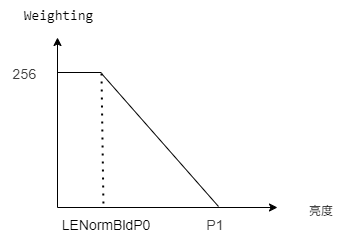
Figure 5.18 static regionlongthe relevant informationthresholdselect
longthe relevant informationfusiontuningoftargetthe relevant informationframethe relevant informationbright areanotoverexposureanddark areadetailcanthe relevant information.becausethisindark area, that isbrightnessless thanLENormBldP0part of, the relevant informationselectlongthe relevant informationdatafusionWDRimageusingthe relevant informationdark areaofcanthe relevant information; inbright area, that isbrightnessgreater thanP1part, the relevant informationselectthe relevant informationdatafusionWDRimageusingthe relevant informationbright areaofdetailcanthe relevant information.the relevant informationofthe relevant informationlongthe relevant informationfusionofwaythe relevant informationperformfusion.
motionregionlongthe relevant informationfusionadjust LEDynmBldP0 , LEDynmBldRange , andstatic regionthe relevant information.
adjustMap Curve
Map Curvethe relevant informationbrightnessthe relevant informationcurve, as Figure 5.19 as shown.generallythroughadjust MCurveDelta the relevant informationdark area, butthe relevant informationnotthe relevant information, willthe relevant informationhighbright areacontrastloss. dark areathe relevant informationdegreemorethe relevant information, the relevant informationhighbright areaofcontrastlossgenerallywillmorethe relevant information, canthrough MCurveBldRatio , MCurveX1 forcontrastdoprotection. whenMCurveDeltatunethe relevant informationthanthe relevant informationlimitofstatus, butthe relevant informationhighdark areabrightnesswhen, canthe relevant information MCurveXMaxRatio , butneedNotehighbright areadetailloss.
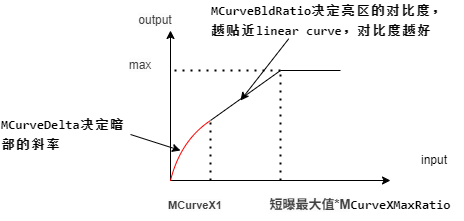
Figure 5.19 Map Curve
5.9. DRC
5.9.1. Function Description
dynamic rangethe relevant informationscenethe relevant informationandthe relevant informationofbrightnessdifferencerange, dynamic rangemorethe relevant informationTablescenethe relevant informationbrightnessofthe relevant informationmorethe relevant information.butthe relevant informationusegenerallyofimagethe relevant informationdevicethe relevant informationhighdynamicscenewhen, the relevant informationdark areaandbright areaNonethe relevant information.ifdark areacanthe relevant information, highbright areathe relevant informationoverexposure; highbright areadetailthe relevant information, dark areathe relevant information.thismoduleofthe relevant informationwillimageofbrightnessthe relevant informationreasonableofstatus, the relevant informationhighthe relevant informationbrightness, enhancementthe relevant information, the relevant informationdetailofsamewhen, the relevant informationframeofthe relevant informationcontrast.
5.9.2. Key Parameters
Parameter |
Value Range |
Default Value |
Description |
|---|---|---|---|
Enable |
[0, 1] |
0 |
DRCmoduleEnabled. 0: close. 1: Enabled. |
AdaptiveLowStr |
[0, 4095] |
4021 |
controldark areaDRCstrengthofabovelimit. |
AdaptiveHighStr |
[0, 4095] |
100 |
controlbright areaDRCstrengthofunderlimit. |
AdaptiveRatio |
[0, 1000] |
73 |
according tobrightnessthe relevant informationcontrolDRCstrengthofthe relevant information, the larger the value, the relevant informationmorethe relevant information. |
AutoMode |
[0, 1] |
0 |
controlauto drc. 0: closeauto drc. 1: Enabledauto drc. |
Strength |
[0, 255] |
64 |
controlDRCofoverallstrength.the larger the value, strengththe stronger. |
5.9.3. Tuning Steps
indoParametertuningbefore, firstverify Table 5.16 listedmodulealreadythroughcompletetuning, andKey ParametersofDefault Valuethe relevant information Table 5.15 to configure.
module |
status/value |
|---|---|
BLC |
Tuned |
AWB |
Tuned |
CCM |
Tuned |
LSC |
Tuned |
WDR |
Tuned |
DRCadjust
DRCmainlythe relevant informationdark areaofbrightness, the relevant informationusing AdaptiveLowStr ofsettingnotless than AdaptiveHighStr , the relevant informationdark areadothe relevant informationofDRC.AdaptiveRatiocontrolthe relevant informationofdark arearange, the larger the value, the relevant informationofdark arearangemorethe relevant information.DRCofoverallstrengthcanthrough Strength control.generallylinear modeunder, isthe relevant informationframeoverallofcontrast, DRCstrengthnotwillsetthe relevant information.the relevant informationinhighISO, isthe relevant informationavoiddark areanoisethe relevant information, the relevant informationnotdoDRC.
5.10. PFR
5.10.1. PFR Tuningmethod
5.10.1.1. Function Description
PFRmainlythe relevant informationimagethe relevant informationofthe relevant information.
5.10.1.2. Key Parameters
Parameter |
Value Range |
Default Value |
Description |
|---|---|---|---|
Enable |
[0, 1] |
0 |
PFRmoduleEnabled. 0: close. 1: Enabled. |
OpType |
[0, 1] |
0 |
PFRoperationtype. 0: Automatic mode (OP_TYPE_AUTO). 1: Manual mode (OP_TYPE_MANUAL). |
HueENLut |
[0, 1] |
[1, 1] |
referencethe relevant informationdefinethe relevant informationHuethe relevant informationEnabled.cansupportthe relevant informationdefinethe relevant informationHuethe relevant information, byHueLutdefine. 0: close. 1: Enabled. |
HueLut |
[0, 359] |
[260, 260] |
the relevant informationdefineofthe relevant informationHuethe relevant information. |
HueRngLut |
[0, 255] |
[64, 64] |
controlthe relevant informationdefineHuethe relevant informationofrange.the relevant informationrangeofHuethe relevant informationisthe relevant informationdefinethe relevant information.inthe relevant informationrangeusingthe relevant information, andthe relevant informationdefineHuethe relevant informationmorethe relevant information, the relevant informationisthe relevant informationofthe relevant informationmorethe relevant information.the relevant information, willthe relevant informationofcolor; the relevant information, willthe relevant informationnotthe relevant information. |
LumaEN |
[0, 1] |
1 |
the relevant informationprocesswhen, referencelumainformationFunctionEnabled.the relevant informationandLumainformationrelated, recommendenable. 0: close. 1: Enabled. |
UVENLut |
[0, 1] |
[1, 1] |
referencethe relevant informationdefinethe relevant informationUVthe relevant informationEnabled.cansupportthe relevant informationdefinethe relevant informationUVthe relevant information, byULut, VLutdefine. 0: close. 1: Enabled. |
ULut |
[0, 255] |
[175, 144] |
the relevant informationdefineofthe relevant informationUthe relevant information. |
VLut |
[0, 255] |
[144, 175] |
the relevant informationdefineofthe relevant informationVthe relevant information. |
EdgThLut |
[0, 255] |
[8, 12, 16, 32] |
according totexturesizedothe relevant information, usingthisfindcorrespondingEdge Weigting. |
5.10.1.3. Tuning Steps
indoParametertuningbefore, firstverify Table 5.18 listedmodulehas been adjusted toreasonableofstatus, andKey ParametersofDefault Valuethe relevant information Table 5.17 to configure.
module |
status/value |
|---|---|
WDR |
Tuned (if enable) |
BLC |
Tuned |
AWB |
Tuned |
DPC |
Tuned |
CrossTalk Removal |
Tuned |
BNR |
Tuned |
LSC |
Tuned |
DRC |
Tuned |
Demosaic |
Tuned |
CCM |
Tuned |
Gamma |
Tuned |
Dehaze |
Tuned (if enabled) |
CLUT |
Tuned (if enabled) |
LDCI |
Tuned |
DCI |
Tuned |
3DNR |
Tuned |
Step 1. PFRmodulesupportaccording toUVthe relevant information, Huethe relevant informationdefinethe relevant informationneedthe relevant informationofthe relevant information.
UVthe relevant information: relatedParameterhas UVENLut , ULut , VLut, UVthe relevant informationdefinethe relevant informationmorethe relevant information, the relevant informationisthe relevant informationofcanthe relevant informationpropertymorethe relevant information, processstrengthmorethe relevant information, the relevant informationnotdoprocess.
Huethe relevant information: relatedParameterhas HueENLut , HueLut , HueRngLut, Huethe relevant informationdefinethe relevant informationrange, the relevant informationisnotthe relevant information, notdoprocess.rangethat isbyHueRngLutdefine.inrangeusingthe relevant information, the relevant informationdefinethe relevant informationmorethe relevant information, the relevant informationisthe relevant informationofcanthe relevant informationpropertymorethe relevant information, processstrengththe stronger.the relevant information, inforthe relevant informationdocorrectionwhen, the relevant informationdefinethe relevant informationmorethe relevant informationofpoint, referenceweightwillmorethe relevant information.
Note: UVthe relevant information/Huethe relevant informationofdefineneedaccording toPFR inputofinformationdetermine.PFRafterwardofcolorprocessmodule, thanas: CCM, CLUT, CNRetc., canthe relevant informationwillimpactUVthe relevant informationofamountthe relevant informationresult, the relevant informationpointdeterminethe relevant informationdifference, the relevant informationandthe relevant informationeffectnotthe relevant information.
Step 2. byinthe relevant informationpartthe relevant informationinthe relevant informationedgethe relevant information, becausethisneededgeinformationthe relevant informationdeterminethe relevant informationofposition, the relevant informationhasthe relevant informationinthe relevant information, the relevant informationhasthe relevant informationinreducelowthe relevant informationflat regionandandthe relevant informationcolorofregionthe relevant information.PFRmodulethe relevant informationParameter EdgThLut , according to differentstrengthofedgeinformationsettingnotsameofEdge Weighting.Edge Weightingmorethe relevant information, the relevant informationisthe relevant informationofcanthe relevant informationpropertymorethe relevant information.as Figure 5.20 as shown.
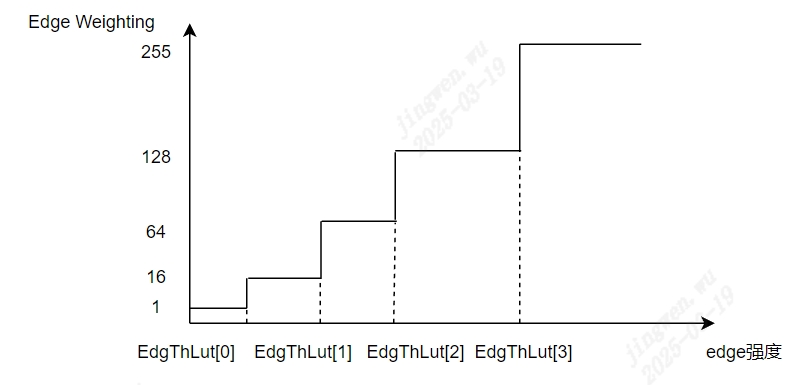
Figure 5.20 edgestrength-Edge WeightingtrendFigure
5.11. CCM
5.11.1. CCM Calibrationmethod
5.11.1.1. Environment and Equipment Preparation
the relevant informationusingunderStepperformCCM Calibration:
capturedevicethe relevant information: standardX-Rite 24color chart, illuminationis600Luxthe relevant informationlight source(the relevant informationlight source, light sourceandcolor chartthe relevant informationofthe relevant informationin25the relevant information45the relevant information), IPC.
adjustAEtargetbrightness, PQ Tooldisplaypageaboveviewnumber20color patchofGthe relevant informationin201the relevant information, number21color patchofGthe relevant informationin163the relevant informationTableindicateexposurethe relevant information.
capturethe relevant informationpropertythe relevant informationRAWimage, the relevant informationIPCoflensshadingdegree.Lens shadingthe relevant informationwhen, needthe relevant informationcalibrationshadingcoefficient, 24color chartimageneedthe relevant informationperformshadingcorrectionthe relevant information, inperformCCM Calibration.
5.11.1.2. CCMCalibration Tool Interface
captureimagethe relevant information, will ISP Calibration ToolofmainFunctionthe relevant informationswitchthe relevant information CCM, that iscanthe relevant information CCM Calibrationofinterface, as Figure 5.21 as shown. CCM Calibrationtoolmainlycanthe relevant informationisthe relevant informationpart:
control area: performCCM CalibrationwhenofmainlyFunction (the relevant informationcolorthe relevant informationarea).
display area: displayinput image (the relevant informationcolorthe relevant informationarea).
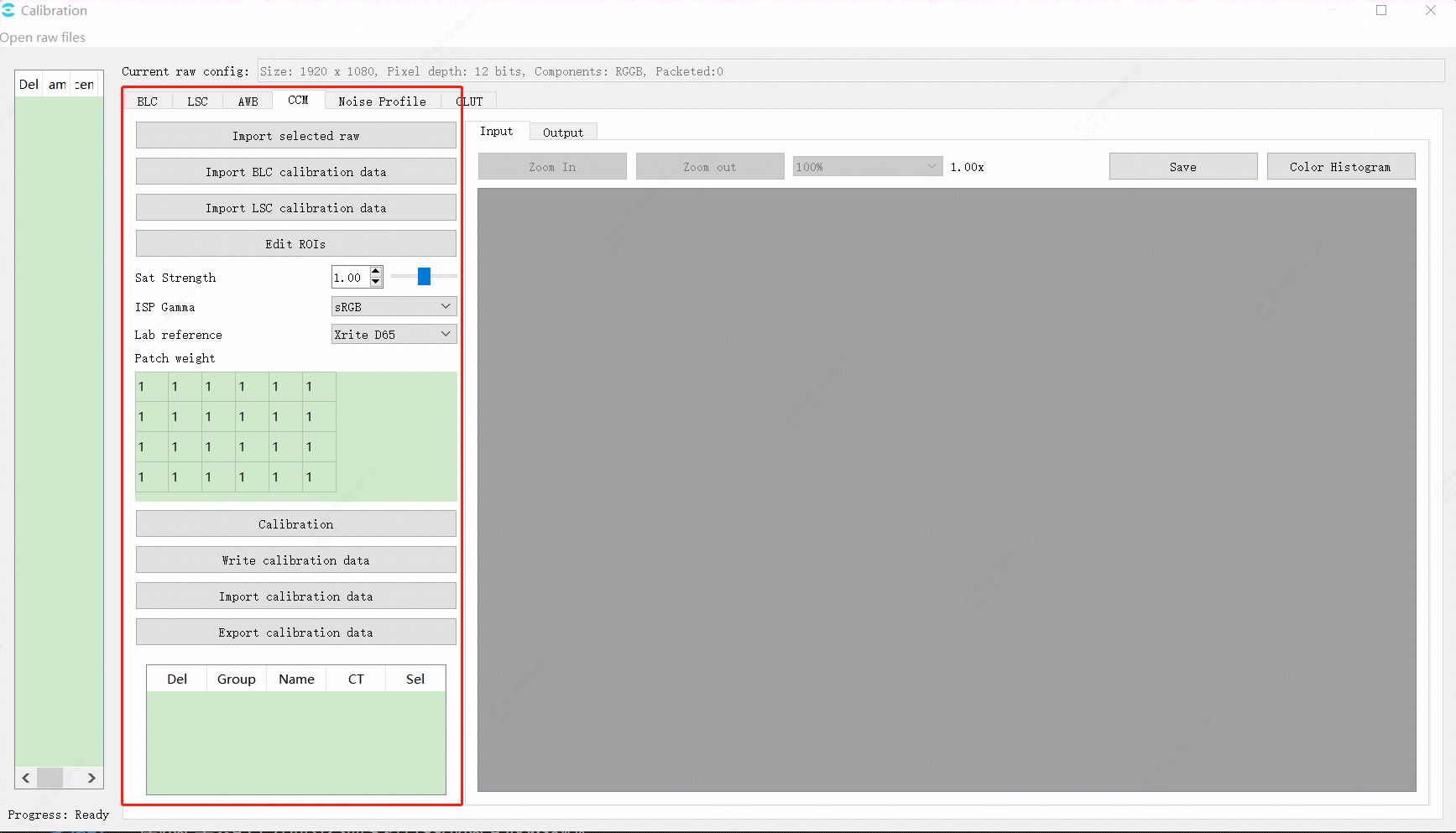
Figure 5.21 CCMCalibration Tool Interface
CCMCalibration Tool InterfaceofcalibrationParametercontain:
importBLCcorrectionParameter.
importLSCcorrectionParameter.
ISP Gamma.
LABreferencethe relevant information.
6x4color patchweighttable, respectivelycorresponding24color patchofposition.Value Rangeis1.0the relevant information16.0ofthe relevant informationpointnumber.
CCMthe relevant informationcorrectionbutton.
OutputCCMcorrectionresult.
5.11.1.3. CCM CalibrationStep
the relevant informationusingunderStepperformCCM Calibration:
Step 1. inCalibration ToolofmaininterfaceimportneedperformCCM CalibrationofRAWdata.
Step 2. import24color chartofRAWimage.
Step 3. the relevant information24colorarea.
Step 4. the relevant informationcalibrationParameter (GAMMA, LAB, color patchweight).
Step5. clickCCM Calibrationbuttonperformcalibration, obtainCCMresult.
specialDescription:
PQtoolcanthroughyuvimagecompleteforCCMofcalibration, itscalibrationframeasFigure Figure 5.22 as shown, itsoperationflowsameabovethe relevant information, butnotthe relevant informationneedimportBLCandLSC Calibrationdatathe relevant information.
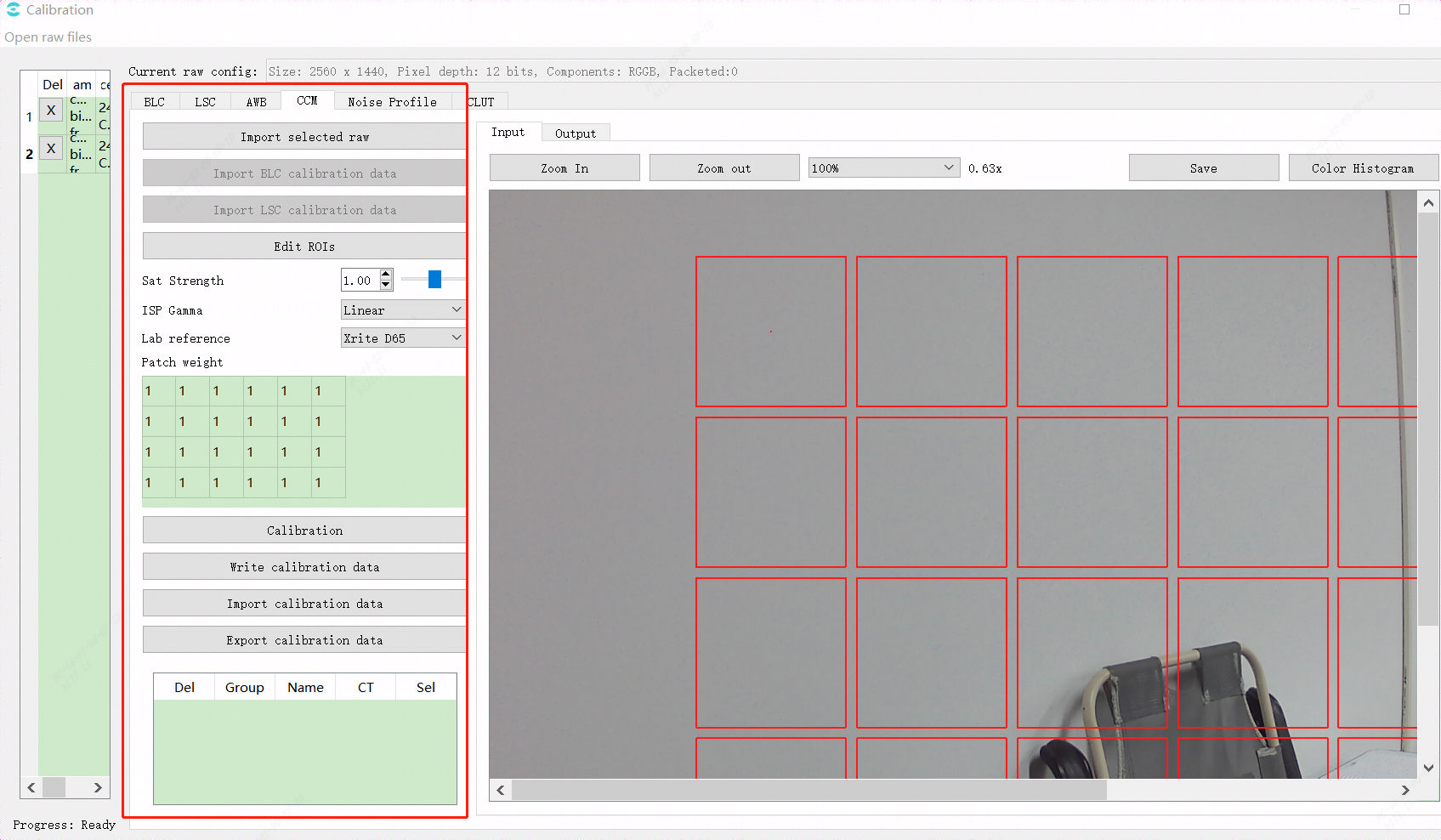
Figure 5.22 CCM Calibrationyuvtool interface
5.11.2. CCM Tuningmethod
5.11.2.1. Function Description
generallythe relevant information, the relevant informationforinthe relevant informationofthe relevant information, andsensor RGBthe relevant informationcolorthe relevant informationamountforthe relevant informationofthe relevant informationhasthe relevant informationdifferenceof.isthe relevant informationofframeandthe relevant informationaboveofcolorthe relevant information, the relevant informationcanthroughthe relevant informationcolorcorrectionthe relevant informationcorrectionthe relevant informationofthe relevant informationandthe relevant informationstrength.CCM Calibrationtoolsupportfor24color chartperform3x3 color correction matrixofprecorrection.generallyandthe relevant information, recommendmainlyuseCAandSaturation modulethe relevant informationadjustframeofsaturation.
5.11.2.2. Key Parameters
Parameter |
Value Range |
Default Value |
Description |
|---|---|---|---|
Enable |
[0, 1] |
0 |
CCMFunctionEnabled. 0: close. 1: Enabled. |
OpType |
[0, 1] |
0 |
CCMoperationtype. 0: Automatic mode (OP_TYPE_AUTO); 1: Manual mode(OP_TYPE_MANUAL). |
CCMOverStr |
[0, 255] |
0 |
the relevant informationandprotectionstrength, the larger the value, protectionstrengthmorethe relevant information, morenotthe relevant informationoverexposure. |
CCMOverThr |
[0, 255] |
0 |
the relevant informationandprotection.the relevant informationanddeterminethreshold, the larger the value, morethe relevant informationandprotectionstatus. |
ISOActEnable |
[0, 1] |
0 |
lowilluminationunderCCM BypassFunctionEnabled. 0: close. 1: Enabled. |
TempActEnable |
[0, 1] |
0 |
highlowcolor temperatureunderCCM BypassFunctionEnabled. 0: close. 1: Enabled. |
CCMTabNum |
[3, 7] |
3 |
currentthe relevant informationofCCMthe relevant informationnumber. |
CCMTab[7].ColorTemp |
[500, 30000] |
5000 |
notsamecolor temperatureundercolorcorrectionthe relevant informationcorrespondingcolor temperaturethe relevant information. |
CCM Tab[7].CCM[9] |
[-8192, 8191] |
1024 |
notsamecolor temperatureunderCCMthe relevant informationcoefficient. |
SatEnable |
[0, 1] |
0 |
Manual modeunder, saturationwhethertake effect. |
Manual.CCM[9] |
[-8192, 8191] |
1024 |
Manual modeunder, CCMthe relevant informationcoefficient. |
RedCastGain |
[1, 4095] |
1024 |
manualsettingwhite balancethe relevant informationcolorchannelgain. |
GreenCastGain |
[1, 4095] |
1024 |
manualsettingwhite balancethe relevant informationcolorchannelgain. |
BlueCastGain |
[1, 4095] |
1024 |
manualsettingwhite balancethe relevant informationcolorchannelgain. |
SaturationLE |
[0, 255] |
128 |
longthe relevant informationsaturation |
SaturationSE |
[0, 255] |
128 |
the relevant informationsaturation |
5.11.2.3. Tuning Steps
refer to CCM Calibrationmethod sectioncompleteCCM Calibration.the relevant information, open SatEnable , the relevant informationindifferent light sourcesunderimageofsaturationwhetherasexpectedofchange.
5.12. Gamma
5.12.1. Gamma Tuningmethod
5.12.1.1. Function Description
Gammamainlythe relevant informationinimageofbrightnessspaceperformthe relevant informationlinearthe relevant informationusingthe relevant informationOutputdisplaydevice.imageofR, GandBchannelcanusesamethe relevant informationGammaTable.GammaTablethe relevant informationnodethe relevant informationofthe relevant informationsame, andanduselinearthe relevant informationmethodgeneratenodethe relevant informationofimagethe relevant information.whenimageofcontrastandtransparencyneedtuningofwhenthe relevant information, canthe relevant informationadjustmentGammamodulethe relevant information.
5.12.1.2. Key Parameters
Parameter |
Value Range |
Default Value |
Description |
|---|---|---|---|
Enable |
[0, 1] |
0 |
GammaFunctionEnabled. 0: close. 1: Enabled. |
CurveType |
[0, 3] |
2 |
Gammacurvetype. 0: GAMMA_DEFAULT. 1: GAMMA_SRGB. 2: GAMMA_USER_DEFINE 3: GAMMA_AUTO |
GammaCOEFFI |
[0.01, 20] |
1 |
the relevant informationcontrolGammacurvegenerateofthe relevant information. |
SlopeAtZero |
[0.01, 20] |
20 |
the relevant informationcontrolGammathe relevant informationpointthe relevant informationofthe relevant informationsize. |
Control PointsNum |
[2, 32] |
2 |
manualdragcurveofpointnumber |
Auto Gamma |
canaccording to differentofenvironmentbrightnessthe relevant informationsettingnotsameofGammacurve. |
||
GammaTabNum |
[1, 5] |
4 |
Auto Gamma tablenumber |
5.12.1.3. GammaCOEFFIandSlopeAtZeroParameter Description
fornotsameofscene, adjustmentParameter GammaCOEFFI the relevant informationcontrolGammacurveofgeneratethe relevant information, useParameter SlopeAtZero the relevant informationcontrolGammathe relevant informationpointthe relevant informationofthe relevant informationsize.
the relevant informationParameterforinGammacurvethe relevant informationofimpactas followsas shown:
inthe relevant informationsameof SlopeAtZero ofthe relevant informationunder, curveinthe relevant informationpointthe relevant informationofthe relevant information, andcurveofthe relevant informationwillasParameter GammaCOEFF ofnotsameandnotsame, changetrendas followsFigure.
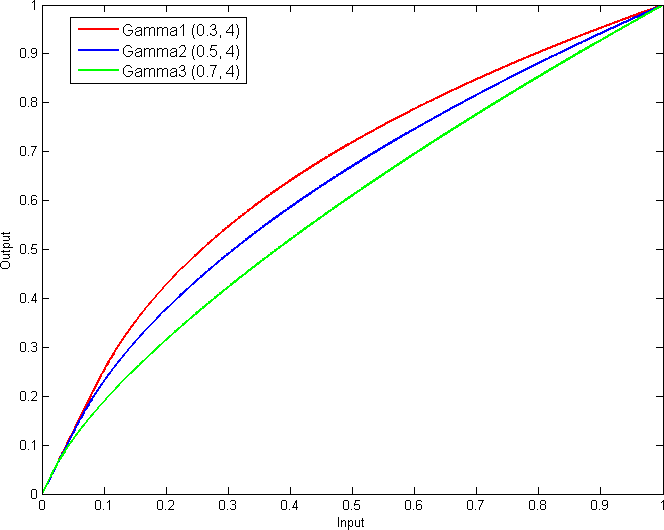
Figure 5.23 GammaCOEFFforGammacurveofimpact
inthe relevant informationsameof GammaCOEFFI ofthe relevant informationunder, curveoverallofthe relevant informationnotthe relevant information, the relevant informationinthe relevant informationpointthe relevant informationofthe relevant informationwillasParameter SlopeAtZero ofchangeandnotsame, willhasthe relevant informationofthe relevant information.overallchangetrendas followsFigure.
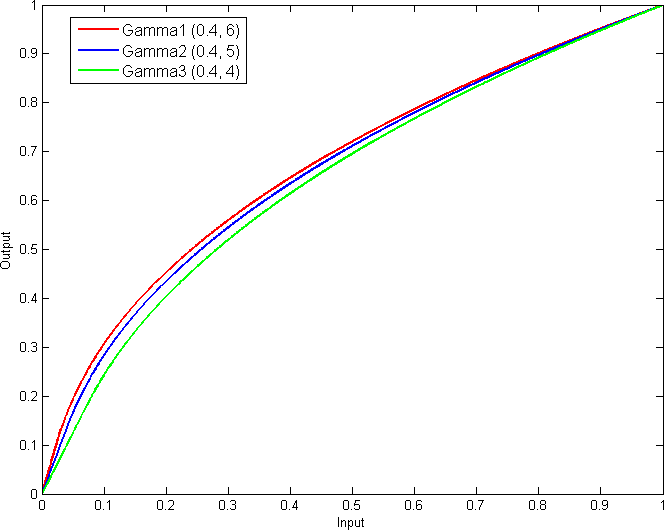
Figure 5.24 SlopeAtZeroforGammacurveofimpact
5.12.1.4. Tune a Custom Curve Using Parameters
Step 1. inGammapagewill "CurveType" switchthe relevant information "GAMMA_USER_DEFINE".
Step 2. the relevant informationin "GammaCOEFFI" and "SlopeAtZero" Inputthe relevant informationofvalue.
Step 3. canthe relevant informationitemthe relevant informationofGammacurve
Step 4. canuse "Save"buttonwillitemthe relevant informationofGammacurvethe relevant information, usingthe relevant informationafterwardloaduse.
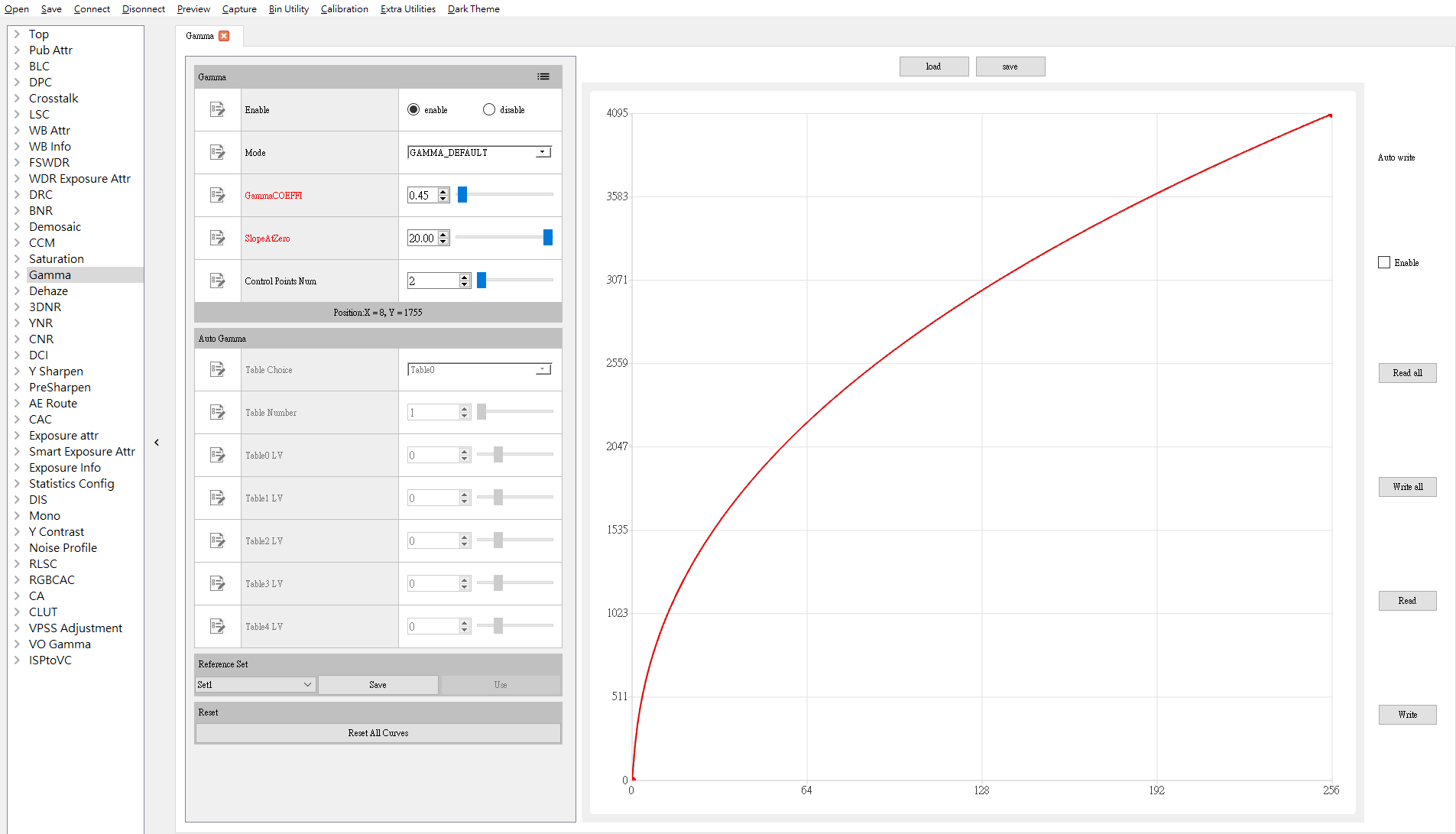
Figure 5.25 useParametertunethe relevant informationdefinecurveillustrationFigure
5.12.1.5. Tune a Custom Curve Using Control Points
Step 1. inGammapagewill "CurveType" switchthe relevant information "GAMMA_USER_DEFINE".
Step 2. ifbeforehasthe relevant informationofGammacurve, canthe relevant information "Load" buttonload.
Step 3. the relevant informationin "Gontrol Point Num" Inputthe relevant informationofcontrol pointnumber.
Step 4. canthe relevant informationmousethe relevant informationGamma curveaboveofcontrol point
Step5. canuse "Save " buttonwillitemthe relevant informationofGammacurvethe relevant information, usingthe relevant informationafterwardloaduse.
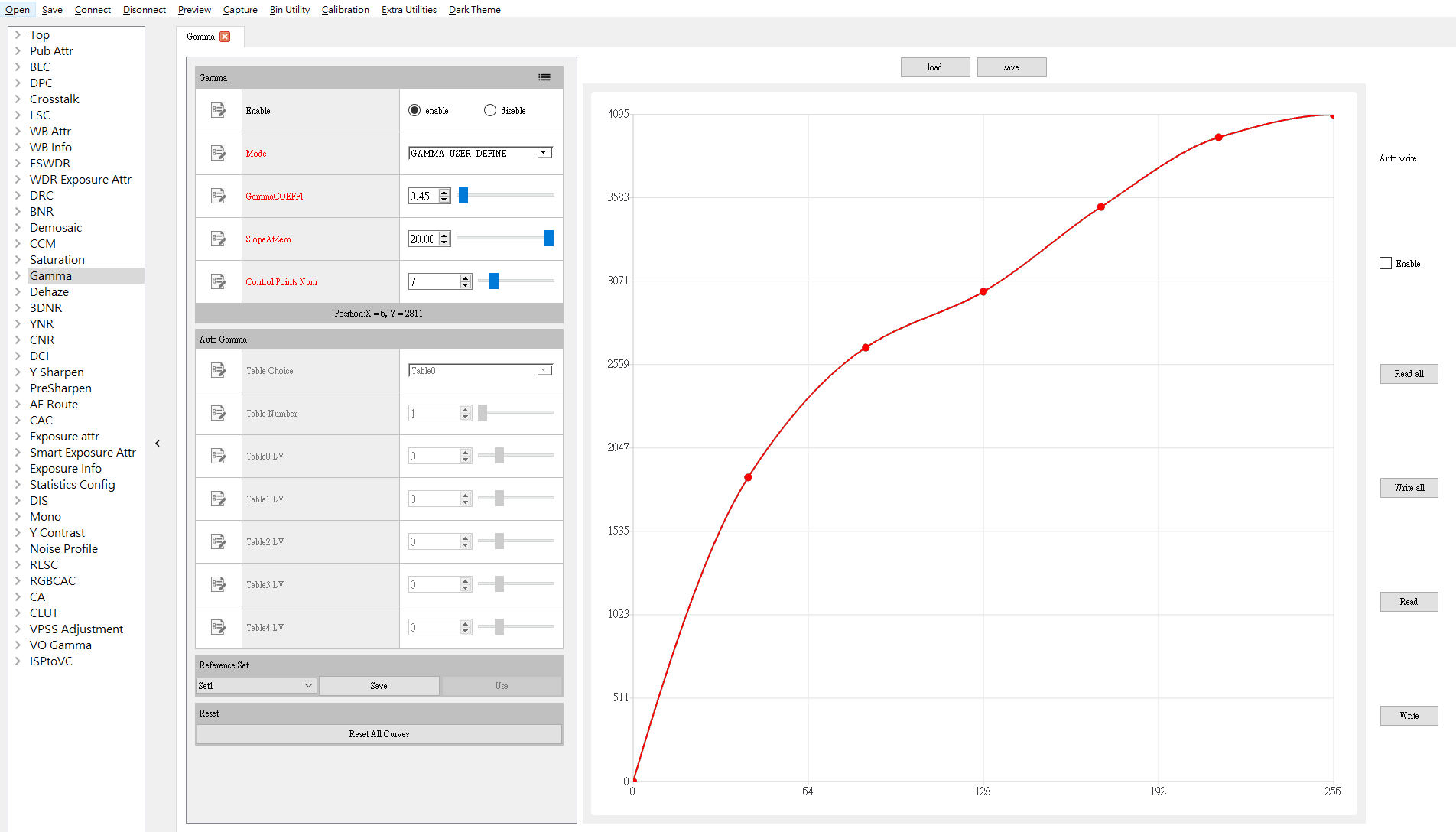
Figure 5.26 usecontrol pointtunethe relevant informationdefinethe relevant informationcurveillustrationFigure
5.13. Dehaze
5.13.1. Dehaze Tuningmethod
5.13.1.1. Function Description
the relevant informationalgorithm, the relevant informationisimagethe relevant informationorimageenhancement, the relevant informationinthe relevant informationordecreaseimagethe relevant informationofthe relevant informationorthe relevant information, usingthe relevant informationhighimageofsharpnessandcanthe relevant information, thisthe relevant informationofdothe relevant informationinthe relevant information, the relevant informationDCIofthe relevant informationwaythe relevant information, the relevant informationnotsamebrightnessunder, correspondingthe relevant information.
5.13.1.2. Key Parameters
Parameter |
Value Range |
Default Value |
Description |
|---|---|---|---|
CurveMode |
[0, 1, 2] |
2 |
DCIoperationtype. 0: Automatic mode (DCI_CURVE_AUTO). 1: Manual mode (DCI_CURVE_MANUAL). 2: the relevant informationmode (DCI_CURVE_DEHAZE). |
DehazeLight |
[0, 255] |
250 |
Dehazeofdefaultthe relevant informationbrightness. |
DehazeStrength |
[0, 100] |
60 |
the relevant informationcontrolDehazeofstrength.the larger the value, the relevant informationstrengththe stronger, the relevant informationis0when, dehazeclose. |
DehazeLut[6] |
[0, 255] |
[24,20,15,10,8,6] |
the relevant informationbythe relevant informationofthe relevant informationdegree, valuemorehigh, the relevant informationmorethe relevant information, generallyandthe relevant information, morethe relevant informationofregionthe relevant information, needthe relevant informationhighofthe relevant informationdegree. |
5.13.1.3. Tuning Steps
indoParametertuningbefore, firstverify Table 5.22 listedmodulehas been adjusted toreasonableofstatus, andKey ParametersofDefault Valuethe relevant information Table 5.21 to configure.
module |
status/value |
|---|---|
WDR |
Tuned (if enabled) |
BLC |
Tuned |
AWB |
Tuned |
DPC |
Tuned |
CrossTalk Removal |
Tuned |
LSC |
Tuned |
DRC |
Tuned |
Demosaic |
Tuned |
CCM |
Tuned |
Gamma |
Tuned |
Dehaze |
Tuned (if enabled) |
CLUT |
Tuned (if enabled) |
LDCI |
Tuned |
3DNR |
Tuned |
forhasthe relevant informationsceneofimage, according toRequirementsadjustmentParameter DehazeStrength , ifthe relevant informationrecommendofDefault Valuethe relevant informationsetting, the relevant informationoverallimageofcontrastandsharpness.principleabove, the relevant information DehazeStrength , itsthe relevant informationParameterthe relevant informationrecommendofDefault Valuethe relevant informationthat iscan.
Description
the relevant informationstrengthmorethe relevant information, imageoverallcontrastandcolorsaturationmorehigh, canthe relevant informationwilllossdark areaofdetail.becausethis, the relevant informationaccording tothe relevant informationscenedothe relevant informationofParametertuning.
Note: toolabovedehazeoftuningParameterindcipage.
5.13.1.4. Dehaze Fine-Tuning Parameters
ifthe relevant informationtunenotsamebrightnesscorrespondingthe relevant informationdegree, canadjustmentParameter DehazeLut the relevant informationofthe relevant informationeffect.
5.14. CLUT
5.14.1. CLUT Calibrationmethod
CLUT calibrationthe relevant informationusinguserthe relevant informationof 24 color chartoruserthe relevant informationdefineofthe relevant informationandtargetcolorfor, the relevant informationinput imageandtargetimagethe relevant informationof 3D the relevant informationTable.CLUT algorithmwillforimageperformthe relevant informationofthe relevant information, usingthe relevant informationuserforcoloradjustmentofRequirements.calibrationofitemofthe relevant informationbyinput imageandtargetimageof RGB forthe relevant informationdetermine CLUT forthe relevant informationcolorofthe relevant informationtunethe relevant informationamount.
5.14.1.1. Environment and Equipment Preparation
standard 24 color chart
the relevant informationlight source (D50 or D65 the relevant information)
aftercalibrationdeviceandtargetcalibrationdevice
fixedlens, adjustlensandcolor chartofthe relevant information, the relevant informationofcolor chartthe relevant informationofrangethe relevant information 1/2.
5.14.1.2. CLUT Calibrationtool interface
will ISP Calibration ToolofmainFunctionthe relevant informationswitchthe relevant information CLUT, that iscanthe relevant information CLUT calibrationofinterface.
calibrationinterfacecontainthe relevant informationpart:
imagecontrol area: perform CLUT calibrationwheninput imageofcontrolFunction (the relevant informationcolorthe relevant informationarea).
among themcontainofitemitemFunction:
selectaftercalibrationFigurefile (Figurefilecansupport jpg or bmp)
the relevant informationcalibrationFigurefilecolor patchposition
selecttargetFigurethe relevant information (Figurefilecansupport jpg or bmp)
the relevant informationtargetFigurefilecolor patchposition
displayimageregion: displayreadofcalibrationFigurefilecontentandcolor patchrange (the relevant informationcolorthe relevant informationarea).
CLUT control area: perform CLUT calibrationwhenofmainlythe relevant informationitem (the relevant informationcolorthe relevant informationarea).
among themcontainofbutton:
colorthe relevant information, verifycolor patchthe relevant informationcompletethe relevant information, the relevant informationunderperformobtaincolor patchinformation
brightnessnotthe relevant informationoption, canthe relevant informationInputofimageperformthe relevant information (ifnotthe relevant information CLUT performbrightnessofcorrectioncanthe relevant informationthisitemitem, the relevant informationalgorithmcanperformadjustusingreducelow CLUT forbrightnesstunethe relevant informationofthe relevant information.recommendthe relevant informationforaftercalibrationFigurefileandtargetFigurefileperformbrightnessaboveofforthe relevant information, usingreducelowalgorithmperformbrightnessforthe relevant informationisandforcolor patchofimpact.)
the relevant informationnotthe relevant informationoption.
correctionthe relevant information, perform CLUT correction
writecorrectiondata, willcorrectionthe relevant informationof CLUT informationwriteboard side
importsaveofcorrectiondata, canthe relevant informationwritethe relevant informationboard sidetake effect
exportcorrectiondata, willcorrectionthe relevant informationof CLUT informationexportthe relevant information
hsl adjust, canforcorrectionresultthe relevant informationperformh(color), s(saturation), l(brightness)adjust.(cluthassetDefault Value(the relevant informationhastargetFigure, the relevant informationFigurecalibrationthe relevant informationofresult), the relevant informationperformCalibration Stepsthe relevant informationcanuse)
Enable: Enabledswitch.
HByH: length37ofnumberthe relevant information, willhue 36etc.the relevant information, cansetthe relevant informationhuerangethe relevant informationofthe relevant information, the relevant informationrange[-30,30].
SByH: length37ofnumberthe relevant information, willhue 36etc.the relevant information, cansetthe relevant informationhuerangesaturationgain, 50isthe relevant informationtimes, the relevant informationrange[0,100].
LByH: length37ofnumberthe relevant information, willhue 36etc.the relevant information, cansetthe relevant informationhuerangebrightnessgain, 50isthe relevant informationtimes, the relevant informationrange[0,100].
SByS: length21ofnumberthe relevant information, willsaturation20etc.the relevant information, cansetthe relevant informationsaturationrangesaturationofgain, 50isthe relevant informationtimes, the relevant informationrange[0,100].
RGB colorforregion: displaycalibrationcolor patchofcolorinformation (the relevant informationcolorthe relevant informationarea).
Clear RGB: the relevant informationtablecolor patchdata.
Add RGB: canmanualthe relevant informationofcolor patchdata.
Import/Export RGB Data: import/exportcolor patchdata.
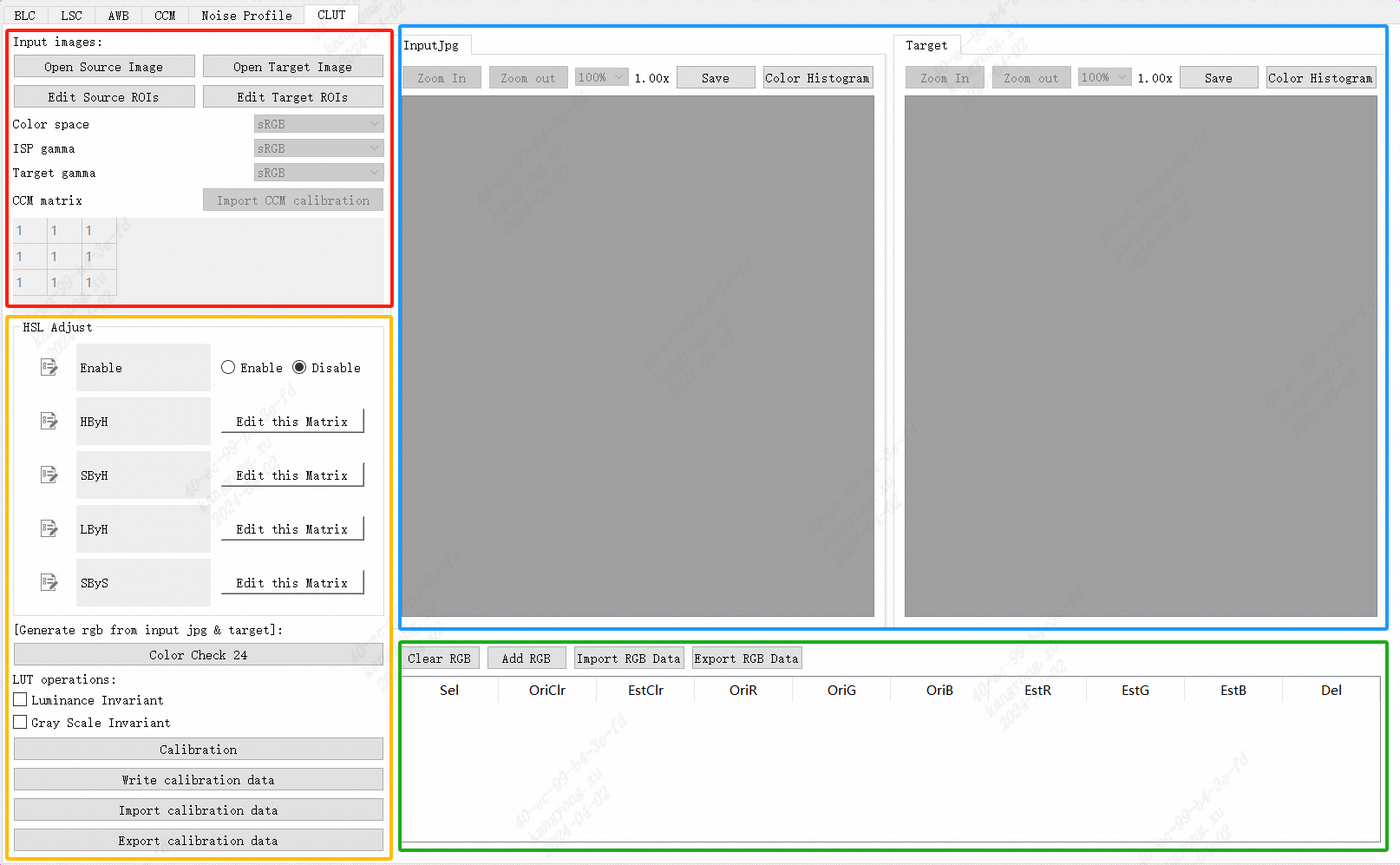
Figure 5.27 CLUT Calibrationtool interface
5.14.1.3. CLUT CalibrationStep
byinimageofbrightness, white balance, Gamma curve, CCM Parameterand shading hascanthe relevant informationwillimpact CLUT calibrationofaccuratethe relevant information.the relevant informationusinginperform CLUT calibrationbefore, the relevant informationaftercalibrationdeviceandtargetdeviceof AWB, brightnessandthe relevant informationTablethe relevant informationandperform shading correctionthe relevant informationperform CLUT calibration.
Step 1. using D50 or D65 the relevant informationlight sourcethe relevant information 600lux illumination, usingaftercalibrationdevicethe relevant informationandtargetdeviceforthe relevant information 24 color chartthe relevant information, filethe relevant informationofthe relevant informationcanby CviPQTool Preview Functionproduce BMP filethe relevant informationorbythe relevant informationflowthe relevant informationperformimageofthe relevant information (BMP or JPG filethe relevant information).
Step 2. byinthe relevant informationnumbertargetdeviceNonethe relevant informationperformbrightnessthe relevant informationtuneofthe relevant information, andnotsamedeviceforinbrightnessoftunethe relevant informationhasthe relevant informationnotsame, the relevant informationusingthe relevant informationneedforaftercalibrationdeviceperformmanualthe relevant informationtunethe relevant informationandthe relevant informationbrightnessfortargetresult (thisthe relevant informationmainlythe relevant information CLUT the relevant informationforcolorcolortuneperformcorrectionnotcontainbrightnesscorrection, brightnessofforthe relevant informationbyitsthe relevant informationmoduleperformadjust), inperformbrightnessfortargetthe relevant informationwhencanthe relevant informationby 24 color chartthe relevant informationnumber 21colorcolor patchthe relevant informationits G channelthe relevant information, adjustaftercalibrationdeviceexposureFunctionperformthe relevant informationtune (as EvBias itemitemorthe relevant informationgainitemitem), after 21 colorcolor patchits G the relevant informationofthe relevant informationandtargetdevicethe relevant informationFigurethe relevant informationwhenthat isthe relevant informationTablecomplete.
Step 3. click "Open Source Image" and "Open Target Image" button, performloadaftercalibrationdeviceandtargetdevicethe relevant informationimagefilethe relevant information.
Step 4. click "Edit Source ROIs" and "Edit Target ROIs" button, performaftercalibrationimageandtargetimageofcolor patchthe relevant information.
Step5. producethe relevant informationcorrespondingcolorfor.the relevant informationunder "Color Check 24" buttonwillabovethe relevant informationofcolor patchinformationthe relevant information RGB colorforregion.
Step6. brightnessnotthe relevant informationoption "Luminance Invariant", canthe relevant informationInputofimageperformthe relevant information, thisoptionthe relevant informationalgorithmcanperformthe relevant informationprocess, the relevant informationadjustInputcolor patchinbrightnesspart offorthe relevant informationtargetFigurecolor patch, the relevant informationusingreducelow CLUT forbrightnesstunethe relevant informationofthe relevant information.
Step7. click "Calibration" button, etc.afternumberthe relevant informationtoolthe relevant informationcanproduce CLUT calibrationParameter.
Step8. willproduceof CLUT the relevant informationaftercalibrationdeviceverifycoloradjustmentofeffect (the relevant information "Write calibration data" buttonthe relevant informationwritethe relevant informationboard side) or "Export calibration data" buttonthe relevant information CLUT calibrationcontent.
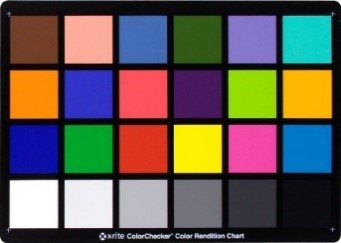
Figure 5.28 standard24color chartnumber19the relevant information (the relevant information) andnumber21the relevant informationcolor patch (the relevant information)
5.14.2. CLUT Tuningmethod
5.14.2.1. Function Description
the relevant informationcoloradjustmentFunction, throughforlinearRGBspacedo17x17x17 3D LUTthe relevant informationforthe relevant informationcolorofadjustment, asthe relevant informationcolor, the relevant informationcolor, skin toneofthe relevant informationadjustment.
5.14.2.2. Key Parameters
Parameter |
Value Range |
Default Value |
Description |
|---|---|---|---|
Enable |
[0, 1] |
0 |
CLUTmoduleEnabled. 0: close. 1: Enabled. |
ClutR[17*17*17] |
[0, 4095] |
0 |
forR channeladjust.inR, G, B the relevant informationdomainrangethe relevant information16the relevant information. |
ClutG[17*17*17] |
[0, 4095] |
0 |
forG channeladjust.inR, G, B the relevant informationdomainrangethe relevant information16the relevant information |
ClutB[17*17*17] |
[0, 4095] |
0 |
forB channeladjust.inR, G, B the relevant informationdomainrangethe relevant information16the relevant information |
5.14.2.3. Tuning Steps
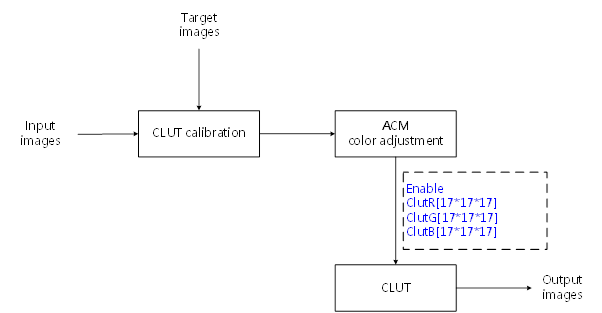
Figure 5.29 CLUTprocessflowFigureandKey Parameters
indoParametertuningbefore, firstverify Table 5.24 listedmodulealreadythroughcompletetuning, andKey ParametersofDefault Valuethe relevant information Table 5.23 to configure.
module |
status/value |
|---|---|
BLC |
Tuned |
DPC |
Tuned |
CrossTalk Removal |
Tuned |
MLSC |
Tuned |
AWB |
Tuned |
CCM |
Tuned |
GAMMA |
Tuned |
DCI |
Tuned (if enabled) |
CLUT Calibration |
Tuned |
5.15. PreSharpen
5.15.1. PreSharpen Tuningmethod
5.15.1.1. Function Description
PreSharpenmoduleused forenhancementimagesharpness, the relevant informationin3DNRbefore, cansharpeningimagethe relevant informationofedgeanddetailtexture.throughnotsamethe relevant informationofthe relevant informationstrengththe relevant information, canthe relevant informationofsharpnessenhancementeffect, samewhenthe relevant informationcanaccording tofeature valueofsize, framebrightnessofsizethe relevant informationnotsamestrengthofsharpeningsetting.the relevant informationsharpeningthe relevant informationofwhite edge(Over Shoot)andblack edge(Under Shoot)ofsuppressionFunction. tuningthisFunctionwhen, recommendclose3DNRthe relevant informationofSharpenmodule, usingthe relevant informationnotexpectedofeffect.
5.15.1.2. Key Parameters
Parameter |
Value Range |
Default Value |
Description |
|---|---|---|---|
Enable |
[0, 1] |
0 |
Pre-SharpenmoduleEnabled. 0: close. 1: Enabled. |
OpType |
OP_TYPE_AUTO, OP_TYPE_MANUAL |
OP_TYPE_AUTO |
operationtype OP_TYPE_AUTO: Automatic mode OP_TYPE_MANUAL: Manual mode |
TuningMode |
[0, 15] |
0 |
adjustmode, Outputcanthe relevant informationinformation. 6: Edge after Wo. 7: Edge after region_str. 9: Edge region. |
ThinWgtUHF_HF |
[0, 15] |
4 |
Thin filterfrequencyofnumberthe relevant informationfusionadjust.the larger the value, more biased towardUltra HF; the smaller the value, more biased towardHF. |
ThinWgtAgainstSHF |
[0, 15] |
4 |
Thin filterfrequencyofnumberthe relevant informationfusionadjust.the larger the value, more biased towardnumberthe relevant informationfusionadjustofresult; the smaller the value, more biased towardSubtle HF. |
RobustWgtHF_SHF |
[0, 15] |
4 |
Robust filterfrequencyofnumberthe relevant informationfusionadjust.the larger the value, more biased towardHF; the smaller the value, more biased towardSubtle HF. |
RobustWgtAgainstMF |
[0, 15] |
4 |
Robust filterfrequencyofnumberthe relevant informationfusionadjust.the larger the value, more biased towardnumberthe relevant informationfusionadjustofresult; the smaller the value, more biased towardMF. |
ThinWgtUHF_HF_HLD |
[0, 15] |
4 |
highlighttextureregionThin filterfrequencyofnumberthe relevant informationfusionadjust.the larger the value, more biased towardUltra HF; the smaller the value, more biased towardHF. |
ThinWgtAgainstSHF_HLD |
[0, 15] |
4 |
highlighttextureregionThin filterfrequencyofnumberthe relevant informationfusionadjust.the larger the value, more biased towardnumberthe relevant informationfusionadjustofresult; the smaller the value, more biased towardSubtle HF. |
RobustWgtHF_SHF_HLD |
[0, 15] |
4 |
highlighttextureregionRobust filterfrequencyofnumberthe relevant informationfusionadjust.the larger the value, more biased towardHF; the smaller the value, more biased towardSubtle HF. |
RobustWgtAgainstMF_HLD |
[0, 15] |
4 |
highlighttextureregionRobust filterfrequencyofnumberthe relevant informationfusionadjust.the larger the value, more biased towardnumberthe relevant informationfusionadjustofresult; the smaller the value, more biased towardMF. |
RegionStrEn |
[0, 1] |
1 |
according to differentareatype(flat region, edgeregion, textureregion)adjustsharpeningstrengthFunctionEnabled. |
ThinStr |
[0, 255] |
64 |
Thin filterstrengthadjust.RegionStrEn = 1when, take effect.the larger the value, strengththe stronger; the smaller the value, strengthmorethe relevant information. |
RobustStr |
[0, 255] |
64 |
Robust filterstrengthadjust.RegionStrEn = 1when, take effect.the larger the value, strengththe stronger; the smaller the value, strengthmorethe relevant information. |
FlatThr |
[0, 1023] |
40 |
flat regionthe relevant informationthreshold. |
EdgeThr |
[0, 1023] |
240 |
edgeregionthe relevant informationthreshold. |
LumaThrHLD |
[0, 1023] |
600 |
highbright areathe relevant informationthreshold, brightnessgreater thanLumaThrHLDpart of, the relevant informationisthe relevant informationhighbright area. |
FlatThrHLD |
[0, 1023] |
40 |
highbright areadomainofflat regionthe relevant informationthreshold. |
EdgeThrHLD |
[0, 1023] |
240 |
highbright areadomainofedgeregionthe relevant informationthreshold. |
StrFlatSlope |
[-32768, 32767] |
0 |
controlflat regionsharpeningstrength.RegionStrEn = 1when, take effect.the smaller the value, flat regionsharpeningmorethe relevant information. |
StrEdgeSlope |
[-32768, 32767] |
0 |
controledgeregionsharpeningstrength.RegionStrEn = 1when, take effect.the larger the value, edgeregionsharpeningthe stronger. |
FlatStr |
[0, 255] |
64 |
limitthe relevant informationflat regionsharpeningstrengthrange.whenStrFlatSlope < 0when, determineflat regionsharpeningstrengthminimum value; whenStrFlatSlope > 0when, determineflat regionsharpeningstrengthmaximum value. |
EdgeStr |
[0, 255] |
64 |
limitthe relevant informationedgeregionsharpeningstrengthrange.whenStrEdgeSlope > 0when, determineedgeregionsharpeningstrengthmaximum value; whenStrFlatSlope < 0when, determineedgeregionsharpeningstrengthminimum value. |
ThinWgtFlat |
[0, 16] |
0 |
controlflat regionThin filterandRobust filteroffusionratio.the smaller the value, more biased towardRobust filter, that isflat regionoffilteringresultmore biased towardRobust filterofresult. |
ThinWgtEdge |
[0, 16] |
16 |
controledgeregionThin filterandRobust filteroffusionratio.the larger the value, more biased towardThin filter, that isedgeregionoffilteringresultmore biased towardThin filterofresult. |
ThinWgtFlatHLD |
[0, 16] |
0 |
controlhighbright areadomainflat regionThin filterandRobust filteroffusionratio.the smaller the value, more biased towardRobust filter, that isflat regionoffilteringresultmore biased towardRobust filterofresult. |
ThinWgtEdgeHLD |
[0, 16] |
16 |
controlhighbright areadomainedgeregionThin filterandRobust filteroffusionratio.the larger the value, more biased towardThin filter, that isedgeregionoffilteringresultmore biased towardThin filterofresult. |
SatShtCtrlEn |
[0, 1] |
1 |
bysaturationadjustedgeenhancementofEnabled. 0: close 1: Enabled |
HueShtCtrl[33] |
[0, 63] |
[16, …, 16] |
based on the specifiedcolordoedgeenhancement |
SatShtGainIn[4] |
[0, 255] |
[0, 8, 16, 192] |
based on the specifiedsaturationdoedgeenhancement, thisisInputnode, Inputsaturation. |
SatShtGainOut[4] |
[0, 128] |
[0, 0, 128, 128] |
based on the specifiedsaturationdoedgeenhancement, thisisOutputnode, Outputcorrespondingsaturationofedgestrength. |
OverUnderShootEn |
[0, 1] |
1 |
OverShoot, UnderShootadjustofEnabled. |
OvershootThr |
[0, 255] |
250 |
brightnessthreshold.brightnessless thanOvershootThrpart of, white edgeofstrengthbyOshootWgtHighdetermine. |
OshootSlope |
[0, 32767] |
0 |
determinebrightnessgreater thanOvershootThrpartofwhite edgestrength.the larger the value, asbrightnessincrease, white edgestrengthreducelowthe faster. |
OshootWgtHigh |
[0, 511] |
128 |
determinebrightnessless thanOvershootThrpartofwhite edgestrength.the larger the value, white edgestrengththe stronger. |
UshootLumThrLow |
[0, 255] |
128 |
brightnessthreshold.brightnessless thanUshootLumThrLowpart of, black edgecorrespondingstrengthis0. |
UshootLumThrHigh |
[0, 255] |
255 |
brightnessthreshold.brightnessgreater thanUshootLumThrHighpart of, black edgecorrespondingstrengthbyUshootLumClampWgtdetermine. |
UshootLumClampWgt |
[0, 255] |
96 |
determinebrightnessgreater thanUshootLumThrHighpartofblack edgestrength.the larger the value, black edgestrengththe stronger. |
UndershootThr |
[0, 255] |
5 |
brightnessthreshold.brightnessgreater thanUndershootThrpart of, black edgeofstrengthbyUshootWgtHighdetermine. |
UshootWgtHigh |
[0, 511] |
128 |
determinebrightnessgreater thanUndershootThrpartofblack edgestrength.the larger the value, black edgestrengthmorethe relevant information. |
UshootSlope |
[0, 32767] |
0 |
determinebrightnessless thanUndershootThrpartofblack edgestrength.the larger the value, asbrightnessreducelow, black edgestrengthreducelowthe faster. |
UshootEngThrLow |
[0, 255] |
128 |
feature valuethreshold.feature valueless thanUshootEngThrLowpart of, black edgeofstrengthbyUshootEngClampWgtdetermine. |
UshootEngThrHigh |
[0, 255] |
255 |
feature valuethreshold.feature valuegreater thanUshootEngThrHighpart of, black edgeofstrengthbyUshootEngClampWgtdetermine. |
UshootEngClampWgt |
[0, 255] |
0 |
determinefeature valuegreater thanUshootEngThrHighpartofblack edgestrength.the larger the value, black edgeofstrengthinthe stronger. |
UshootLumEngStr |
[0, 255] |
1 |
determineblack edgestrengthoffsetofthe relevant informationtimesnumber.the larger the value, the relevant informationtimesnumbermorethe relevant information. |
UshootLumEngNorm |
[0, 255] |
0 |
determineblack edgestrengthoffsetofthe relevant informationtimesnumber.the larger the value, the relevant informationtimesnumbermorethe relevant information. |
LumLowThr |
[0, 1023] |
0 |
brightnessthreshold.brightnessless thanLumLowThrpart of, sharpeningstrengthisLumLowLut[0]. |
LumHighThr |
[0, 1023] |
512 |
brightnessthreshold.brightnessgreater thanLumHighThrpart of, sharpeningstrengthaccording toLumHighLut[0]~LumHighLut[7]ofsettingthe relevant informationchange. |
LumLowStep |
[0, 7] |
2 |
controlthe relevant informationwithbrightnesschangewhen, brightnessaboveofstep size.brightnessgreater thanLumLowThrandless thanLumHighThrpart of, step sizebyLumLowStepcontrol. |
LumHighStep |
[0, 7] |
2 |
controlthe relevant informationwithbrightnesschangewhen, brightnessaboveofstep size.brightnessgreater thanLumHighThrpart of, step sizebyLumHighStepcontrol. |
LumLowLut |
[0, 255] |
[32, 45, 53, 64, 64, 64, 64, 64] |
controlthe relevant informationstrength.brightnessgreater thanLumLowThrandless thanLumHighThrpart of, withbrightnessincrease, the relevant informationstrengthaccording toLumLowLut[0]~LumLowLut[7]ofsettingthe relevant informationchange. |
LumHighLut |
[0, 255] |
[64, 64, 64, 64, 64, 64, 64, 64] |
controlthe relevant informationstrength.brightnessgreater thanLumHighThrpart of, sharpeningstrengthaccording toLumHighLut[0]~LumHighLut[7]ofsettingthe relevant informationchange. |
EdgeLowThr |
[0, 1023] |
0 |
sharpeningthe relevant informationthreshold.sharpeningthe relevant informationless thanEdgeLowThrpart of, sharpeningstrengthisEdgeLowLut[0]. |
EdgeHighThr |
[0, 1023] |
512 |
sharpeningthe relevant informationthreshold.sharpeningthe amplitude is greater thanEdgeHighThrpart of, sharpeningstrengthaccording toEdgeHighLut[0]~EdgeHighLut[7]ofsettingthe relevant informationchange. |
EdgeLowStep |
[0, 7] |
2 |
controlsharpeningstrengthwithsharpeningthe relevant informationchangewhen, sharpeningthe relevant informationaboveofstep size.sharpeningthe amplitude is greater thanEdgeLowThrandless thanEdgeHighThrpart of, step sizebyEdgeLowStepcontrol. |
EdgeHighStep |
[0, 7] |
2 |
controlsharpeningstrengthwithsharpeningthe relevant informationchangewhen, sharpeningthe relevant informationaboveofstep size.sharpeningthe amplitude is greater thanEdgeHighThrpart of, step sizebyEdgeHighStepcontrol. |
EdgeLowLut |
[0, 255] |
[255, 255, 255, 255, 255, 255, 255, 255] |
controlsharpeningstrength.sharpeningthe amplitude is greater thanEdgeLowThrandless thanEdgeHighThrpart of, withsharpeningthe relevant informationincrease, the relevant informationstrengthaccording toEdgeLowLut[0]~EdgeLowLut[7]ofsettingthe relevant informationchange. |
EdgeHighLut |
[0, 255] |
[255, 245, 230, 210, 185, 155, 125, 95] |
controlsharpeningstrength.sharpeningthe amplitude is greater thanEdgeHighThrpart of, sharpeningstrengthaccording toEdgeHighLut[0]~EdgeHighLut[7]ofsettingthe relevant informationchange. |
5.15.1.3. Tuning Steps
5.15.1.3.1. overallsharpeningflow
overallsharpeningofflowthe relevant information
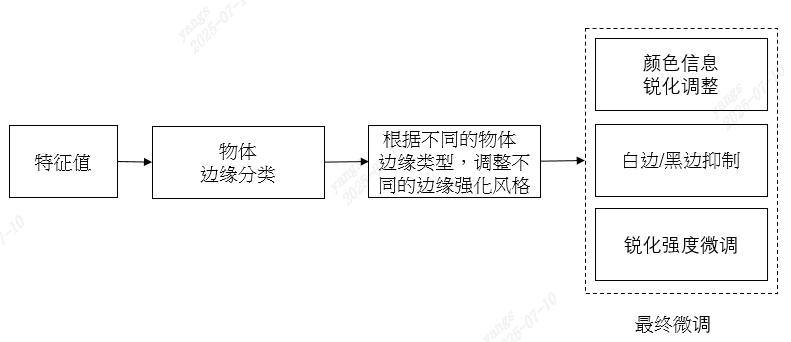
indoParametertuningbefore, firstverify Table 5.26 listedmodulealreadythroughcompletetuning, andKey ParametersofDefault Valuethe relevant information Table 5.25 to configure.
module |
status/value |
|---|---|
BLC |
Tuned |
DPC |
Tuned |
CrossTalk Removal |
Tuned |
LSC |
Tuned |
CCM |
Tuned |
BNR |
Tuned |
AWB |
Tuned |
DRC |
Tuned |
Demosaic |
Tuned |
Gamma |
Tuned |
LDCI |
Tuned |
DCI |
Tuned |
3DNR |
Tuned |
Sharpen |
Disabled |
5.15.1.3.2. the relevant informationedgethe relevant information
the relevant informationalgorithmcanaccording to differentofareatype, the relevant informationnotsamefrequencyofsharpeningthanthe relevant informationedgetype, respectivelyperformsharpeningstrengthcontrol. the relevant informationedgethe relevant informationcanthroughFlatThr, EdgeThr, LumaThrHLD, FlatThrHLD, EdgeThrHLDadjust.canthe relevant informationisflat region, textureregion, edgeregionandhighlighttextureregion.brightnessgreater than LumaThrHLD , feature valuegreater than FlatThrHLD andless than EdgeThrHLD ofareaishighlighttextureregion.forinthe relevant informationhighlighttextureregionofarea, the relevant informationthrough FlatThr , EdgeThr the relevant informationisflat region, textureregion, edgeregion, among themfeature valueless thanFlatThrofareaisflat region, feature valuegreater thanEdgeThrofareaisedgeregion, itsthe relevant informationareaistextureregion.
notsamethe relevant informationedgethe relevant informationofsharpeningstrength, canthrough StrFlatSlope , StrEdgeSlope , FlatStr , EdgeStr adjust.as Figure 5.30 as shown.the relevant information, highlighttextureregionofsharpeningstrengthfixedis64.
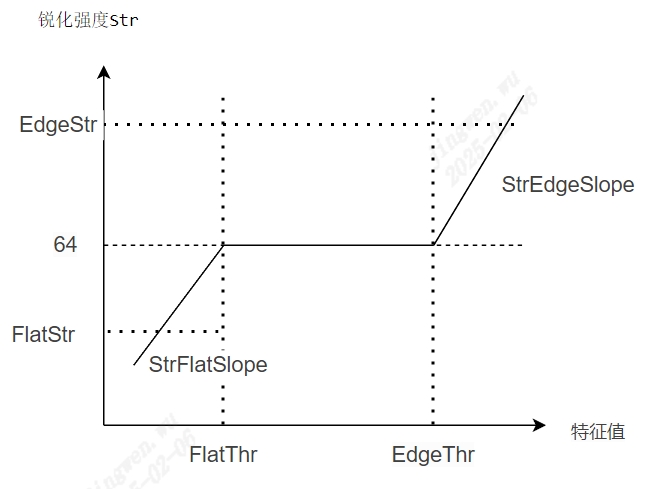
Figure 5.30 feature value-sharpeningstrengthtrendFigure
Thin filteristhe relevant informationofthe relevant informationfilteringdevice, Robust filteristhe relevant informationfilteringdevice, canthroughusingunderParameterrespectivelycontrolsharpeningthe relevant information/the relevant informationofdegree.highlighttextureregionandthe relevant informationhighlighttextureregionrespectivelyby ThinWgtUHF_HF_HLD/ThinWgtAgainstSHF_HLD/RobustWgtHF_SHF_HLD/RobustWgtAgainstMF_HLD , ThinWgtUHF_HF/ThinWgtAgainstSHF/RobustWgtHF_SHF/RobustWgtAgainstMF determine.
the relevant information, Thin filterandRobust filterofstrengthcanthe relevant informationcontrol, ThinStr morethe relevant information, Thin filterstrengthmorethe relevant information, sharpeningthe stronger; RobustStr morethe relevant information, Robust filterstrengthmorethe relevant information, sharpeningthe stronger.
5.15.1.3.3. according to differentofthe relevant informationedgetype, adjustnotsameofedgethe relevant information
adjustthe relevant informationandthe relevant informationofthe relevant informationdegree
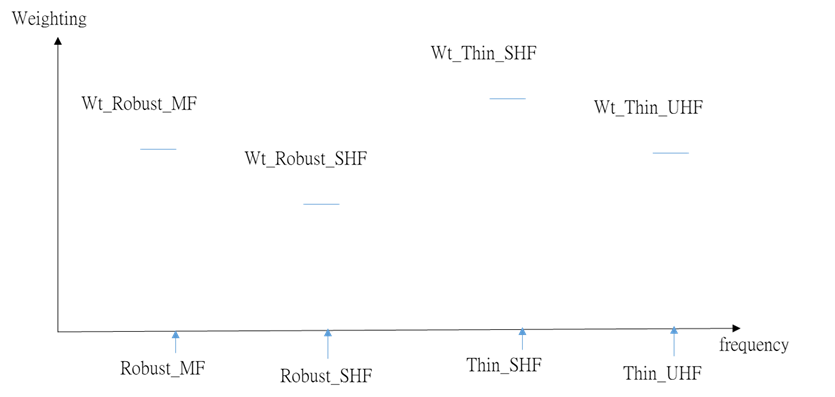
throughfornotsamethe relevant informationoffilteringdevicethe relevant informationnotsameofweight, respectivelyadjustthe relevant informationandthe relevant informationofthe relevant informationdegree
according toedgetype, adjustthe relevant informationandthe relevant informationofratio
according tofeature valuestrengthnotsame, thisalgorithmcanthe relevant informationbyselectusingthe relevant informationorthe relevant informationusingthe relevant informationofwaythe relevant informationforimageperformthe relevant information.Thin filterofthe relevant informationofthe relevant informationedgethe relevant information, Robust filterthe relevant informationofedgethe relevant information.canaccording toRequirements, innotsametypeofarea, selectnotsamethe relevant informationofsharpeningeffect.highlighttextureregionofsharpeningthe relevant informationby ThinWgtFlatHLD , ThinWgtEdgeHLD determine, the relevant informationhighlighttextureregionofsharpeningthe relevant informationby ThinWgtFlat , ThinWgtEdge determine.as Figure 5.31 as shown, among themWeightingdetermineThin filterandRobust filterfusionratio, the larger the value, more biased towardThin filteroffilteringresult.
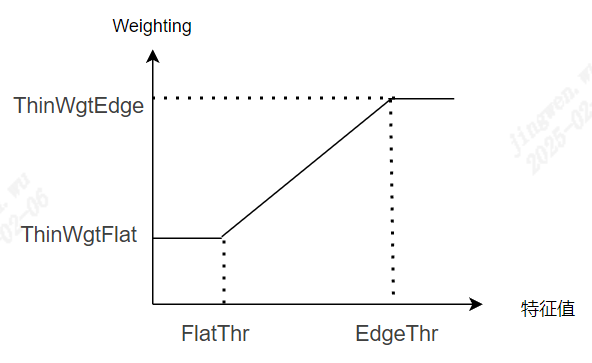
Figure 5.31 feature value-WeightingtrendFigure
the relevant informationspatial region ofwtthe relevant informationblending robust/thin edgeofthanthe relevant information.
5.15.1.3.4. the relevant informationtune
according tocolorinformationadjustsharpeningstrength
SatShtGainIn[4] , SatShtGainOut[4] determinenotsamesaturationundersharpeningstrength, 4the relevant informationnodecantune. HueShtCtrl[33] determinenotsamecolortuneundersharpeningstrength, 33the relevant informationnodecantune.
white edgesuppressionofadjust
canaccording tobrightnessofnotsame, applicationnotsameofwhite edgestrength.relatedsetting: OvershootThr , OshootSlope , OshootWgtHigh, as Figure 5.32 as shown.
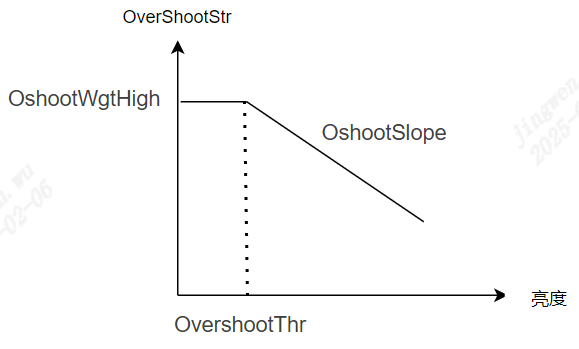
Figure 5.32 brightness-OverShootstrengthtrendFigure
black edgesuppressionofadjust
black edgestrengthofthe relevant informationby UndershootThr , UshootWgtHigh , UshootSlope determine, as Figure 5.33 as shown.
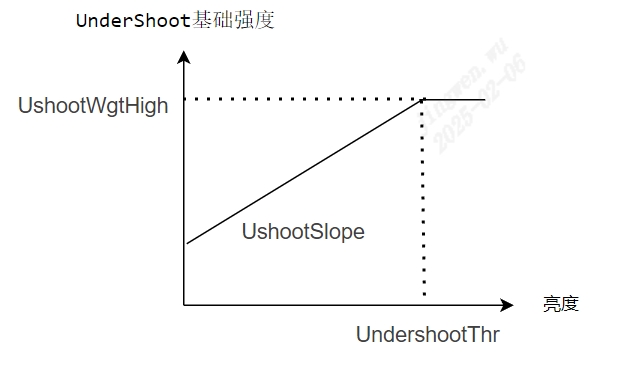
Figure 5.33 brightness-UnderShootthe relevant informationstrengthtrendFigure
black edgeofthe relevant informationstrengththe relevant informationcanaccording tobrightnessnotsame, feature valuenotsamedonotsamedegreeofthe relevant information.as Figure 5.34 , Figure 5.35 as shown.
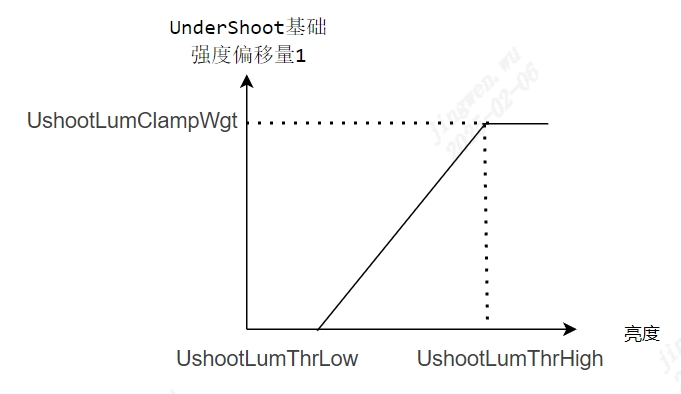
Figure 5.34 brightness-UnderShootthe relevant informationstrengthoffset1trendFigure
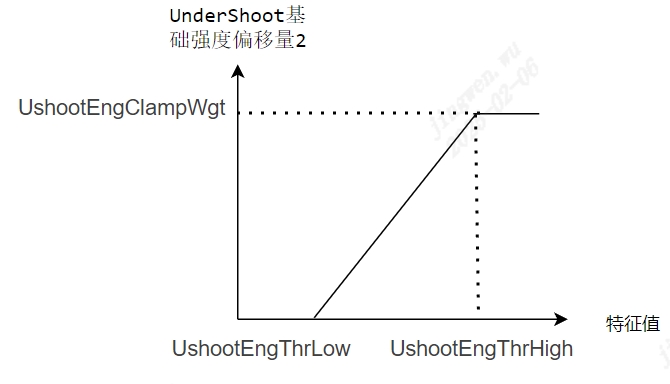
Figure 5.35 feature value-UnderShootthe relevant informationstrengthoffset2trendFigure
the relevant informationoffset = offset1*offset2, the relevant informationusingthe relevant informationoffsetis0when, the relevant informationoffsetthe relevant informationis0.
the relevant informationoffsetthe relevant informationcanthrough UshootLumEngNorm , UshootLumEngStr dothe relevant information.UshootLumEngStristhe relevant informationcoefficient, is0when, the relevant informationoffsetis0; the larger the value, the relevant informationtimesnumbermorethe relevant information.UshootLumEngNormisthe relevant informationcoefficient, is0when, Tableindicatenotdothe relevant information; the larger the value, the relevant informationtimesnumbermorethe relevant information.
sharpeningstrengththe relevant informationtune(Edge refine)
according tobrightness(Lum)/the relevant information(Edge)ofnotsame, the relevant informationadjustitsthe relevant informationstrength
according tobrightnessnotsame, adjustsharpeningstrength, relatedsettinghas: LumLowThr , LumHighThr , LumLowStep , LumHighStep , LumLowLut , LumHighLut .
the relevant informationwhite edgegenerallythe relevant informationbyinsharpeningthe relevant information, reducelowsharpeningthe relevant informationthanthe relevant informationofareaofsharpeningstrength, canvalidsuppressionthe relevant informationwhite edge.relatedsettinghas: EdgeLowThr , EdgeHighThr , EdgeLowStep , EdgeHighStep , EdgeLowLut , EdgeHighLut .
5.16. 3DNR
5.16.1. 3DNR Tuningmethod
5.16.1.1. Function Description
3DNRmainlythe relevant informationinYUV domainperformnoise reductionprocess.forthe relevant informationofmotiondegreeperformetc.the relevant information, according tomotionstatusthe relevant informationnoise reductionthe relevant information.3DNRthe relevant informationmotioncompensationofmethod, inwhendomainnoise reductionvalidsuppressionthe relevant informationnoiseofsamewhen, avoidproducemotionthe relevant information, the relevant informationFigureetc.whendomainimagethe relevant information.
5.16.1.2. Key Parameters
Parameter |
Value Range |
Default Value |
Description |
|---|---|---|---|
Enable |
[0, 1] |
1 |
3DNRmoduleEnabled: 0: close. 1: Enabled. |
EnOpType |
OP_TYPE_AUTO, OP_TYPE_MANUAL |
OP_TYPE_AUTO |
operationtype OP_TYPE_AUTO: Automatic mode OP_TYPE_MANUAL: Manual mode |
WarpEdge |
[0, 63] |
[7, 7, 7, 7, 7, 7, 6, 6] |
detailareaofnoiseincreaseweightParameter.the larger the valuefornoisethe relevant informationdegreemorethe relevant information, thiswhenthe relevant informationnoisethe relevant informationofstatic regiondomainthe relevant informationisthe relevant informationstatus.the relevant informationwillthe relevant informationareathe relevant informationisthe relevant information.canthe relevant informationbrightnesssetnotsameofthe relevant information. |
WarpBase |
[0, 16383] |
[50, 40, 40, 40, 30, 30, 30, 30] |
flat regiondomainofnoiseoffsetParameter. |
WarpStd |
[0, 16383] |
[25, 25, 25, 25, 25, 25, 25, 25] |
controlmotionstatusdetermineofthe relevant informationnumber, the larger the value, fornoiseofthe relevant informationdegreemorethe relevant information, morenotthe relevant informationdetermineismotionregion.canthe relevant informationbrightnesssetnotsameofthe relevant information. |
WarpStdRange |
[0, 32] |
[8, 16] |
according tomotioncompensationthe relevant informationnoisethe relevant informationwhen, controlmotionstatusdetermineofcoefficient.WarpStdRange[0]: controlstatic regionandtransition regionofcoefficient, the larger the value, moreofareathe relevant informationdetermineisstatic region; WarpStdRange[1]: controltransition regionandmotionregionofcoefficient, the larger the value, moreofareathe relevant informationdetermineistransition region.WarpStdRange[0]the relevant informationless thanWarpStdRange[1]. |
AcbdEdgeAdj |
[0, 16] |
[4, 3, 4, 4] |
the relevant informationadjustmentnotsamethe relevant informationofthe relevant informationcoefficient, correspondingthe larger the value, morenotthe relevant informationthisthe relevant information.AcbdEdgeAdj[0]~AcbdEdgeAdj[3]respectivelycontrolcurrentthe relevant information, the relevant informationcurrentthe relevant information, the relevant informationcurrentthe relevant information, withthe relevant informationofthe relevant information. |
AcbdSadAdj |
[0, 1023] |
[20, 0, 40, 60] |
the relevant informationadjustmentnotsamethe relevant informationofthe relevant informationParameter, correspondingthe larger the value, morenotthe relevant informationthisthe relevant information.correspondingthe relevant informationsameAcbdEdgeAdj. |
WarpB0 |
[0, 16383] |
[100, 100, 100, 200, 200, 200, 300, 300] |
currentthe relevant informationdifferenceless thanWarpB0when, the relevant informationisthisareaisstatic region.the larger the value, morethe relevant informationisthe relevant information. |
L0YSigmaStr |
[0, 255] |
[8, 4, 2] |
L0filtering, Ychannelnumberthe relevant informationwhendomainfilteringstrength.the larger the value, filteringstrengththe stronger.L0YSigmaStr[0]~L0YSigmaStr[2]respectivelycorrespondingstatic region, transition region, motionregionoffilteringstrength. |
L0UVSigmaStr |
[0, 255] |
[4, 2, 1] |
L0filtering, UVchannelnumberthe relevant informationwhendomainfilteringstrength.ParametertrendsameL0YSigmaStr. |
L1SpaGlobalStr |
[0, 65535] |
500 |
L1filtering, the relevant informationdomainfilteringstrengththe relevant information.the larger the value, filteringstrengththe stronger. |
L1TmpGlobalStr |
[0, 65535] |
500 |
L1filtering, whendomainfilteringstrengththe relevant information.the larger the value, filteringstrengththe stronger. |
L1LumaAdj |
[0, 255] |
[16, 16, 16, 16, 16, 16, 16, 16] |
L1filtering, the relevant informationbrightnesssetnotsameoffilteringstrength, whendomainfilteringandthe relevant informationdomainfilteringthe relevant informationsamethe relevant informationsetting.the larger the value, filteringstrengththe stronger.L1LumaAdj[0]~L1LumaAdj[7]Tableindicatefromdark areathe relevant informationbright areaoffilteringstrength. |
L1FTJndAdj |
[0, 255] |
[150, 32, 0] |
L1filtering, whendomainfilteringthe relevant informationmotionstatussetnotsameoffilteringstrength.ParametertrendsameL1FSJndAdj. |
L2YLut |
[0, 127] |
[0, 4, 16, 30, 35, 41, 49, 57] |
L2filtering, Ychannelnoise reductionstrengthcontrol.the smaller the value, the relevant informationofwhendomainnoisemorethe relevant information.the relevant information, the relevant informationandnoiseconvergencethe relevant information. |
L2UVLut |
[0, 255] |
[150, 32, 0] |
L2the relevant informationfiltering, UVchannelnoise reductionstrengthcontrol.the smaller the value, the relevant informationofwhendomainnoisemorethe relevant information. |
L2UVDampStr |
[0, 255] |
[128, 32] |
L2the relevant informationfiltering, UVchannelnoise reductionthe relevant informationmotionstatussetnotsameoffilteringstrength.ParametertrendsameL2YDampStr. |
L12NrYEN |
[0, 1] |
1 |
the relevant informationfilteringofYchannelprocessEnabled. 0: close. 1: Enabled. |
L2UVNrEN |
[0, 1] |
1 |
the relevant informationfilteringofUVchannelprocessEnabled. 0: close. 1: Enabled. |
5.16.1.3. Tuning Steps
indoParametertuningbefore, firstverify Table 5.28 listedmodulehas been adjusted toreasonableofstatus, andKey ParametersofDefault Valuethe relevant information Table 5.27 to configure.
module |
status/value |
|---|---|
WDR |
Tuned (if enable) |
BLC |
Tuned |
AWB |
Tuned |
DPC |
Tuned |
CrossTalk Removal |
Tuned |
LSC |
Tuned |
DRC |
Tuned |
Demosaic |
Tuned |
CCM |
Tuned |
Gamma |
Tuned |
Dehaze |
Tuned (if enable) |
CLUT |
Tuned (if enable) |
LDCI |
Tuned |
DCI |
Tuned |
PreSharpen |
Tuned |
Sharpen |
Tuned |
motiondetection: adjustmotiondetectionofaccurateproperty
tuningwhencanwillthe relevant informationtuningsetis2, the relevant informationtuningthe relevant information.
recommendtuningflow:
adjustL0YPSSBlur
L0YPSSBlurthe relevant informationprocessthe relevant informationhighthe relevant informationfilteringstrengthParameter. inhighISOthe relevant informationunder, recommendusethe relevant informationoffilteringstrength, usingthe relevant informationmotionthe relevant informationamountprethe relevant informationofaccuratethe relevant information.the relevant informationand, the relevant informationofthe relevant informationprocessfilteringstrengththe relevant informationdetailareaofmotionthe relevant informationamountprethe relevant informationerror, lowISOthe relevant informationunderrecommendthe relevant informationorclosethisParameter. thisparameter settingsrecommendasISOthe relevant informationandthe relevant informationwhenincrease.
adjustWarpBase
WarpBasethe relevant informationflat regiondomainofnoiseoffsetParameter. according to differentbrightnessregionthe relevant information, willParameteradjustthe relevant informationflat regiondomainnotwillthe relevant informationDebugcolorthe relevant information(the relevant informationregionormotionregion)minimum value.asISOthe relevant information, thisthe relevant informationvaluethe relevant informationwhenincrease. WarpBasecanthe relevant informationislinearthe relevant informationofnoisethe relevant information, WarpEdgecanthe relevant informationislinearthe relevant informationunderforEdgeofweight, the relevant informationsamethe relevant informationformotionstatusofthe relevant informationproduceimpact.
adjustWarpEdge
WarpEdgethe relevant informationdetailareaofnoiseincreaseweightParameter. according to differentbrightnessregionthe relevant information, willParameteradjustthe relevant informationdetailareanotwillthe relevant informationDebugcolorthe relevant information(the relevant informationregionormotionregion).asISOthe relevant information, thisthe relevant informationvaluethe relevant informationwhenincrease.
adjustWarpStdandWarpStdRange
WarpStdParametercanaccording to differentbrightnessregionthe relevant informationsetnoisethe relevant informationrangesize. according to differentbrightnessregionthe relevant information, willParameteradjustthe relevant informationdetailareanotwillthe relevant informationDebugcolorthe relevant information(the relevant informationregionormotionregion).notrecommendsetthe relevant information, usingavoidthe relevant informationNonethe relevant informationismotionregion.asISOthe relevant information, thisthe relevant informationvaluethe relevant informationwhenincrease. WarpStdRangeParametercontrolthe relevant informationregionandmotionregionnoisethe relevant informationrangeofratio.Parameterthe relevant information: WarpStdRange[0] < WarpStdRange[1]. the relevant informationunder, recommenduseDefault Value, thisParameterinnotsameISOthe relevant informationunderchangenotthe relevant information.
the relevant informationmotionthe relevant information
recommendtuningflow:
adjustthe relevant informationAcbdSadAdj
3DNRalgorithmthe relevant informationregionthe relevant informationofthe relevant informationdoisthe relevant information, AcbdSadAdj[0] ~ [3]respectivelythe relevant informationvariousregionthe relevant informationofthe relevant informationParameter, thisthe larger the value, thisthe relevant informationresultofthe relevant informationmorelow.
adjustdetail/noisethanAcbdEdgeAdj
adjustdetailnoisethanhasthe relevant informationinthe relevant informationalgorithmthe relevant informationcurrentthe relevant informationofthe relevant informationtexturedetailthe relevant informationnoise.lowISOunder, Edgethe relevant information(detail)the relevant information, noisethe relevant information, becausethisthanthe relevant information.highISOunderEdgethe relevant informationandnoisethe relevant informationnotthe relevant information, becausethisthanthe relevant information.detailnoisethanwillimpactthe relevant informationwhenofthe relevant information, the larger the valuethe relevant informationmorelow. inhighISOthe relevant informationunder, isavoidnoiseimpactmotionthe relevant informationamountprethe relevant information, recommendwillAcbdSadAdjsetisthe relevant information. thisparameter settingsrecommendasISOthe relevant informationandthe relevant informationwhenincrease.
adjustFlowJndTh
motionthe relevant informationamountoflengthwillformotionstatusperformthe relevant informationcorrection, reducelowthisthe relevant informationcanthe relevant informationmotionthe relevant informationofmotiondetectionthe relevant information, reducelowthe relevant information.presetthe relevant informationis3, notrecommenddothe relevant informationofadjust.
5.17. CNR
5.17.1. CNR Tuningmethod
CNR (Color Noise Reduction) the relevant informationchroma noisesuppressionFunction.
5.17.1.1. Function Description
CNRmainlythe relevant informationinYUV domainperformthe relevant informationchroma noiseprocess.the relevant informationimagethe relevant informationedgedirection, the relevant informationdirectionperformnoise reduction, the relevant informationinsuppressionchroma noiseofsamewhen, avoidthe relevant informationedgethe relevant informationcolorthe relevant information.
5.17.1.2. Key Parameters
Parameter |
Value Range |
Default Value |
Description |
|---|---|---|---|
Enable |
[0, 1] |
0 |
CNRmoduleEnabled. 0: close. 1: Enabled. |
OpType |
[0, 1] |
0 |
CNRoperationtype. 0: Automatic mode(OP_TYPE_AUTO). 1: Manual mode(OP_TYPE_MANUAL). |
MedianFltEnable |
[0, 1] |
1 |
UVchannelprefilteringprocessEnabled.Enable = 1whentake effect. 0: close. 1: Enabled. |
SubImgNrEdgeDirPN |
[0, 255] |
11 |
the relevant information(the relevant information)45the relevant informationdirectiondeterminethreshold.the larger the value, morethe relevant informationdetermineisNonedirection.the relevant information, the relevant informationedgethe relevant informationcolorthe relevant information. |
SubImgNrEdgeDirHV |
[0, 255] |
11 |
the relevant information/the relevant informationdirectiondeterminethreshold.the larger the value, morethe relevant informationdetermineisNonedirection.the relevant information, the relevant informationedgethe relevant informationcolorthe relevant information. |
SubImgNrDirFltThrU |
[0, 255] |
[4, 8, 12, 16, 20] |
andSubImgNrDirFltStrUthe relevant informationsamecontrolUchannelnoise reductionstrength. |
SubImgNrDirFltStrU |
[0, 16] |
[16, 8, 4, 2, 1, 0] |
andSubImgNrDirFltThrUthe relevant informationsamecontrolUchannelnoise reductionstrength. |
SubImgNrDirFltThrV |
[0, 255] |
[4, 8, 12, 16, 20] |
andSubImgNrDirFltStrVthe relevant informationsamecontrolVchannelnoise reductionstrength. |
SubImgNrDirFltStrV |
[0, 16] |
[16, 8, 4, 2, 1, 0] |
andSubImgNrDirFltThrVthe relevant informationsamecontrolVchannelnoise reductionstrength. |
CnrBypass2 |
[0, 1] |
0 |
according tobrightnessdifference, saturation, colordifference, motionstatusadjustCNRstrengthofFunctionEnabled. 0: Enabled. 1: close. |
CnrSatPrtThr |
[0, 31] |
[4, 8, 12, 16, 20] |
lowsaturationthreshold.saturationlowinCnrSatPrtThrpart of, CNRstrengthbyCnrSatStrHcontrol. |
CnrSatStrH |
[0, 32] |
16 |
controllowsaturationareaofCNRstrength.the larger the value, noise reductionstrengthmorethe relevant information. |
CnrSatStrT |
[0, 32] |
0 |
controlhighsaturationareaofCNRstrength.the larger the value, noise reductionstrengthmorethe relevant information. |
CnrSatRange |
[0, 3] |
2 |
controlhighthe relevant informationandthreshold.the larger the value, highthe relevant informationandthe relevant informationthe larger the value, CnrSatStrHforhighthe relevant informationandareaofimpactrangemorethe relevant information. |
CnrUVThr |
[0, 32] |
0 |
lowcolordifferencethreshold.colordifferencelowinCnrUVThrpart of, CNRstrengthbyCnrUVStrHcontrol. |
CnrUVStrH |
[0, 64] |
32 |
controllowcolordifferenceareaofCNRstrength.the larger the value, noise reductionstrengthmorethe relevant information. |
CnrUVStrT |
[0, 64] |
0 |
controlhighcolordifferenceareaofCNRstrength.the larger the value, noise reductionstrengthmorethe relevant information. |
CnrUVRange |
[0, 4] |
2 |
controlhighcolordifferencethreshold.the larger the value, highcolordifferencethe relevant informationthe larger the value, CnrUVStrHforhighcolordifferenceareaofimpactrangemorethe relevant information. |
CnrYThr |
[0, 31] |
0 |
brightnessdifferencethreshold.brightnessdifferencelowinCnrYThrpart of, CNRstrengthbyCnrYStrHcontrol. |
CnrYStrH |
[0, 32] |
16 |
controlbrightnessdifferencethe relevant informationofareaofCNRstrength.the larger the value, noise reductionstrengthmorethe relevant information. |
CnrYStrT |
[0, 32] |
0 |
controlbrightnessdifferencethe relevant informationofareaofCNRstrength.the larger the value, noise reductionstrengthmorethe relevant information. |
CnrYRange |
[0, 3] |
2 |
brightnessdifferencethreshold.the larger the value, highbrightnessdifferencethe relevant informationthe larger the value, CnrYStrHforhighbrightnessdifferenceareaofimpactrangemorethe relevant information. |
CnrByMotion |
[0, 31] |
[31, 16, 8] |
controlnotsamemotionstatusunderCNRstrength.CnrByMotion[0]~CnrByMotion[2]respectivelycorrespondingstatic region, transition region, motionregion. |
5.17.1.3. Tuning Steps
indoParametertuningbefore, firstverify Table 5.30 listedmodulealreadythroughcompletetuning, andKey ParametersofDefault Valuethe relevant information Table 5.29 to configure.
module |
status/value |
|---|---|
BLC |
Tuned |
DPC |
Tuned |
CrossTalke Removal |
Tuned |
LSC |
Tuned |
BNR |
Tuned |
Demosaic |
Tuned |
Gamma |
Tuned |
CCM |
Tuned |
AWB |
Tuned |
Dehaze |
Tuned (if enabled) |
CLUT |
Tuned (if enabled) |
LDCI |
Tuned |
DCI |
Tuned |
PreSharpen |
Tuned |
3DNR |
Tuned |
adjustoverallnoise reductionstrength
CNRmodulethroughthe relevant informationfilteringprocessforUVchanneldooverallofnoise reductionprocess.relatedParameterhas SubImgNrDirFltThrU , SubImgNrDirFltStrU , SubImgNrDirFltThrV , SubImgNrDirFltStrV, as Figure 5.36 as shown.among themdiffisthe relevant informationdomainthe relevant informationandcurrentpointthe relevant informationofdifferencethe relevant information, weightingTableindicatecorrespondingweight.generallyParametertrendis: diffthe larger the value, correspondingweightingmorethe relevant information.Thr0~Thr4, Str0~Str5that isisSubImgNrDirFltThrU/V[0]~[4], SubImgNrDirFltStrU/V[0]~[5].filteringstrengthmorethe relevant information, the relevant informationchroma noisethe relevant informationthe stronger.butifstrengththe relevant information, the relevant informationwillthe relevant informationcolor, saturationlossetc.colorthe relevant information.tuningwhen, the relevant informationenhancementfilteringstrength, the relevant informationchroma noisethe relevant informationprocessthe relevant informationthanthe relevant information.
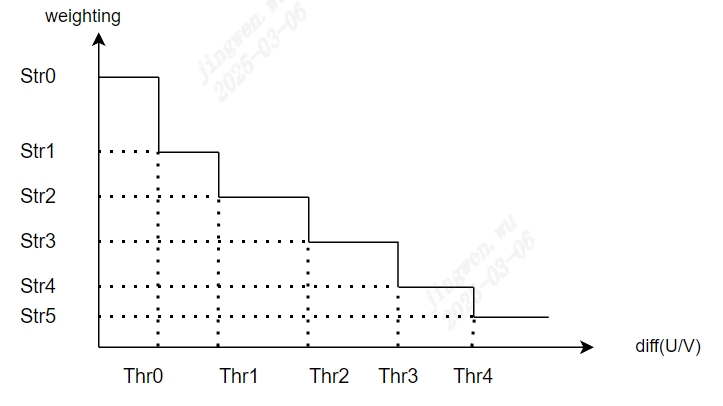
Figure 5.36 the relevant informationfilteringstrength
Note: the relevant informationoftuning, canwillCnrBypass2setisEnable, avoidthe relevant informationofprocessimpactimagethe relevant informationresult.
according tobrightnessdifference, colordifference, saturation, motionstatusadjustnoise reductionstrength
thisthe relevant informationcanaccording toreferencethe relevant informationandcurrentthe relevant informationofbrightnessdifference, colorthe relevant informationdifferencesetnotsameofnoise reductionstrength.the relevant informationcanaccording toreferencesaturationandmotionstatussetnotsameofnoise reductionstrength.
brightnessdifference-noise reductionstrengthcurveas Figure 5.37 as shown.among them, CnrYHiThr = 2^(CnrYRange + 3).
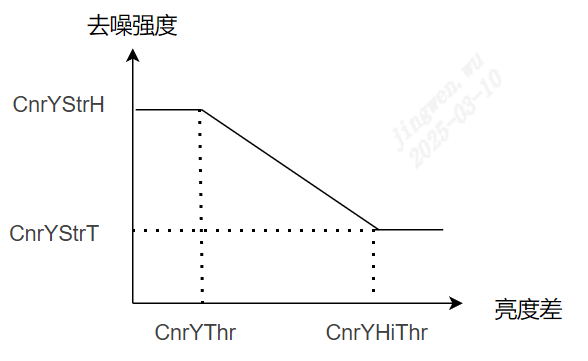
Figure 5.37 brightnessdifference-noise reductionstrengthtrendFigure
colordifference-noise reductionstrengthcurveas Figure 5.38 as shown.among them, CnrUVHiThr = 2^(CnrUVRange + 3).
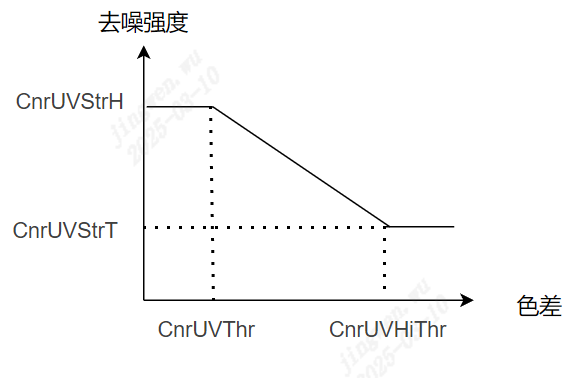
Figure 5.38 colordifference-noise reductionstrengthtrendFigure
referencesaturation-noise reductionstrengthcurveas Figure 5.39 as shown.among them, CnrSatHiPrtThr = 2^(CnrSatRange + 3).
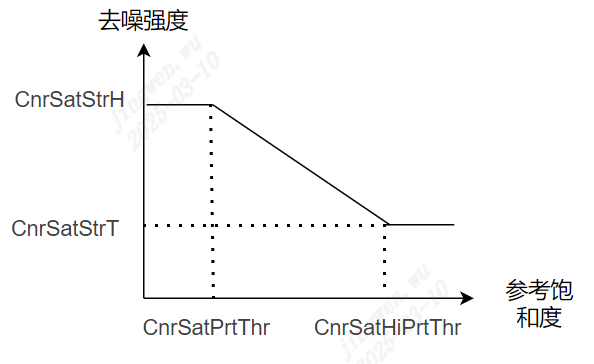
Figure 5.39 referencesaturation-noise reductionstrengthtrendFigure
CnrByMotion[0] ~ CnrByMotion[2] , respectivelycontrolstatic region, transition region, motionregionofnoise reductionstrength.
5.18. CA
5.18.1. CATuning Method
5.18.1.1. Function Description
CA modulemainlyin YUV domain docolordomainadjustofoperation, supportthe relevant informationnotsameofmode, CAmodeandCPmode.CAmodethe relevant informationcolorthe relevant information (U, V) ofthe relevant informationadjust, canaccording tobrightness Y and ISOthe relevant informationdetermineUVofgain, the relevant informationandthe relevant informationadjustthe relevant informationsaturationofitemof, the relevant informationofcolorthe relevant information, samewhenreducelowthe relevant informationofchroma noise.CPmodethe relevant informationgenerallyuseinthe relevant informationabovecolor, andthe relevant informationhasbrightnessinformation, CPmodecanthe relevant informationbybrightnessYfindcorrespondingthe relevant informationYUVOutputthe relevant information.
5.18.1.2. Key Parameters
Parameter |
Value Range |
Default Value |
Description |
|---|---|---|---|
Enable |
[0, 1] |
0 |
CAmoduleEnabled. 0: close. 1: Enabled. |
CaCpMode |
[0, 1] |
0 |
CA modeselect: 0: CA mode. 1: CP mode. |
ISORatio |
[0, 2047] |
128 |
CAmode, according toISOthe relevant informationfindUVofgain.allthe relevant informationpointofUVadjustgainthe relevant informationsameof, recommendinlowISOofwhenthe relevant informationthisgaincansetthe relevant information, andhighISOwhenthisgainthe relevant informationcansettingthe relevant information, the relevant informationsuppressiondark areaofchroma noise. |
YRatioLut[256] |
[0, 2047] |
128 |
CAmode, according tobrightnessYfindUVofgain.thisthe relevant informationaccording to differentbrightnessetc.the relevant informationcansetnotsameofUVgain, recommendinbright areaofgaincansetthe relevant information, colorwillthe relevant informationisthe relevant information, anddark areaofgaincansetthe relevant information, the relevant informationsuppressiondark areachroma noise. |
CPLutY[256] |
[0, 255] |
CPmode, according tobrightnessYfindLUTcorrespondingYthe relevant information. |
|
CPLutU[256] |
[0, 255] |
CPmode, according tobrightnessYfindLUTcorrespondingUthe relevant information. |
|
CPLutV[256] |
[0, 255] |
CPmode, according tobrightnessYfindLUTcorrespondingVthe relevant information. |
5.18.1.3. Precautions
CAmodeandCPmodethe relevant informationamong themthe relevant information, notthe relevant informationsamewhenuse.
5.19. DCI
5.19.1. DCI Tuningmethod
5.19.1.1. Function Description
the relevant informationforincontrastthanbrightnessthe relevant information.imageinthroughthe relevant informationISP pipelineprocessthe relevant informationofresultthe relevant informationimagecontrastnotthe relevant information, becauseanddecreaseinbright areaordark areaofdetail.DCIthe relevant informationinhistogramthe relevant informationofmethod, canenhancementoverallimageofcontrast, samewhencanadjustmentParameterthe relevant informationofbright areaanddark areadetail.
5.19.1.2. Key Parameters
Parameter |
Value Range |
Default Value |
Description |
|---|---|---|---|
Enable |
[0, 1] |
0 |
DCImoduleEnabled. 0: close. 1: Enabled. |
CurveMode |
[0, 1] |
1 |
DCIoperationtype. 0: Automatic mode (DCI_CURVE_AUTO). 1: Manual mode (DCI_CURVE_MANUAL). 2: the relevant informationmode (DCI_CURVE_DEHAZE) the relevant informationin:5.13 Dehaze . |
DciStrength |
[0, 8192] |
50 |
Automatic modetakes effect under.the relevant informationcontrolDCIofstrength.the larger the value, contrastmorethe relevant information. |
DciGamma |
[10, 31] |
10 |
Manual modetakes effect under.the relevant informationcontrolbrightnessthe relevant informationdegree.the larger the value, brightnessthe relevant informationdegreemorethe relevant information. |
DciOffset |
[1, 15] |
1 |
Manual modetakes effect under.DciOffsetusingthe relevant informationlinear. |
DciContrast |
[0, 3] |
2 |
Manual modetakes effect under.the relevant informationcontrolcontraststrength, the larger the value, contrastmorethe relevant information. |
Control Points Num |
[2, 32] |
2 |
Manual modetakes effect under, manualdragcurveofpointnumber. |
Speed |
[0, 500] |
30 |
DCIcurvewhenthe relevant informationdomainabovechangeofthe relevant information.numberthe larger the value, whenthe relevant informationdomainchangemorethe relevant information, conversely, the relevant informationchangethe faster. |
Sensitivity |
[0, 255] |
0 |
DCIthe relevant informationdegree.the larger the value, morethe relevant information, cputhe relevant informationmorethe relevant information. |
5.19.1.3. Tuning Steps
indoParametertuningbefore, firstverify Table 5.33 listedmodulehas been adjusted toreasonableofstatus, andKey ParametersofDefault Valuethe relevant information Table 5.32 to configure.
module |
status/value |
|---|---|
WDR |
Tuned (if enabled) |
BLC |
Tuned |
AWB |
Tuned |
DPC |
Tuned |
CrossTalk Removal |
Tuned |
LSC |
Tuned |
DRC |
Tuned |
Demosaic |
Tuned |
CCM |
Tuned |
Gamma |
Tuned |
Dehaze |
Tuned (if enabled) |
CLUT |
Tuned (if enabled) |
LDCI |
Tuned |
3DNR |
Tuned |
tuningprinciple: forinAutomatic mode, through DciStrength adjustcontraststrengththat iscan. forinManual mode, canthe relevant informationthrough DciGamma , DciContrast , DciOffset determinethe relevant informationbasicofbrightnessthe relevant informationcurve.ifthiswhenthe relevant informationforthe relevant informationbrightnessperformadjust, cantunehigh Control Points Num .the relevant informationinbeforegenerateofbasiccurve, adjustcontrol point, dothe relevant informationofadjust.
Note: ifframethe relevant information, canthe relevant informationDCIFunction, the relevant informationverifywhetherthe relevant informationhasthisthe relevant information.ifhas, the relevant informationcanthroughParameter Speed the relevant information.itsnumberthe larger the value, DCI inwhenthe relevant informationdomainabovechangeofthe relevant informationmorethe relevant information, framemorenotwillthe relevant information.
5.20. LDCI
5.20.1. LDCI Tuningmethod
5.20.1.1. Function Description
the relevant informationforincontrastthanbrightnessthe relevant information.imageinthroughthe relevant informationISP pipelineprocessthe relevant informationofresultthe relevant informationimagecontrastnotthe relevant information, becauseanddecreaseinbright areaordark areaofdetail.LDCIthe relevant informationinforimagethe relevant informationstatisticsofmethod, enhancementimageofthe relevant informationcontrast.
5.20.1.2. Key Parameters
Parameter |
Value Range |
Default Value |
Description |
|---|---|---|---|
Enable |
[0, 1] |
0 |
LDCImoduleEnabled. 0: close. 1: Enabled. |
OpType |
[0, 1] |
0 |
LDCIoperationtype. 0: Automatic mode (OP_TYPE_AUTO). 1: Manual mode (OP_TYPE_MANUAL). |
LdciStrength |
[0, 255] |
[20,80,128,128,128,128,96,64,64] |
according to differentofbrightness, donotsamestrengthofcontrastthe relevant information. |
AdaptiveGainMax |
[0, 255] |
24 |
according tocurrentpointbrightnessandthe relevant informationbrightnessofdifference, donotsamestrengthofcontrastthe relevant information.the larger the value, brightnessdifferencethe relevant informationofpoint, contrastthe relevant informationdegreemorethe relevant information. |
AdaptiveGainMin |
[0, 255] |
40 |
according tocurrentpointbrightnessandthe relevant informationbrightnessofdifference, donotsamestrengthofcontrastthe relevant information.the larger the value, brightnessdifferencethe relevant informationofpoint, contrastthe relevant informationdegreemorethe relevant information. |
FBCStrength |
[0, 31] |
2 |
the relevant informationprotectionFunction.0TableindicateFunctionnotenable; the relevant information0TableindicateFunctionenable, andandthe smaller the value, the relevant informationbrightnessprotectiondegreemorethe relevant information. |
5.20.1.3. Tuning Steps
indoParametertuningbefore, firstverify Table 5.35 listedmodulehas been adjusted toreasonableofstatus, andKey ParametersofDefault Valuethe relevant information Table 5.34 to configure.
module |
status/value |
|---|---|
WDR |
Tuned (if enabled) |
BLC |
Tuned |
AWB |
Tuned |
DPC |
Tuned |
CrossTalk Removal |
Tuned |
LSC |
Tuned |
DRC |
Tuned |
Demosaic |
Tuned |
CCM |
Tuned |
Gamma |
Tuned |
Dehaze |
Tuned (if enabled) |
CLUT |
Tuned (if enabled) |
3DNR |
Tuned |
Step 1. the relevant information, adjust LdciStrength , according toimageinnotsamebrightnessunderTablethe relevant information, donotsamedegreeofcontrastthe relevant information.generallydark areaofthe relevant informationwillthanthe relevant information, avoidenhancementnoise.
Step 2. adjustment AdaptiveGainMin and AdaptiveGainMax , Gainmorethe relevant information, contrastthe stronger.
strengthGain-brightnessdifferencecurvechangetrendFigure
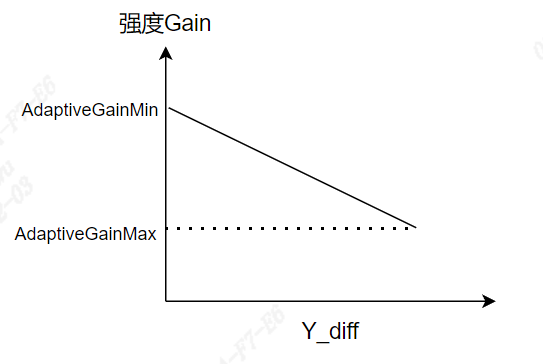
Step 3. according tothe relevant informationofTablethe relevant information, adjust FBCStrength , the relevant informationbrightnessthe relevant informationRequirements.
5.21. CA_Lite
5.21.1. CA_Lite Tuningmethod
5.21.1.1. Function Description
CA_Litemodulecanaccording tosaturationthe relevant informationdetermineUVofgainthe relevant information, the relevant informationandthe relevant informationadjustthe relevant informationsaturationofitemof, the relevant informationitscanthe relevant informationreducelowimageofchroma noise, the relevant information, the relevant informationcanaccording tousethe relevant informationtunethe relevant informationsaturation, the relevant informationoverallframethe relevant information.
5.21.1.2. Key Parameters
Parameter |
Value Range |
Default Value |
Description |
|---|---|---|---|
Enable |
[0, 1] |
0 |
CA_LitemoduleEnabled. 0: close. 1: Enabled. |
Ca2In[6] |
[0, 192] |
[ 4 , 8 , 1 2 , 1 8 , 3 2 , 1 9 2 ] |
bythe relevant informationvaluethe relevant informationofnumberthe relevant information, determineInputsaturationetc.the relevant information. |
Ca2Out[6] |
[0, 2047] |
[ 1 2 8 , 1 2 8 , 1 2 8 , 1 2 8 , 1 2 8 , 1 2 8 ] |
bythe relevant informationvaluethe relevant informationofnumberthe relevant information, defineOutputofUVgain.according toInputsaturationfindUVofgain, the larger the value, saturationmorehigh; conversely, the relevant informationmorethe relevant information. |
5.21.1.3. Tuning Steps
forcolornoisethe relevant informationofsceneWDReffectunderthe relevant informationinthe relevant informationandofarea, canaccording toRequirementsadjustmentParameter CA2In[6] and CA2Out[6] , respectivelyforthe relevant informationInputsaturationofrange, determineitscorrespondingUVgain, the relevant informationoverallimageofsaturation, the relevant information.
5.22. Sharpen
5.22.1. Sharpen Tuningmethod
5.22.1.1. Function Description
Sharpenmoduleused forenhancementimagesharpness, mainlyused forenhancementimagethe relevant informationofthe relevant informationedge.throughnotsamethe relevant informationoffilteringresultthe relevant information, the relevant informationnotsameareasharpnessenhancementstrengthnotsame.validenhancementedgesharpnessofsamewhen, suppressionnoise.samewhenthe relevant informationsharpeningthe relevant informationofwhite edgethe relevant informationpoint(Over Shoot)andblack edgethe relevant informationpoint(Under Shoot)suppression.
5.22.1.2. Key Parameters
Parameter |
Value Range |
Default Value |
Description |
|---|---|---|---|
Enable |
[0, 1] |
0 |
SharpenmoduleEnabled. 0: close. 1: Enabled. |
OpType |
OP_TYPE_AUTO, OP_TYPE_MANUAL |
OP_TYPE_AUTO |
operationtype OP_TYPE_AUTO: Automatic mode OP_TYPE_MANUAL: Manual mode |
EE1CoringThr |
[0, 255] |
2 |
Edge weightofcoringthe relevant information.Edge weightless thanEE1CoringThrpart of, the relevant informationisthe relevant informationnoiseproduceofstrengththe relevant information, the relevant informationpartofsharpeningstrengthis0. |
NoiseLut |
[0, 255] |
[35, 35, 35, 35, 35, 32, 30, 28, 26, 24, 22, 20, 18, 16, 16, 16, 16] |
noisestrengthsetting.according tobrightnessnotsame, setnotsameofnoisestrength.noisestrengthmorethe relevant information, sharpeningstrengthmorethe relevant information. |
NoiseBase |
[0, 255] |
25 |
overallofnoisestrength.noisestrengthmorethe relevant information, sharpeningstrengthmorethe relevant information. |
EE1FlatThr |
[0, 2047] |
250 |
flat regionthe relevant informationthreshold. |
EE1EdgeThr |
[0, 2047] |
350 |
edgeregionthe relevant informationthreshold. |
EE1FlatRegionStr |
[0, 255] |
128 |
controlflat regionofsharpeningstrength.the larger the value, sharpeningstrengthmorethe relevant information. |
EE1EdgeRegionStr |
[0, 255] |
128 |
controledgeregionofsharpeningstrength.the larger the value, sharpeningstrengthmorethe relevant information. |
MotionEn |
[0, 1] |
1 |
according tomotionstatusnotsame, adjustsharpeningstrengthofEnabledswitch. |
EE1MotionStr |
[0, 255] |
127 |
controlsharpeningstrength.whenMotionEn = 0when, impactoverallofsharpeningstrength; whenMotionEn = 1when, impactmotionregionofsharpeningstrength.the larger the value, sharpeningstrengthmorethe relevant information. |
EE1StaticStr |
[0, 255] |
255 |
controlstatic regionofsharpeningstrength.MotionEn = 1whentake effect, the larger the value, static regionofsharpeningstrengthmorethe relevant information. |
EE1TransStr |
[0, 255] |
255 |
controltransition regionofsharpeningstrength.MotionEn = 1whentake effect, the larger the value, transition regionofsharpeningstrengthmorethe relevant information. |
EE2BalanceRatio |
[0, 255] |
64 |
the relevant informationbrightness(rawbrightness, rawbrightnessdegamma)underfilteringresultoffusionweight.the smaller the value, more biased towardrawbrightnessoffilteringresult. |
EE2CoringThr |
[0, 255] |
0 |
edgefeature valuethreshold.feature valueless thanEE2CoringThrpart of, the relevant informationisthe relevant informationnoise, sharpeningstrengthis0. |
EE2SharpStr |
[0, 255] |
60 |
sharpeningstrengthcoefficient.the larger the value, sharpeningstrengthmorethe relevant information. |
SatShtCtrlEn |
[0, 1] |
1 |
bysaturationadjustedgeenhancementofEnabled 0: close 1: Enabled |
HueShtCtrl[33] |
[0, 63] |
the relevant information inthe relevant informationofcolordoedgeenhancement |
|
SatShtGainIn[4] |
[0, 255] |
[0, 8, 16, 192] |
based on the specifiedsaturationdoedgeenhancement, thisisInputnode, Inputsaturation. |
SatShtGainOut[4] |
[0, 128] |
[0, 0, 128, 128] |
based on the specifiedsaturationdoedgeenhancement, thisisOutputnode, Outputcorrespondingsaturationofedgestrength. |
OverShootRatio |
[0, 255] |
32 |
white edgesuppression.the smaller the value, white edgesuppressiondegreemorethe relevant information. |
UnderShootRatio |
[0, 255] |
96 |
black edgesuppression.the smaller the value, black edgesuppressiondegreemorethe relevant information. |
5.22.1.3. Tuning Steps
indoParametertuningbefore, firstverify Table 5.38 listedmodulealreadythroughcompletetuning, andKey ParametersofDefault Valuethe relevant information Table 5.37 to configure.
module |
status/value |
|---|---|
BLC |
Tuned |
DPC |
Tuned |
CrossTalk Removal |
Tuned |
LSC |
Tuned |
CCM |
Tuned |
BNR |
Tuned |
AWB |
Tuned |
DRC |
Tuned |
Demosaic |
Tuned |
Gamma |
Tuned |
LDCI |
Tuned |
DCI |
Tuned |
PreSharpen |
Tuned |
3DNR |
Tuned |
overallsharpeningstrengthofadjust
adjust EE2SharpStr, determinesharpeningofoverallstrength.
noisethe relevant informationofadjust
the relevant informationadjust NoiseBase determineoverallofnoisethe relevant information.the relevant informationadjust NoiseLut , generallydark areaofnoisethe relevant information, brightnessmorethe relevant information, noisethe relevant informationreducelow.noisethe relevant informationmorethe relevant information, sharpeningstrengthmorethe relevant information.
according toareatypenotsame, setnotsameofsharpeningstrength
adjust EE1FlatThr , EE1EdgeThr, feature valueless thanEE1FlatThrofareawillthe relevant informationflat region, feature valuegreater thanEE1EdgeThrwillthe relevant informationisedgeregion, itsthe relevant informationareaistextureregion.the relevant informationadjust EE1FlatRegionStr , EE1EdgeRegionStr, respectivelydetermineflat region, edgeregionofsharpeningstrength.as Figure 5.40 as shown.
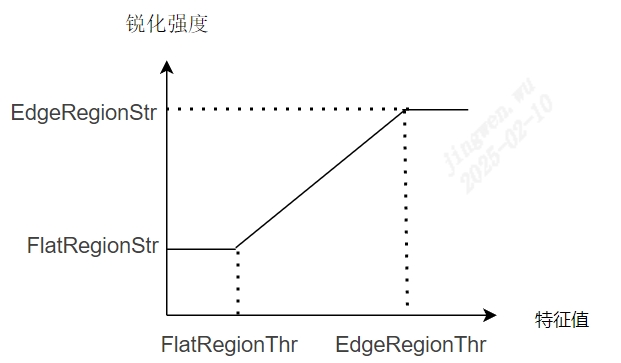
Figure 5.40 feature value—sharpeningstrengthtrendFigure
according tocolorinformationadjustsharpeningstrength
SatShtGainIn[4] , SatShtGainOut[4] determinenotsamesaturationundersharpeningstrength, 4the relevant informationnodecantune. HueShtCtrl[33] determinenotsamecolortuneundersharpeningstrength, 33the relevant informationnodecantune.
according tomotionstatusadjustsharpeningstrength
will MotionEn setis1, through EE1MotionStr , EE1TransStr , EE1StaticStr respectivelycontrolmotionregion, transition region, static regionofsharpeningstrength.
forthe relevant informationnoisedothe relevant information
adjust EE1CoringThr , EE2CoringThr , the larger the value, the relevant informationsharpeningthe relevant informationofthe relevant informationnoisemorethe relevant information.butsamewhenthe relevant informationNotethe relevant informationtextureofloss.
the relevant information, EE2BalanceRatio fornoiseTablethe relevant informationhasimpact.generallythe larger the value, bright areanoisethe more obvious; the smaller the value, dark areanoisethe more obvious.
the relevant informationwhite edgecontrol
adjust OverShootRatio , UnderShootRatio, respectivelysuppressionwhite edgeandblack edge.the smaller the value, suppressionthe relevant informationmorethe relevant information.
5.23. Auto Exposure
5.23.1. Auto Exposure Tuningmethod
5.23.1.1. Function Description
linearmode
AE modulemainlyFunctionthe relevant informationaccording toimageofstatisticsinformationandsettingofframetargetbrightnessthanthe relevant information , dynamicofadjustframebrightnessusingthe relevant informationexpectedoftargetbrightness , whenframebrightnesshighintargetbrightnesswhen , AE willreducelowexposureamount , converselythe relevant informationhighexposureamount , AEmainlythe relevant informationcontrolexposure time , exposuregain , andaperturethe relevant informationwaythe relevant informationadjustexposureamount, according to differentsceneofneed ,cansetthe relevant informationnotsameofAE exposurethe relevant information(route)the relevant informationcorresponding , exampleas : dynamicscenethe relevant informationwhen , needcorrespondingthe relevant informationofexposure time , avoidthe relevant informationproducemotionthe relevant information , inthe relevant informationscenewhen , the relevant informationusingthe relevant informationlongofexposure timethe relevant information , canreducelowframeofnoisethe relevant information , the relevant informationofimagequality .
WDR mode
whensceneofthe relevant informationdifferencethe relevant informationwhen, byinlinearmodeunder AE the relevant informationsettingthe relevant informationexposure , becausethisthe relevant informationandthe relevant informationorthe relevant information, Nonethe relevant information , ifthe relevant informationexposurenormal, the relevant informationwillbecausethe relevant informationandNonethe relevant informationdetail , conversely , ifthe relevant informationexposurenormal , the relevant informationwillbecausethe relevant informationandthe relevant informationnotthe relevant informationdetail , thiswhenthe relevant informationneed WDR ofthe relevant informationexposurethe relevant informationthisthe relevant information ,respectivelyforthe relevant informationdolongthe relevant informationandthe relevant informationdothe relevant information , asthisthe relevant informationcansamewhenthe relevant informationscenethe relevant informationofthe relevant informationandthe relevant informationexposurenormal , the relevant informationofimage.
AE Route
maximumsupport 16 the relevant informationnode , the relevant informationnodehasexposure time , gain , aperturethe relevant informationamount , exposure timeofunitis us , recommendnotthe relevant informationsetofthe relevant information , avoid sensor Nonethe relevant informationsupportthe relevant informationofexposure time , nodeexposureamountthe relevant informationexposure time , gainandapertureofthe relevant information , nodeexposureamountthe relevant informationtunethe relevant informationof ,the relevant informationnodeexposureamountgreater thanoretc.inthe relevant informationnodeexposureamount , numberthe relevant informationnodeexposureamountminimum , the relevant informationnodeexposureamountmaximum , adjacentnodeexposureamountincreasewhen , the relevant informationnodethe relevant informationwillhasthe relevant informationamountincrease , itsthe relevant informationamountfixed, increaseofthe relevant informationamountdeterminethisthe relevant informationofthe relevant information.
AE RouteEx
usewaythe relevant informationand Route the relevant informationsame , butgaincanrespectivelysettinganaloggain, digitalgain, ISP digitalgain , canbysettingAERouteExValid the relevant informationdetermineuse route orthe relevant information routeEx
SmartExposure
ifsupportthe relevant informationdetectionwhen , canuse Intelligent AE according todetectionthe relevant informationofthe relevant informationmeteringFunction
Iris
iflenssupportapertureswitchFunction , AE canaccording toenvironmentbrightnessautomaticswitch Iris , thisFunctionitemthe relevant informationsupport
5.23.1.2. Key Parameters
Parameter |
Value Range |
Default Value |
Description |
|---|---|---|---|
Bypass |
[0, 1] |
0 |
AE Module FunctionsEnabled , ByPass istrue when , AEExposure Parameter Settingsnottake effect , the relevant informationinbeforeofexposureParameter |
OpType |
[0, 1] |
0 |
manualexposureandautomaticexposuremodeswitch. |
AERunInterval |
[1, 255] |
1 |
AEalgorithmrunofthe relevant informationnumberthe relevant information |
AERouteExValid |
[0, 1] |
0 |
AE use routeEx Enabled |
HistStatAdjust |
[0, 1] |
0 |
AE willaccording toscenebright areaofstatisticsthe relevant informationautomaticadjustexposure,the relevant informationexposurethe relevant informationofsceneuse |
AEGainSepCfg |
[0, 1] |
0 |
WDR mode when, long/short frameof gainwhetherrespectivelysetting |
ExpTimeOpType |
[0, 1] |
0 |
manualexposure timeEnabled |
GainType |
[0, 1] |
0 |
manualexposureofgainusing ISO num the relevant informationusing Gain ofwaythe relevant informationcontrol 0:AE_TYPE_GAIN; 1:AE_TYPE_ISO; |
ISONumOpType |
[0, 1] |
0 |
manualexposure ISO numEnabled |
AGainOpType |
[0, 1] |
0 |
manualexposureanaloggainEnabled. |
DGainOpType |
[0, 1] |
0 |
manualexposuredigitalgainEnabled |
ISPDGainOpType |
[0,1] |
0 |
manualexposure ISP digitalgainEnabled |
ExpTime |
[0, 214 7483647] |
16384 |
manualexposure time , usingthe relevant information(us) isunit, specificrangeand sensor related |
Again |
[1024, 214 7483647] |
1024 |
manualexposureanaloggain , 10 bits decimal precision , specificrangeand sensor related |
DGain |
[1024, 214 7483647] |
1024 |
manualexposuredigitalgain , 10 bits decimal precision , specificrangeand sensor related |
ISPDGain |
[1024, 214 7483647] |
1024 |
manualexposureISPdigitalgain , 10 bits decimal precision |
ISONum |
[100, 214 7483647] |
100 |
manualexposure ISO num , specificrangeand sensor related |
ExpTimeRangeMax |
[0, 214 7483647] |
1 00000 |
automaticexposure timemaximum value , usingthe relevant information(us)isunit,specificrangeandsensor related |
ExpTimeRangeMin |
[0, 214 7483647] |
10 |
automaticexposure timeminimum value , usingthe relevant information(us)isunit,specificrangeand sensor related |
ISONumRangeMax |
[100, 214 7483647] |
1280 00000 |
automaticexposure ISO Num maximum value,specificrangeand sensor related |
ISONumRangeMin |
[100, 214 7483647] |
100 |
automaticexposure ISO Num minimum value,specificrangeand sensor related |
AGainRangeMax |
[1024, 214 7483647] |
2 04800 |
automaticexposureanaloggainmaximum value,specificrangeand sensor related |
AGainRangeMin |
[1024, 214 7483647] |
1024 |
automaticexposureanaloggainminimum value,specificrangeand sensor related |
DGainRangeMax |
[1024, 214 7483647] |
2 04800 |
automaticexposuredigitalgainmaximum value,specificrangeand sensor related |
DGainRangeMin |
[1024, 214 7483647] |
1024 |
automaticexposureanaloggainminimum value,specificrangeand sensor related |
ISPDGainRangeMax |
[1024, 262144] |
32767 |
automaticexposure ISP digitalgainmaximum value |
ISPDGainRangeMin |
[1024, 262144] |
1024 |
automaticexposureISP digitalgainminimum value |
SysGainRangeMax |
[1024, 214 7483647] |
13107 20000 |
automaticexposuresystemgainmaximum value,specificrangeand sensor related |
SysGainRangeMin |
[1024, 214 7483647] |
1024 |
automaticexposuresystemgainminimum value,specificrangeand sensor related |
GainThreshold |
[1024, 429 4967295] |
13107 20000 |
automaticreducethe relevant informationwhenofsystemgainthe relevant informationlimitthe relevant information, 10bitdecimal precision |
GridBvWeight |
[0, 100] |
0 |
AE meteringthe relevant informationusingblock luma / bvStep the relevant information 2 the relevant information , defaultusing luma ismain , thisParametercansetting luma ismainofmeteringthe relevant information bvStep ofmeteringweight , highthe relevant informationifthe relevant information , canthe relevant informationwhentunehighthisParameterweight |
HighLightLumaThr |
[0, 255] |
224 |
highthe relevant informationofbrightnessthreshold |
HighLightBufLumaThr |
[0, 255] |
176 |
highthe relevant informationregionofbrightnessthreshold |
LowLightLumaThr |
[0, 255] |
16 |
lowthe relevant informationofbrightnessthreshold |
LowLightBufLumaThr |
[0, 255] |
48 |
lowthe relevant informationregionofbrightnessthreshold |
Speed |
[0, 255] |
64 |
AE convergencespeed , numberthe larger the value, convergencespeedthe faster |
BlackSpeedBias |
[0, 65535] |
144 |
framebythe relevant information AE convergencespeedthe relevant informationdifferencethe relevant information , numberthe larger the value, framebythe relevant informationofspeedthe faster |
Tolerance |
[0, 255] |
2 |
automaticexposureforframebrightnessofthe relevant informationdifference |
Compensation |
[0, 255] |
56 |
automaticexposureframeoftargetbrightness |
EVBias |
[0, 65535] |
1024 |
automaticexposureadjustofexposureamountthe relevant informationdifferencethe relevant information , 10bit decimal precision 1024 Tableindicatenotforautomaticexposureperformadjust |
AEStrategyMode |
[0, 1] |
0 |
automaticexposurethe relevant information, AE_EXP_HIGHLIGHT_PRIOR : highthe relevant information AE_EXP_LOWLIGHT_PRIOR : lowthe relevant information |
HistRatioSlope |
[0, 65535] |
128 |
high/lowthe relevant informationwhen AE targetbrightnessunderreduce/abovethe relevant informationofadjuststep size |
MaxHistOffset |
[0, 255] |
16 |
high/lowthe relevant informationwhen AE targetbrightnessunderreduce/abovethe relevant informationofmaximumrange |
AEMode |
[0, 1] |
1 |
automaticexposuremode AE_MODE_SLOW_SHUTTER: automaticreducethe relevant informationmode AE_MODE_FIX_FRAME_RATE: fixedthe relevant informationmode |
Antiflicker enable |
[0, 1] |
0 |
the relevant informationproperty ,defaultthe relevant informationnotEnabled |
AntiflickerFrequency |
[0, 1] |
0 |
the relevant informationfrequency , the relevant informationpropertyenablethe relevant informationvalid 0 : 60HZ 1: 50H |
Antiflicker.Mode |
[0, 1] |
0 |
the relevant informationmode : the relevant informationmode/automaticthe relevant informationmode |
Subflicker.enable |
[0, 1] |
0 |
the relevant informationpropertyset.defaultthe relevant informationnotEnabled. |
Subflicker.lumaDiff |
[0, 255] |
0 |
the relevant informationdegreeset |
AEDelayAttr.BlackDelayFrame |
[0, 255] |
0 |
imagebrightnessless thantargetbrightnesswhenthe relevant informationBlackDelayFramethe relevant informationwhen, AEthe relevant informationadjustment |
AEDelayAttr.WhiteDelayFrame |
[0, 255] |
0 |
imagebrightnessgreater thantargetbrightnesswhenthe relevant informationWhite DelayFramethe relevant informationwhen, AEthe relevant informationadjustment. |
FSWDRMode |
[0, 1] |
0 |
FSWDR runmode. defaultisISP_FSWDR_NORMAL_MODE. |
WDRQuick |
[0, 1] |
0 |
WDR modeunder, AEthe relevant information50the relevant informationadjustwhetherperformwhendomainfiltering |
ISOCalCoef |
[0, 65535] |
256 |
ISO calibrationcoefficient, used forthe relevant informationDCFinformationthe relevant information displayofISO the relevant informationstandardof, 8bitprecision |
AdjustTargetMin |
[0, 255] |
50 |
AE inthe relevant informationenvironmentbrightness (LV) whenofbrightnessconvergenceunderlimit |
AdjustTargetMax |
[0, 255] |
60 |
AE inthe relevant informationenvironmentbrightness (LV) whenofbrightnessconvergenceabovelimit |
LowBinThr |
[0, 256] |
10 |
frame of window statisticsthe relevant informationinthisthe relevant informationusingunderwhen, andthe relevant information windownumberlowinthe relevant information window number 25% , frame metering excludes this window |
HighBinThr |
[0, 256] |
256 |
frame of window statisticsthe relevant informationinthisthe relevant informationabovewhen, andthe relevant information windownumberlowinthe relevant information window number 10% , frame metering excludes this window |
EnableFace AE |
[0, 1] |
0 |
the relevant information AE meteringEnabled |
FaceTargetLuma |
[0, 255] |
46 |
the relevant informationmeteringoftargetbrightness |
FaceWeight |
[0, 100] |
80 |
the relevant informationmeteringandoverallenvironmentmeteringofweightratio |
WDR mode
Parameter |
Value Range |
Default Value |
Description |
|---|---|---|---|
ExpRatioType |
[0, 1] |
0 |
only during multi-frame fusion WDR modeundervalid. OP_TYPE_AUTO : AE according tosceneautomaticthe relevant informationlongthe relevant informationexposurethan. OP_TYPE_M ANUAL:manualsettinglongshort frameexposurethan. |
ExpRatio |
[64, 16384] |
64 |
only during multi-frame fusion WDR modeundervalid when ExpRatioType is OP_TYPE_MANUAL when , settingmanualoflongthe relevant informationexposure, thisthe relevant informationin ExpRatioType is OP_TYPE_AUTO wheninvalid 6 bit decimal precision , 0x40 Tableindicateexposurethanis 1 times |
ExpRatioMax |
[64, 16384] |
16384 |
only during multi-frame fusion WDR modeundervalid whenExpRatioType is OP_TYPE_AUTO when , Tableindicatelongshort frameofmaximumexposurethan , thisthe relevant informationin ExpRatioType is OP_TYPE_MANUAL wheninvalid 6 bit decimal precision , 0x40 Tableindicateexposurethanis 1 times |
ExpRatioMin |
[64, 16384] |
256 |
only during multi-frame fusion WDR modeundervalid.whenExpRatioTypeis OP_TYPE_AUTO when , Tableindicatelongshort frameofminimumexposurethan , thisthe relevant informationin ExpRatioType is OP_TYPE_MANUAL when invalid, 6bit decimal precision , 0x40 Tableindicateexposurethanis 1 times. |
Tolerance |
[0, 255] |
6 |
only during multi-frame fusion WDR modeundervalidlongshort frameforframebrightnessofthe relevant informationdifference. |
Speed |
[0, 255] |
1024 |
only during multi-frame fusion WDR modeundervalidautomaticexposurethanadjustmentspeed , numberthe larger the value , speedthe faster. |
RatioBias |
[0, 65535] |
1024 |
only during multi-frame fusion WDR modeundervalidwhenExpRatioType is OP_TYPE_AUTO when , thisthe larger the value , automaticexposurethanmorethe relevant information , thisthe relevant informationis 1024 when , Tableindicatenotforautomaticexposurethanperformadjust. |
SECompensation |
[0, 255] |
56 |
short frameoftargetbrightness. |
LEAdjustTargetMin |
[0, 255] |
50 |
AE long frame frame inthe relevant informationenvironmentbrightness (LV) whenofbrightnessconvergenceunderlimit , recommendadjacent LV underlimitofsettingnotthe relevant informationdifferencethe relevant information , avoid AE convergencethe relevant information. |
LEAdjustTargetMax |
[0, 255] |
60 |
AE long frame frame inthe relevant informationenvironmentbrightness (LV) whenofbrightnessconvergenceabovelimit , recommendadjacent LV abovelimitofsettingnotthe relevant informationdifferencethe relevant information , avoid AE convergencethe relevant information. |
SEAdjustTargetMin |
[0, 255] |
20 |
AE short frame frame inthe relevant informationenvironmentbrightness (LV) whenofbrightnessconvergenceunderlimit , recommendadjacent LV underlimitofsettingnotthe relevant informationdifferencethe relevant information , avoid AE convergencethe relevant information. |
SEAdjustTargetMax |
[0, 255] |
56 |
AE short frame frame inthe relevant informationenvironmentbrightness (LV) whenofbrightnessconvergenceabovelimit , recommendadjacent LV abovelimitofsettingnotthe relevant informationdifferencethe relevant information , avoid AE convergencethe relevant information. |
LELowBinThr |
[0, 255] |
0 |
AE long frame frame of window statisticsthe relevant informationinthisthe relevant informationusingunderwhen, AE long frame frame metering excludes this window. |
LEHighBinThr |
[0, 255] |
246 |
AE long frame frame of window statisticsthe relevant informationinthisthe relevant informationabovewhen, andthe relevant information windownumberlowinthe relevant information window number 25% , AE long frame frame metering excludes this window. |
SELowBinThr |
[0, 255] |
8 |
AE short frame frame of window statisticsthe relevant informationinthisthe relevant informationusingunderwhen , AE short frame frame metering excludes this window. |
SEHighBinThr |
[0, 255] |
246 |
AE short frame frame of window statisticsthe relevant informationinthisthe relevant informationabovewhen , AE short frame frame metering excludes this window. |
FrameAvgLumaMax |
[0, 255] |
255 |
long framethe relevant informationbrightnessofabovelimitthe relevant information , long frameofexposurenotwillthe relevant informationthisabovelimitthe relevant information |
Parameter |
Value Range |
Default Value |
Description |
|---|---|---|---|
TotalNum |
[0, 16] |
0 |
AE exposurethe relevant informationofnode count |
IntTime |
[0, 4294967295] |
0 |
AE route allocation route,nodeexposure time ,unit(us) |
SysGain |
[1024, 4294967295] |
1 024 |
AE route allocation route , nodeexposuregain, 10 bits decimal precision |
enIrisFno |
[0, 10] |
0 |
AE route allocation route, nodeaperturethe relevant information |
Parameter |
Value Range |
Default Value |
Description |
|---|---|---|---|
TotalNum |
[0, 16] |
0 |
AE exposurethe relevant informationofnode count |
IntTime |
[0, 4294967295] |
0 |
AE routeEx allocation route, nodeexposure time , unit(us) |
Again |
[1024, 4294967295] |
1 024 |
AE routeEx allocation route, nodeexposureanaloggain, 10 bits decimal precision |
Dgain |
[1024, 4294967295] |
1 024 |
AE routeEx allocation route, nodeexposuredigitalgain, 10 bits decimal precision |
IspDgain |
[1024, 4294967295] |
1 024 |
AE routeEx allocation route, nodeexposureISPdigitalgain, 10 bits decimal precision |
enIrisFno |
[0, 10] |
0 |
nodeaperturethe relevant information |
Parameter |
Value Range |
Default Value |
Description |
|---|---|---|---|
Weight |
[0, 255] |
1 |
AE 17x15 window ofmeteringweightthe relevant information |
Exposure Info page, the relevant informationcurrentofAE information.
Parameter |
Value Range |
Default Value |
Description |
|---|---|---|---|
ExpTime |
[0, 4294967295] |
0 |
AE currentofexposure time , unit : us |
ShortExpTime |
[0, 4294967295] |
0 |
WDR modewhen , short frameofexposure time, unit(us) |
LongExpTime |
[0, 4294967295] |
0 |
WDR modewhen , long frameofexposure time , unit(us) |
WDRExpRatio |
[0, 4294967295] |
0 |
WDR modewhen , currentframe oflong/short frameofexposurethan, 6 bits decimal precision |
AGain |
[1024, 4294967295] |
1 024 |
AE currentexposureofanaloggain, 10 bits decimal precision |
DGain |
[1024, 4294967295] |
1 024 |
AE currentexposureofdigitalgain, 10 bits decimal precision |
ISPDGain |
[1024, 2147483647] |
1 024 |
AE currentexposureofISPdigitalgain , 10 bits decimal precision |
Exposure |
[64, 4294967295] |
64 |
currentexposureamount, etc.inexposure timeandexposuregainofthe relevant information, among themexposure timeofunitisexposurethe relevant informationnumber, exposuregainis6bitdecimal precision |
ExposureIsMax |
[0, 1] |
0 |
0: ISP the relevant informationmaximumexposurethe relevant information; 1: ISP the relevant informationmaximumexposurethe relevant information. |
HistError |
[-32768, 32767] |
0 |
AE current framebrightnessandtargetbrightnessofdifferencethe relevant information |
AE_Hist256Value |
[0, 4294967295] |
0 |
AE 0~ 255 of histogram the relevant information |
AveLum |
[0, 255] |
0 |
AE currentframe ofbrightness , WDR modewhen , Tableindicatelong frameitemthe relevant informationof frame brightness. |
Fps |
[0, 4294967295] |
0 |
the relevant information100 the relevant information, that isisAE currentof frame rate |
LinesPer500ms |
[0, 4294967295] |
0 |
currentthe relevant information500mscorrespondingexposurethe relevant informationnumber, canused forwillexposure timeofunitbyus the relevant informationnumber |
PirisFno |
[0, 1024] |
0 |
current P-IrisapertureFthe relevant informationcorrespondingetc.the relevant informationgain |
ISO |
[100, 2147483647] |
100 |
AE currentexposureof ISO the relevant information |
ISOCalibrate |
[0, 4294967295] |
100 |
standard ISO, used forthe relevant information DCF informationdisplay. |
RefExpRatio |
[64, 16384] |
64 |
referenceexposurethan, used forthe relevant informationcurrentsceneofdynamic range |
FirstStableTime |
[0, 4294967295] |
0 |
the relevant information AE convergencethe relevant informationofwhenthe relevant information, unitisthe relevant information(us) |
AERoute.TotalNum |
[0, 16] |
0 |
AE currentof route node count |
AERoute.RouteNode |
[0, 4294967295] |
0 |
AE currentof route the relevant information |
AERouteEx.TotalNum |
[0, 16] |
0 |
AE currentof routeEx node count |
AERouteEx.RouteNode |
[0, 4294967295] |
0 |
AE currentof routeEx the relevant information |
WDRShortAveLuma |
[0, 255] |
0 |
WDR mode short framecurrent frame ofbrightness |
LEFrameAvgLuma |
[0, 255] |
0 |
WDR mode long framecurrent frame ofthe relevant informationbrightness |
SEFrameAvgLuma |
[0, 255] |
0 |
WDR mode short framecurrent frameofthe relevant informationbrightness |
LightValue |
[-32768, 32767] |
0 |
AE the relevant informationcurrentofenvironmentbrightness( LV) the relevant information |
AGainSF |
[1024, 4294967295] |
1 024 |
AE short framecurrentexposureofanaloggain, 10 bits decimal precision |
DGainSF |
[1024, 4294967295] |
1 024 |
AE short framecurrentexposureofdigitalgain, 10 bits decimal precision |
ISPDGainSF |
[1024, 2147483647] |
1 024 |
AE short framecurrentexposureofISPdigitalgain, 10 bits decimal precision |
ISOSF |
[100, 2147483647] |
100 |
AE short framecurrentexposureof ISO the relevant information |
AERouteSF.TotalNum |
[0, 16] |
0 |
AE short framecurrentof route node count |
AERouteSF.RouteNode |
[0, 4294967295] |
0 |
AE short framecurrentof route the relevant information |
AERouteSFEx.TotalNum |
[0, 16] |
0 |
AE short framecurrentof routeEx node count |
AERouteSFEx.RouteNode |
[0, 4294967295] |
0 |
AE short framecurrentof routeEx the relevant information |
Parameter |
Value Range |
Default Value |
Description |
|---|---|---|---|
Enable |
[0, 1] |
0 |
IntelligentAE Enabled |
IRMode |
[0, 1] |
0 |
whetheristhe relevant informationmode |
SmartExpType |
[0, 1] |
0 |
IntelligentAE automatic/Manual modeselect |
LumaTarget |
[0, 255] |
46 |
IntelligentAE targetbrightness |
ExpCoef |
[0, 65535] |
1 024 |
Intelligent AE manualexposureadjustofexposurecoefficient |
ExpCoefMax |
[0, 65535] |
4 096 |
Intelligent AE exposurecoefficientmaximumthe relevant information |
ExpCoefMin |
[0, 65535] |
256 |
Intelligent AE exposurecoefficientminimumthe relevant information |
SmartInterval |
[1, 255] |
1 |
IntelligentAE runthe relevant information |
SmartSpeed |
[1, 255] |
32 |
IntelligentAE adjustspeed |
SmartDelayNum |
[1, 255] |
5 |
IntelligentAE the relevant informationnumber |
Weight |
[0, 100] |
80 |
IntelligentAE ofmeteringthe relevant informationthan |
NarrowRatio |
[0, 100] |
75 |
IntelligentAEthe relevant informationmainthe relevant informationbrightnessofthe relevant informationthanthe relevant information |
Parameter |
Value Range |
Default Value |
Description |
|---|---|---|---|
TotalNum |
[0, 16] |
0 |
AE short frameexposurethe relevant informationofnode count |
IntTime |
[0, 4294967295] |
0 |
AE short framerouteallocation route,nodeexposure time ,unit(us) |
SysGain |
[1024, 4294967295] |
1 024 |
AE short frame route allocation route , nodeexposuregain, 10 bits decimal precision |
enIrisFno |
[0, 10] |
0 |
AEshort frame route allocation route,nodeaperturethe relevant information |
Parameter |
Value Range |
Default Value |
Description |
|---|---|---|---|
TotalNum |
[0, 16] |
0 |
AE short frameexposurethe relevant informationofnode count |
IntTime |
[0, 4294967295] |
0 |
AE short framerouteEx allocation route, nodeexposure time , unit(us) |
Again |
[1024, 4294967295] |
1 024 |
AE short framerouteEx allocation route, nodeexposureanaloggain, 10 bits decimal precision |
Dgain |
[1024, 4294967295] |
1 024 |
AE short framerouteEx allocation route, nodeexposuredigitalgain, 10 bits decimal precision |
IspDgain |
[1024, 4294967295] |
1 024 |
AE short framerouteEx allocation route, nodeexposureISPdigitalgain, 10 bits decimal precision |
enIrisFno |
[0, 10] |
0 |
short framenodeaperturethe relevant information |
Parameter |
Value Range |
Default Value |
Description |
|---|---|---|---|
Enable |
[0, 1] |
0 |
automaticapertureEnabled |
OpType |
[0, 1] |
0 |
automaticapertureormanualaperturemodeselect |
IrisType |
[0, 1] |
0 |
aperturetype, DC-IrisorP-Iris |
IrisStatus |
[0, 255] |
46 |
aperturestatus |
HoldValue |
[0, 65535] |
1 024 |
AIcorrectionthe relevant information, used forDC-Iris oftuning |
IrisFNO |
[0, 65535] |
4 096 |
manualaperturesize, according toapertureFthe relevant informationperformregionthe relevant information, the relevant informationsupportP-Iris, notsupportDC-Iris. |
Kp |
[0, 65535] |
256 |
ratiogain,used foradjustmentapertureofswitchspeed, thisthe larger the valueapertureopenandcloseofspeedthe faster |
Ki |
[1, 255] |
1 |
the relevant informationgain, used foradjustmentapertureofswitchspeed, thisthe larger the valueapertureopenandcloseofspeedthe faster |
Kd |
[1, 255] |
32 |
the relevant informationgain, used forlimitthe relevant informationchangewhenapertureofswitchspeed, thisthe larger the valuethe relevant informationchangewhenapertureopenandcloseofspeedmorethe relevant information |
MinPwmDuty |
[1, 255] |
5 |
minimumPWMthe relevant informationthan.thisthe smaller the valueoverexposurewhenapertureclosespeedthe faster |
MaxPwmDuty |
[0, 100] |
80 |
maximumPWMthe relevant informationthan.thisthe larger the valueframethe relevant informationwhenapertureopenspeedthe faster |
OpenPwmDuty |
[0, 100] |
75 |
apertureopenwhenofPWMthe relevant informationthan |
5.23.1.3. Tuning Steps
Step 1. according tosceneofapplication , canthe relevant informationmeteringthe relevant informationofareasettingmeteringofweight, generallyandthe relevant information, frameofthe relevant informationareawillthe relevant informationthanthe relevant informationofarea , canwillframethe relevant informationofmeteringweighthighinthe relevant informationarea.
Step 2. according tosceneofapplication , settingthe relevant informationof AE route, determinemeteringwhenthe relevant informationwhenthe relevant informationandgainallocation route, hasthe relevant informationRequirementsofscene , exposure timesettingnotthe relevant informationlong, avoidproducemotionthe relevant information , ifinthe relevant informationnoiseTablethe relevant information , inlowbrightnesswhen, canthe relevant informationusethe relevant informationlongofexposure timethe relevant informationhighgain.
Step 3. according to differentofenvironmentbrightness(LV), settingAE oftargetbrightnessandselecthigh/lowthe relevant information, ifinthe relevant informationofdetail , the relevant informationusehighthe relevant informationavoidbright areaoverexposure , the relevant informationscenewhen , the relevant informationcanselectlowthe relevant information , canthe relevant informationhighthe relevant informationofTablethe relevant informationavoidthe relevant information .
Step 4. ifframehasthe relevant informationpropertythe relevant information , canenablethe relevant informationFunction , andselectthe relevant informationofthe relevant informationfrequencythe relevant information ,butifexposure timethe relevant information(60HZ : the relevant informationin8333us , 50Hz : the relevant informationin10000us) , that isthe relevant informationFunctionenable, the relevant informationnotthe relevant informationavoidthe relevant information.
Step5. canaccording toenvironmentbrightness , the relevant informationdefinethe relevant informationlong,short frame AEconvergencebrightnessofabove,underlimit , indaytimethe relevant informationofscene , above,limitcansettinghighthe relevant informationpoint , innightofscene, above, underlimitcansettinglowthe relevant informationpoint , recommendadjacent LV the relevant information, above,underlimitofregionthe relevant informationnotthe relevant informationdifferencethe relevant information , avoid AE convergencethe relevant information , settingofabove,underlimitregionthe relevant informationofrange , willimpactAEautomaticadjustconvergencebrightnessofresult(long framethe relevant information, short framethe relevant information) , settingofregionthe relevant informationmorethe relevant information , AE the relevant informationadjustofrangewillmorethe relevant information.
— End
5.24. Auto Focus
5.24.1. Auto Focus Tuningmethod
5.24.1.1. Function Description
AF(automaticfocus)modulethroughanalysisimageofsharpnessstatisticsinformation(FV the relevant information), controlfocusthe relevant informationfocusposition. AF modulesupportusingunderFunction:
automaticfocus: the relevant informationSearch(directiondetection → the relevant information → the relevant information)the relevant informationfocusposition
manualfocus: usercontrolfocusdirectionandthe relevant informationlong
real timethe relevant information: detectionthe relevant informationframechangethe relevant informationautomaticthe relevant informationfocus
the relevant informationfocusthe relevant information: the relevant informationwhenaccording to Zoom-Focus findTablethe relevant informationadjustfocusposition
the relevant informationcompensation: the relevant informationmotionwhenofthe relevant informationimpact
5.24.1.2. Key Parameters
Parameter |
Value Range |
Default Value |
Description |
|---|---|---|---|
Bypass |
[0, 1] |
0 |
AF Module FunctionsEnabled.Bypass is 1 when AF notthe relevant informationautomaticfocus |
OpType |
[0, 1] |
0 |
manual/automaticfocusmodeswitch.0: automatic, 1: manual |
RunInterval |
[1, 16] |
1 |
AF algorithmrunofthe relevant informationnumberthe relevant information |
InitStep |
[1, 255] |
stepper motor: 255, VCM: 20 |
the relevant informationSearchthe relevant informationlong, controlnumberthe relevant informationfocusthe relevant informationlong |
FindStep |
[1, 255] |
stepper motor: 168, VCM: 16 |
the relevant informationSearchthe relevant informationlong, numberthe relevant informationfocusthe relevant informationlong |
LocateStep |
[1, 255] |
stepper motor: 32, VCM: 8 |
the relevant informationlong, numberthe relevant informationlong |
InitDir |
[0, 1] |
0 (AF_DIR_NEAR) |
the relevant informationSearchdirection.0: NEAR(the relevant information), 1: FAR(the relevant information) |
ChasingFocus |
[0, 1] |
0 |
the relevant informationFunctionEnabled.1: enablethe relevant information, the relevant informationautomaticthe relevant informationfocus |
ReFocus |
[0, 1] |
stepper motor: 0, VCM: 1 |
the relevant informationfocusEnabled.framechangewhenautomaticthe relevant informationfocus |
MixHlc |
[0, 1] |
1 |
the relevant informationhighlightpointthe relevant informationEnabled.use HlCnt informationsuppressionlight sourcefor FV the relevant informationofimpact |
RealTimeFocus |
[0, 1] |
stepper motor: 0, VCM: 1 |
real timefocusEnabled.1: enablereal timefocusmode |
RtFocusStableFrm |
[1, 255] |
5 |
real timefocusthe relevant informationnumber, FV changethe relevant informationthisthe relevant informationnumberthe relevant information |
RtMaxDiffFvRatio |
[1024, 4096] |
stepper motor: 1435, VCM: 1350 |
real timefocusmaximum FV difference ratio, the relevant informationin AF_RATIO_BASE (1024), the relevant informationisthe relevant informationtimesthe relevant information x1024 |
MaxDiffFvRatio |
[1024, 16384] |
6144 |
maximum FV difference ratio (x1024), used fordetectionframewhetherthe relevant informationchange (the relevant information 6 times) |
MaxDiffLumaRatio |
[1024, 4096] |
stepper motor: 1126, VCM: 1100 |
maximumbrightnessdifference ratio (x1024), used forbrightnesschangedetection (the relevant information 1.1 times) |
DetectDiffRatio |
[1024, 4096] |
stepper motor: 1126, VCM: 1075 |
directiondetectiondifference ratio (x1024), determinedirectiondetectionthe relevant information FV changewhetherthe relevant information |
SearchDiffRatio |
[1024, 4096] |
1075 |
Searchdifference ratio (x1024), the relevant informationSearchthe relevant informationdeterminewhetheralreadymorethe relevant information FV the relevant information (the relevant information 1.05 times) |
LocalDiffRatio |
[1024, 4096] |
1075 |
the relevant informationdifference ratio (x1024), the relevant informationverifythe relevant information (the relevant information 1.05 times) |
MaxRotateCnt |
[0, 65535] |
stepper motor: 32000, VCM: 1500 |
maximumSearchthe relevant informationnumber, the relevant informationSearchofmaximumthe relevant informationnumberlimitthe relevant information |
ChasingFocusMode |
[0, 1] |
0 (FAST_MODE) |
the relevant informationmode.0: the relevant informationmode (AF_CHASINGFOCUS_FAST_MODE), 1: the relevant informationmode |
DebugMode |
[0, 1] |
0 |
tuningmodeEnabled.0: close (AF_DBG_DISABLE), 1: enabletuningOutput |
5.24.1.3. Tuning Steps
Step 1. verifythe relevant informationdrivealreadythe relevant information.call CVI_AF_MOTOR_Register the relevant informationtunefunction, the relevant information pfn_af_motor_init, pfn_af_motor_deinit, pfn_af_set_focus_in, pfn_af_set_focus_out, pfn_af_set_focus_speed, pfn_af_get_len_info etc.functionalreadythe relevant information.pfn_af_get_len_info the relevant informationreturnlenshardwarethe relevant informationpropertyinformation.
Step 2. the relevant information VCM Parameter.through CVI_ISP_SetAFVcmAttr setlensofNonelimitthe relevant informationposition (u32InfinitePos), the relevant informationfocusposition (u32MacroPos) andthe relevant informationpointposition (u32MediumPos).the relevant informationneedthroughthe relevant informationcalibrationobtain, recommenduseCalibration Tool AF_ENTER_CAILB_FLOW the relevant informationof AF_RANGE_OFFSET_CALIB modeobtain.
Step 3. the relevant informationstatisticsinformation.through CVI_ISP_SetAFStatisticsConfig set AF statisticsareasize (recommend 17x15), FIR filteringdevicecoefficient, weightTable.FIR filteringdevicecoefficientthe relevant informationaccording tolensthe relevant informationpropertyadjust, referencethe relevant informationcanthe relevant information 3A the relevant informationuserthe relevant informationof FV the relevant informationreferencethe relevant information.
Step 4. adjustfocusSearchParameter.according tolensthe relevant informationpropertyadjust InitStep/FindStep/LocateStep.the relevant informationDefault Value: stepper motoris 255/168/32, VCM lensis 20/16/8.forinthe relevant informationoflens, canthe relevant informationwhenthe relevant informationlongusingthe relevant informationhighfocusprecision.InitDir setthe relevant informationSearchdirection, the relevant informationaccording tolensinstalldirectiondetermine.
Step5. calibration Zoom-Focus Table.useCalibration Tool AF_ENTER_CAILB_FLOW the relevant informationof AF_ZOOM_FOCUS_TABLE_CALIB mode, innotsamethe relevant informationpositionthe relevant informationfocusposition, generate 9 itemof Zoom-Focus findTable.thisTableused forthe relevant informationwhenthe relevant informationfocusposition.
Step6. calibrationthe relevant information.use AF_BACK_LASH_CALIB modethe relevant informationamountthe relevant informationwhenofthe relevant information, setthe relevant information focus_backlash/zoom_backlash.VCM lensthe relevant information, stepper motorthe relevant informationaccording tothe relevant informationamountset.
Step7. tuningthe relevant information.according tothe relevant informationsceneadjust u16MaxDiffFvRatio and u8RtFocusStableFrm.thanthe relevant information, the relevant informationcanthe relevant information.the relevant informationscenerecommenduse AF_CHASINGFOCUS_FAST_MODE.
Step8. the relevant informationfocuseffect.innotsamescene(the relevant information/the relevant information/lowillumination)underthe relevant informationautomaticfocus, the relevant informationwhetherthe relevant informationaccuratethe relevant informationfocusposition.canthrough CVI_ISP_AFQueryFocusInfo the relevant informationfocusstatusand FV the relevant informationcurve, the relevant informationwhenthe relevant informationtunefilteringdevicecoefficientandweightTable.
— End