5. Application Development Process
GFBG is primarily used to display 2D graphics by directly operating physical video memory. Its core functions use efficient video-memory management and graphics overlay to provide smooth display. It meets the high-performance, low-latency display requirements of embedded systems while supporting flexible resolution and color-depth configuration.
The GFBG application development process is shown below. Developers can design, develop, and debug the application step by step according to the flowchart and actual requirements. Proper video-memory allocation and parameter configuration maximize GFBG performance and provide a high-quality graphics-display experience.
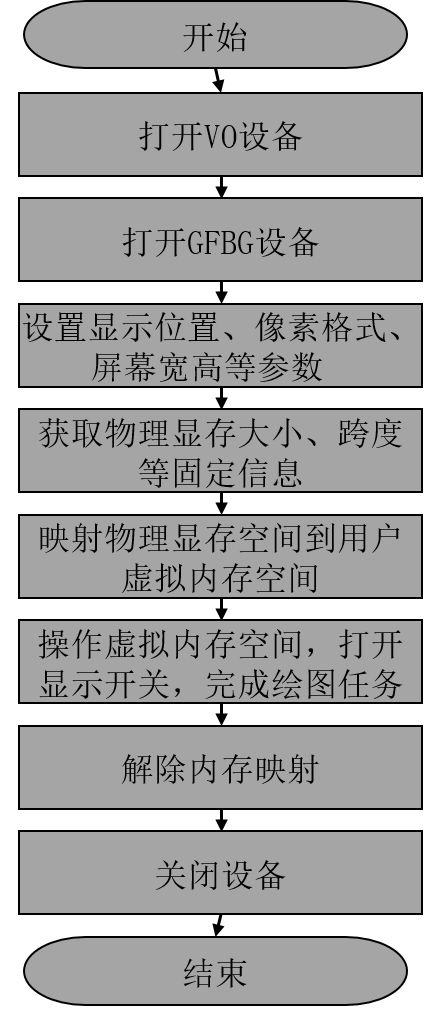
Figure 5.1 GFBG Application Development Flowchart
The development steps are as follows:
Open the VO device through the public VO API.
Call open to open the GFBG device.
Call ioctl to set the GFBG display position, pixel format, screen width and height, and other parameters. See the next section for the GFBG ioctl interface.
Call ioctl to obtain the physical video-memory size, stride, and other information allocated to GFBG for subsequent video-memory access.
Call mmap to map the physical video memory allocated to GFBG into user space and obtain its virtual address.
Operate on virtual memory to complete drawing, enable display, and, in standard mode, set the virtual display resolution to twice the panel resolution for higher display precision.
Call munmap to unmap the memory
Call close to close the GFBG device.